Skip to content
Versunken

Games und Lyrik

Von Spielen inspiriert

  • Inhalt
  • Über uns
  • Shop
    • Mein Konto
    • Kasse
    • Warenkorb
  • Games & Lyrik Podcast
  • Pressezentrum und Media-Kit
  • Jobs
  • Impressum
    • AGBs
    • Datenschutzerklärung
    • Disclaimer
  • 0 Artikel0,00 €
  • Toggle search form
Closed Sprite Shape

Unity – Was ist das 2D-Sprites-Shape-Paket?

Posted on 3. August 20234. August 2023 By Claudia Wendt Keine Kommentare zu Unity – Was ist das 2D-Sprites-Shape-Paket?
Unity - Was ist das 2D-Sprites-Shape-Paket?

Sprite-Shape soll die Freiheit geben, problemlose 2D-Umgebungen direkt in Unity zu kreieren und sie so zu dekorieren, wie du möchtest.

Inhaltsverzeichnis

Toggle
  • 2D-Sprites-Shape-Paket
    • Was ist 2D Sprites Shape?
    • Wie importiere ich Sprites für Sprites Shape?
      • Wie man ein Sprite Shape kreiert
      • Das Sprite Shape Profile
    • Open Shape und Closed Shape
    • Winkelbereich definieren
    • Der Sprite Shape Controller
      • Die Einstellungen des Controllers
      • Zusätzliche Collider-Einstellungen:
      • Das Spline bearbeiten
      • Die Kontrollpunkte

2D-Sprites-Shape-Paket

Die Installation vom Sprite-Shape-Paket ist denkbar einfach. Du suchst unter Window den Package Manager und suchst das 2D Sprite Shape package, um es zu deinem Projekt hinzuzufügen.

Vom Project Panel aus wählst du über die rechte Maustaste Create–>SpriteShape Profile –> Empty, Strip oder Shape

Werbung

In einer anderen Version stehen Open Shap und Closed Shape zur Verfügung.

Was ist 2D Sprites Shape?

Sprite Shape ist ein flexibles und mächtiges Tool, um eine 2D Welt zu bauen. Der Spotlight-Form kann eine Fülltextur zugewiesen werden. Gefüllte Formen und gekachelten Texturen lassen sich als Hintergrund oder Requisite für die Erstellung von Ebenen verwenden.

Sprite Shapes bestehend aus 2 Teilen: dem Sprite Shape Profile Asset und dem Controller. Das Profil enthält Winkeleinstellungen uns bereits, die von Sprite Shape verwendet werden. Du kannst die Sprites bearbeiten und die Kontur der Sprite-Form verändern. Die Veränderung erfolgt mithilfe des Controllers.

Wie importiere ich Sprites für Sprites Shape?

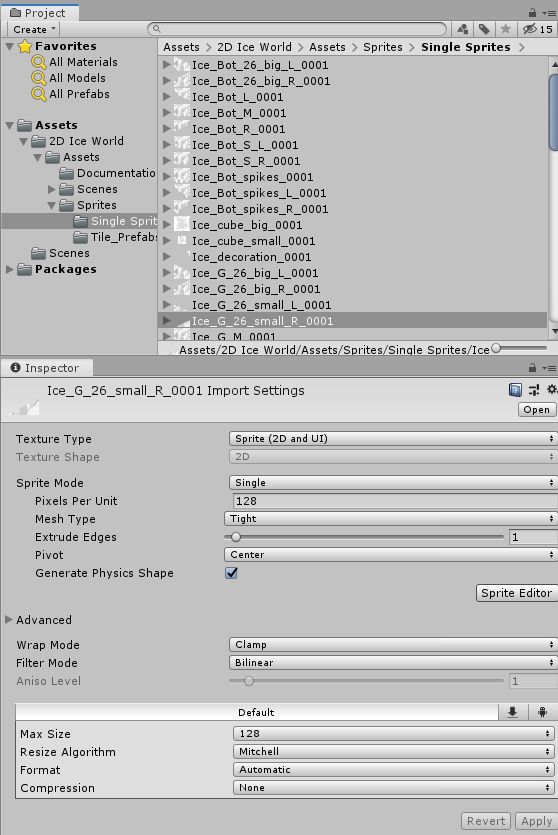
Wählst du ein importiertes Sprite an und betrachtest seine Einstellungen im Inspectorfenster, muss der Texture Type auf Sprite (2D und UI) eingestellt sein, damit 2D Sprite Shape darauf zugreifen kann.
Sprite Shape 2D

Die zweite Einstellung betrifft den Sprite Mode, der auf Singel eingestellt sein muss.

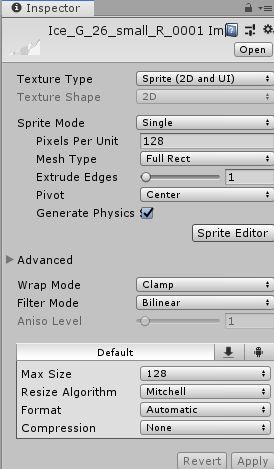
Das Dritte ist die Einstellung vom Mesh Type, der auf Full Rect gesetz werden muss.
Werbung

Full Type 2D

Wie man ein Sprite Shape kreiert

Erstelle zuerst das Sprite Shape Profile, in dem du unter Assets mit der rechten Maustaste die Option Creat–>Sprite Shape Profile auswählst.

Das Sprite Shape Profile
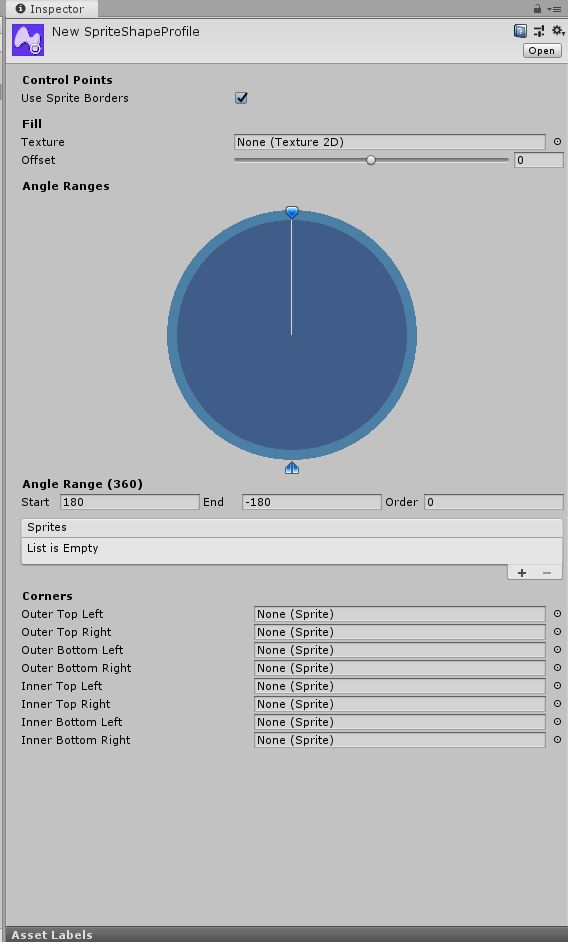
Sprite Shape Profile

Das Sprite Shape Profile enthält Einstellungen, die bestimmen, welche Sprite im Sprite Shape erscheinen und in welchem speziellen Winkel sie dies tun. Dazu kommen weitere Anzeigeeinstellungen. Du kannst dasselbe Sprite Shape Profile für mehrere Sprite-Formen in einer Szene verwenden.

Use Sprite Borders:  Du aktivierst diese Option, um die Sprite-Ränder eines Sprites am Kontrollpunkt zu zeichnen. Den Rahmen eines Sprite definierst du im Sprite-Editor.

Texture: Du legst die Textur fest, die die für die Füllung dieses Feldes verwendest. Sie hat keine Auswirkungen, wenn der Open Shape Controller aktiviert ist.

Offset: Bestimmt die Begrenzungslinien an der Rändern der Fülltextur.

Offset Beispiel

Offset Klein

Angle Ranges: Benutze das Toool, um Winkelbereiche zu erstellen und diesen Bereichen Sprites zuzweisen.

Start: Gib den Startwinkel für den ausgewählten Winkelbereich in Grad ein.

End: Gib den Endwinkel für den Winkelbereich in Grad ein

Order: Legt die Anzeigepriorität fest, wenn sich Sprites überschneiden. Sprites mit höheren Werten werden über jenen gerendert, die geringere Werte haben

Sprites: Hier findest du eine Liste der Sprites, die dem ausgewählten Winkelbereich zugewiesen sind. Die Reihenfolge der Sprites in der Liste der Sprite-Variantennummer beginnt mit Null oben in der Liste. Das erste Sprite am Anfang der Liste ist das Sprite, das standardmäßig an einem Kontrollpunkt angezeigt wird.

Corner-Options: Du weist bestimmte Sprites zu, die in der Sprite-Form an den jeweiligen Ecken angezeigt werden sollen.

Open Shape und Closed Shape

Du wählst entweder das Open Shape oder das Closed Shape aus.

Open Shape: Die offenen Formen bestehen aus einer einzelnen Kante. Die Voreinstellungen sind ideal für das Erstellen von Levelelemente, wie zum Beispiel Plattformen. Zieh das offene Shape Profil ins Szenenfenster und sieh an, wie das offene Sprite Shape generiert wird, wenn die Option für Open Ended in den Einstellungen des Controllers aktiviert sind.
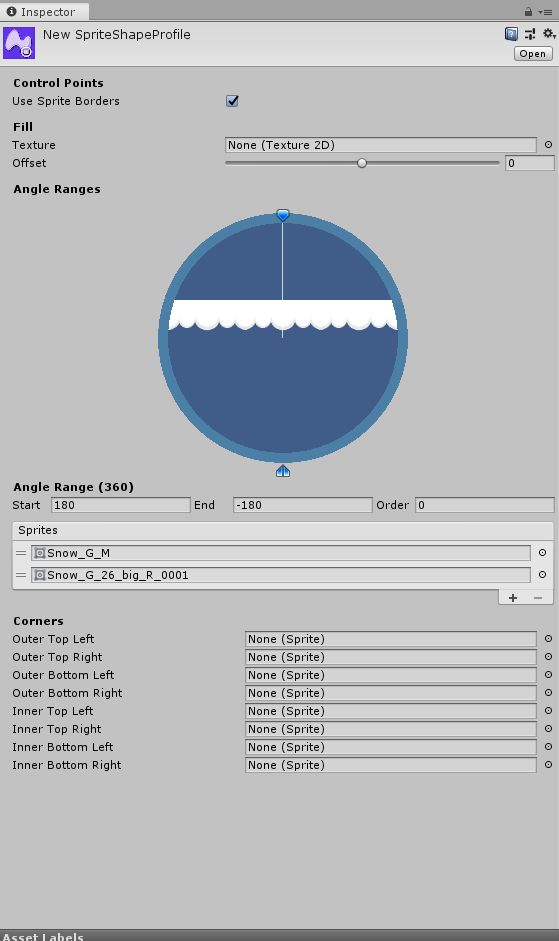
NewSpriteShapeProfile

Closed Shape:

Closed Shapes ermöglicht das Erstellen von Formen, die einen geschlossenen Bereich umfassen. Die geschlossene Sprite-Form zeigt eine Fülltextur im umschlossenen Bereich an, wenn in den Profileinstellungen eine Fülltextur festgelegt ist. Damit können große, voll ausgefüllte Formen erstellt werden, die sich ideal für Hintergründe oder große Plattformen eignen.

Closed Sprite Shape

Ziehe das Closed Shape Profile in die Szene und sieh dir an, wie automatisch ein Sprite Shape generiert wird, bei automatisch eine Spriteform generiert wird, bei der die Open End-Einstellungen des Sprite Shape deaktiviert sind. Standardmäßig wird mit dem voreingestellten Winkelbereich eine quadratische Form erstellt.
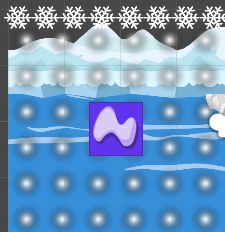
Closed Sprite Shape

Eine wichtige Funktion des Sprite Shape Profiles ist der Angel Range bzw. der Winkelbereich. Darin legst du fest, welches Sprite in einem bestimmten Winkel angezegit wird, wenn die Sprite-Form in der Szene deformiert wird.

Winkelbereich definieren

Winkelbereich

Der Winkelbereich bestimmt, welche Sprites, wie oft angezeigt werden und welche Teile der Sprites zu sehen sind. Ein Winkelbereich, der den gesamten Kreis abdeckt, bedeutet, dass immer die gleichen Sprites angezegit weden. Die Sprites lassen sich außerdem mit dieser Funktion drehen.

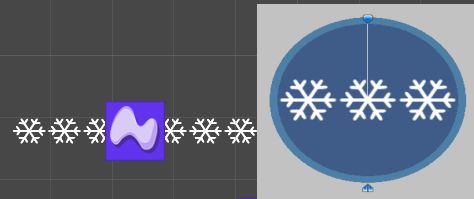
Open Sprite Shape
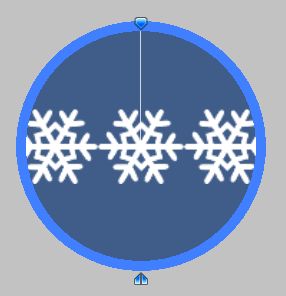
Angle Ranges0

Wird beispielsweise das obere Dreieck gedreht, dreht sich auch das Sprite.

Angle Ranges

Mit den anderen beiden Punkte lässt sich anzeigen, wieviel zu sehen ist.
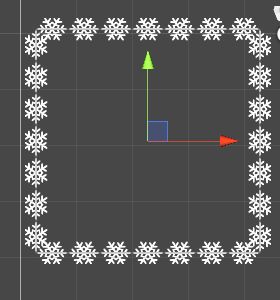
Sprite Shape im Szenenbild

Zum Vergleich einmal der veränderte Winkelbereich:

Winkel geändert

Sprite Shape1

Fügst du noch Textur dazu, wird es ausgefüllt:

Textur

Ist der Winkelbereich von 0 bis 0 definiert, erscheint der Button „Create Range“ zur Auswahl. In einigen Tutorials wird er gezeigt, aber er erscheint nur so:
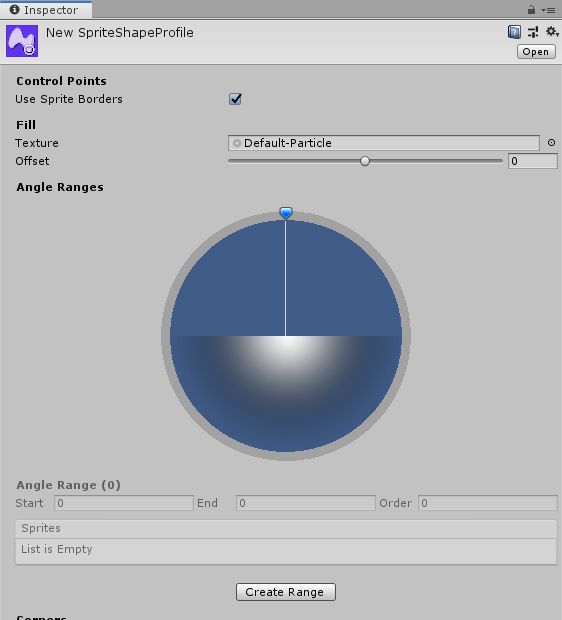
Create Range

Wählst du in den Corners Shapes aus, werden sie an den jeweiligen Ecken angebracht.
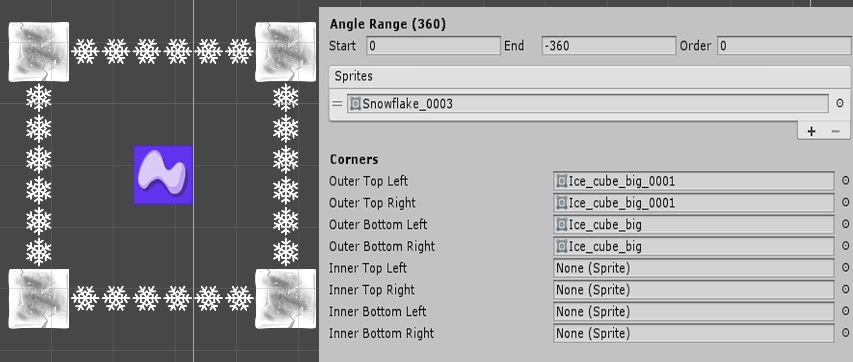
Angle Range1

Eine weitere Möglichkeit den Winkel zu definieren, ist über die Zahlen bzw. den Angel Range.

Angle Range2

Auch über das Anklicken eines neuen Winkels, kann dieser definiert werden.

Bein Closed Sprite kann für jeden Winkel eine andere Form definiert werden und am Ende wird alles zusammengesetzt, wenn es in die Szene gezogen wird.

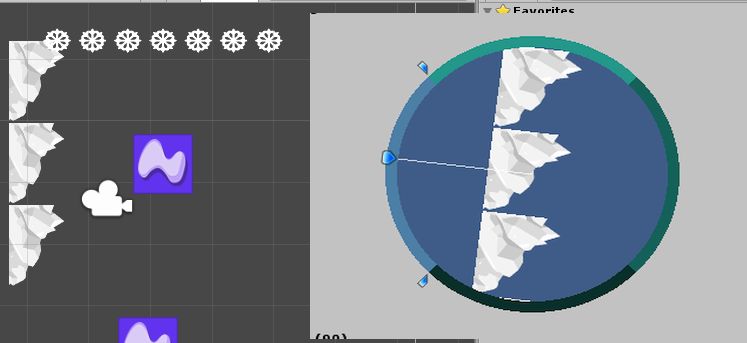
Closed Sprite1

Closed Sprite0

Die Sprites werden den jeweiligen Winkeln zugeordnet. Mit dem +-Zeichen wird es zugeordnet.
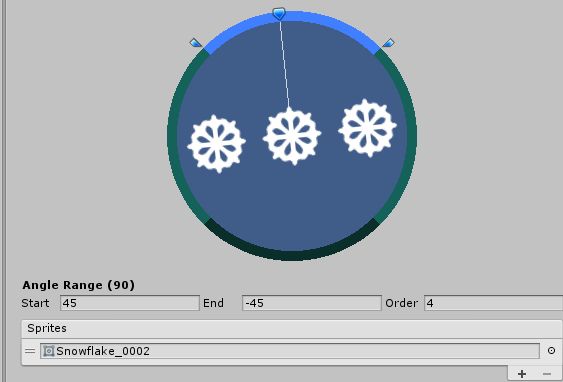
Sprites0

Mit dem Kreis, rechts daneben, öffnest du das Projektfenster. Du kannst Objekte aus dem Projekt als Sprites den Winkeln zuordnen. Du kannst Objekte aber auch per Drag & Drop dorthinziehen. Bei Bedarf kannst du die Liste verändern und Spritevarianten erschaffen, indem zu die zwei Striche Links anklickst, gedrückt hältst und an die gewünschte Positions ziehst. Du siehst beim Anpassen sofort, die Veränderungen im Kreis vom Angel Ranges als Vorschau.

Der Sprite Shape Controller

Der Sprite Shape Controller wird automatisch an ein GameObject angehängt, wenn dieses erstellt wird. Dies passiert, wenn ein Sprite Shape-Profil in eine Szene gezogen wird. Du bearbeitst die Form der Sprite-Shape-Kontur über die Einstellungen des Controllers. Er zeigt, abhängig von den verschiedenen Bedingungen unterschiedliche Einstellungen an.

Die Einstellungen des Controllers

Diese Punkte werden angezegit, wenn keine Kontrollpunkte ausgewählt sind:
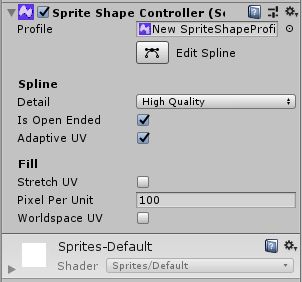
Sprite Shape Controller

Profile: Du wählst das Sprite Shape Profile aus, dass vom Sprite Shape verwendet wird

Edit Spline: Dies zeigt die Kontrollpunkte vom Sprite Shape klar sichtbar an, die dann bearbeitet werden können.
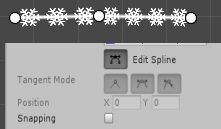
Kontrollpunkte

Bearbeitest du das Spriteshape, steht dir ein Auswahlmenü zum Formen und Einstellen zur Verfügung:

Sprite Shape Kontrollpunkte

Detail: Wähle den Grad der Detailliertheit vom Sprite Shape aus. Du kannst eine detaillierte, nicht so detaillierte und eine geringere Qualität auswählen.

Open Ended: Deaktiviere diese Option, um beide Enden der Sprite-Form zu einer geschlossenen Form zu verbinden. Aktiviere die Option, um die Enden nicht zu verbinden.
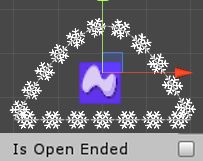
Sprite Shape Enden verbunden

Adaptive UV: Diese Option ist standardmäßig aktiviert. Wenn die Option aktiviert ist, versucht Unity die Sprites entlang des Sprite-Form-Pfades nahtlos zu kacheln, indem die Sprites zwischen Kontrollpunkten deformiert werden. Deaktiviere diese Eigenschaft, um Sprites ohne Verformung und mit genauer Breite zu kacheln. Sprites können abgeschnitten erscheinen, wenn der Abstand zwischen Kontrollpunkten kürzer als die Breite des Sprites ist.
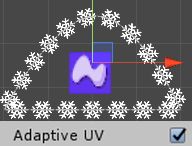
Adaptive UV aktiviert

Hier sieht man oben die Nahtstelle, wo der Kontrollpunkt ist.
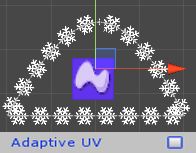
Adaptive UV deaktiviert

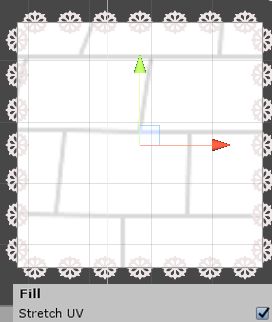
Stretch UV: Aktiviere diese Einstellung, damit Unity die UV von der Fülltextur über das gesamte Rechteck der Sprite-Form erstreckt.

ohne Stretch UV
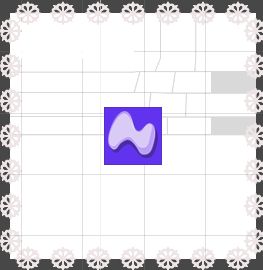
Sprite mit Füllung

mit Stretch UV

Sprite Shape mit Stretch UV

Pixel pro Einheit (nur verfügbar, wenn Stretch UV deaktiviert ist): Diese Werte wirken sich auf das Erscheinungsbild der Fülltextur der Spriteform aus. Der Wert wirkt sich auf die Skallierung der Fülltextur aus, wobei höhere Werte die größe der Textur verringern. Der Standardwert ist 100.

World Space UV (nur verfügbar, wenn Stretch UV deaktiviert ist): Aktiviere die Option, um die Fülltextur gemäß den World Space UV-Wert anstatt den GameObject UV-Wert anzuwenden.
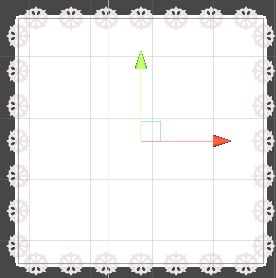
World Space UV

Optionen bei ausgewähltem Kontrollpunkt:
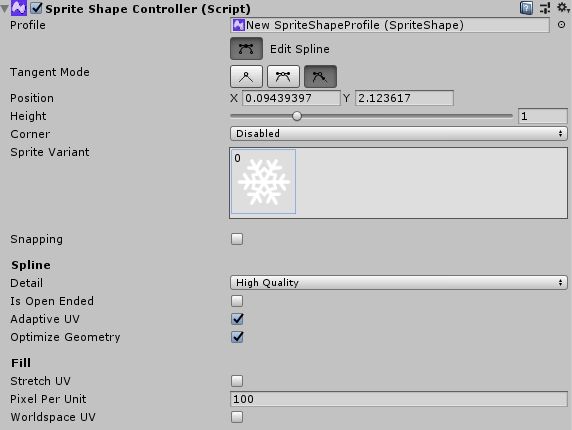
Ausgewählter Kontrollpunkt

Defür musst du Edit Spline auswählen. Dadurch werden Kontrollpunkte sichtbar. Wählst du einen aus, werden die Einstellungen aktiviert.

Mode: Wähle einen von drei Modi aus, welche die Tangenten ändern, an denen die Kontrollpunkte bearbeitet werden können.

Lineare Darstellung: Zwischen den Kontrollpunkten gibt es keine Kurve

Kontinuierliche gespiegelt: Auf den gegenüberliegenden Seiten des Kontrollpunkts werden zwei Tangenten angezegit und die Linie zwischen zwei Kontrollpunkten wird gekrümmt. Passe die Tangente an, um die Form der Kurve zu ändern. Der Winkel zwischen beiden Tangenten beträgt immer 180°

Gebrochen gespiegelt:  Auf den gegenüberliegenden Seiten des Kontrollpunkts werden zwei Tangenten angezegit und die Linie zwischen zwei Kontrollpunkten wird gekrümmt. Passe die Tangente an, um die Form der Kurve zu ändern. Die Länger und der Winkel der Tangenten können unabhängig voneinander verändert werden.

Position: Legt x- und y-Werte für den ausgewählten Kontrollpunkt fest

Sprite Variant: Ermöglicht die Auswahl einer Sprite-Variante aus dem Dropdown-Menü aus. Mit der Taste N kannst du die verschiedenen Varianten für den ausgewählten Kontrollpunkt durchlaufen.

Sprite Variant

Corner: Legt fest ob die Sprites an den Kontrollpunkten gerendert werden. Standardmäßig ist die Einstellung auf automatisch gesetzt.

Automatic: Der Kontrollpunkt zeuigt das zugewiesen Ecksprite an, wenn es und seine Nachbarn im linearen Punktmodus sind.

Disabled: Die ausgewählten Kontrollpunkte weden nicht automatisch gerendert

Snapping: Aktiviere die Option, um die Kontrollpunkte gemäß den Snap-Einstellungen einrasten zu lasen.

Zusätzliche Collider-Einstellungen:

Füge der Sprite-Form einen Polygon-2D-Collider oder Kanten-2D-Collider-Komponenten hinzu, um die zusätzlichen Collider-Einstellungen im Sprite-Ctonroller zu aktivieren.

Update Collider: Standardmäßig ist diese Option aktiviert. Aktiviere sie, damit das Collidernetzt bei der Bearbeitung der Sprite-Form auf die aktuelle orm der Sprite-Form aktualisiert wird. Deaktiviere die Option, wenn du das Collider-Netz separat von der Sprite-Form bearbeiten und ein benutzerdefiniertes Collider-Netz verwenden möchtest.

Detail: Legt die Qualität des gerenderten Colliders fest. Hier gibt es die Option für hohe, mittlere und niedrige Qualität.

Offset: Wähle diesen Part aus, wenn das Collidernetz in Richtung der Kanten der Sprite-Form hinausgestoßen werden soll. Der Bereich liegt zwischen -0,5 und 0,5 und beginnt standardmäßig bei 0.

Optimiere Collider: Standardmäßig ist diese Option aktiviert. Mit Unity kannst du das Collider-Netz optimieren, indem du zusätzliche Kontrollpunkte entfernst, wenn sie auf ein und derselben Geraden liegen. Deaktiviere die Option, wenn das Collider-Netz getrennt von der Sprite-Form bearbeitet wird, um zu verhindern, dass Unity das benutzerdefinierte Collidernetz beeinflusst.

Aktivieren der „Collision“ in 2D

Füge deiner 2D-Collider-Komponente zu deinem Sprite-Shape hinzu, um die Collider-Eigenschafften vom Sprite Shape Controller zu aktivieren. Nur der Edge- und Polygon-2D-Collider können mit Sprite Shapes verwendet werden. Um diesen zu aktivieren wähle Add Component und suche Edge Collider 2D oder den Polygon Collider 2D heraus.

Der Collider wird als Komponente hinzugefügt.
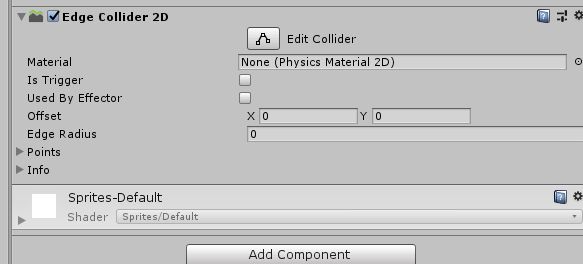
Edge Collider

Anhängen einer Collider-Komponente:

Das Collider-Netz wird beim Anhängen automatisch an die Sprite-Form angebpasst. Standardmäßig wird das Collider-Netz bei jeder Bearbeitung automatisch an die Sprite-Form angepasst. Um manuelle Änderungen, direkt im Collider-Netz vorzunehmen, deaktiviere zunächst den Update Collider und den Optimize Collider im Sprite Shape.

Diese Option steht erst zur Verfügung, wenn du über Add Component einen Collider hinzugefügt hast.

Collider bearbeiten

Zusätzlich musst du den Collider in den Einstellungen des Sprite Shape Controllers optimieren, damit der Controller das Collider-Netz nicht automatisch aktualisiert und manuelle Änderungen überschreibt.

Anschließend kannst du das Collider-Netz unabhängig von der Unity-Optimierung bearbeiten.

Das Spline bearbeiten

Im vorigen Abschnitt habe ich der Einfachheit halber „Spline“ als Linie bezeichnet. Eigentlich beschreibt es eine Funktion im Grafikbereich.

Um die Sprite-Form zu bearbeiten, klicke auf die Schaltfläche Spline bearbeiten, damit die Spline- und Steuerpunkte der Form sichtbar und bearbeitbar werden.

Wenn Spline bearbeiten aktiviert ist, verschieben sich die Steuerpunkte der Sprite-Form, um die Gesamtform und -größe anzupassen. Du kannst zusätzliche Kontrollpunkte hinzufügen, indem du auf den Spline zwischen den Kontrollpunkten klickst. Mit der Taste Entf kannst du aktuell ausgewählte Kontrollpunkte wieder entfernen.

Mit einem ausgewählten Kontrollpunkt kannst du mit der Taste M durch den Punkt- bzw. Tangent-Modus durchschalten. Wenn du im Modus mehrere Kontrollpunkte gleichzeitig ändern willst, musst du sicherstellen, dass die ausgewählten Kontrollpunkte den gleichen Modus aufweisen, bevor du einen anderen Modus auswählst.

Zum Ändern der ausgewählten Sprite-Varianten drückst du N und blätterst alle verfügbaren Varianten durch.

Die Tastenkombinationen können über Edit–> Shortcuts –> SpriteShape Editing neu belegt werden.

Die Kontrollpunkte

Hier gibt es den Linearen, gespiegelten und nicht gespiegelten Modus. Der Punktmodus bestimmt das Verhalten der Tangenten mit denen der Spline zwischen den Kontrollpunkten angepasst wird. Jeder Kontrollpunkt kann auf einen bestimmten Punktmodus eingestellt werden und seine eigenen Einstellungen erhalten.

Linear: Es gibt keine Tangenten, um die Kurve zwischen den Kontrollpunkten und seinen Nachbarn zu steuern. Zwischen den Kontrollpunkten werden keine Kurven gebildet. Sprites können sich überlappen, wenn sie sich schneidern.

Du kannst anpassen, welches Sprite angezeigt wird, wenn 2 oder mehr sich schneiden, indem du den Wert für die Reihenfolge in den Einstellungen für den Winkelbereich des Sprite-Formprofils anpasst.

Der gespiegelte Punktmodus: Die Tangenten erscheinen auf beiden Seiten mit den ausgewählten Kontrollpunkten und zwischen ihnen wird eine Kurve kreiert. Die Form wird durch die Kurven der Tangenten definiert. In diesem Modus beträgt der Winkel zwischen den Tangenten immer 180° und ihrer Länge kann variieren.

Mit B wird die Länge der Tangenten eingestellt.

Der nicht gespiegelte Punktmodus: Im nicht gespiegelten Punktmodus erscheinen die Tangenten auf beiden Seiten von festgelegten Kontrollpunkten und werden ebenfalls eine Kurve. Die Form dieser Kurve bzw. Tangenten kann verändert werden. Beeinflusst werden die länger und der Winkel der Tangenten, die unabhängig voneinander festgelegt werden können.

Mit B wird die Länge der zuletzt bearbeiteten Tangente auf die entgegengesetzte Tangente gespiegelt. B bewirkt aber auch, dass der Winkel der entgegengesetzten Tangente genau 180° von der zuletzt bearbeiteten Tangente abweicht.


Originally posted 2019-11-15 13:05:00.

Post Views: 2.072
Weitersagen:
Games und Lyrik Tags:Sprite Shape, Sprites Shape, Unity

Beitragsnavigation

Previous Post: Aguri Suzuki F-1 Super Driving: Ein Rennspiel für echte Motorsportfans
Next Post: Penumbra Requiem

Related Posts

  • Might Magic Chess Royale Cover
    Might and Magic: Chess Royale Games und Lyrik
  • RPG Maker
    Der RPG Maker Games und Lyrik
  • Shadows of Doubt Cover
    Shadows of Doubt Games und Lyrik
  • Adventure Trilogy
    8-Bit Adventures Anthology Games und Lyrik
  • Fallen Knight: ein futuristisches Actionspiel
    Fallen Knight: ein futuristisches Actionspiel Games und Lyrik
  • Text Mesh Pro
    TextMesh Pro Games und Lyrik

Schreibe einen Kommentar Antwort abbrechen

Deine E-Mail-Adresse wird nicht veröffentlicht. Erforderliche Felder sind mit * markiert

Diese Website verwendet Akismet, um Spam zu reduzieren. Erfahre, wie deine Kommentardaten verarbeitet werden.

Unsere Besucher

089999
Users Today : 3
Total views : 411837
Powered By WPS Visitor Counter
  • Games und Lyrik (2.733)
    • Action (83)
    • Adventure (465)
      • Point & Click-Adventure (16)
    • Ecke der verlorenen Spiele (17)
    • Horror (35)
    • Kinderfreundliche Games (5)
    • Partyspiele (9)
    • Puzzle (17)
    • Rollenspiele (115)
    • Shooter (347)
    • Simulation (32)
    • Sport (114)
      • Fußball (5)
      • Rennspiele (6)
    • Strategie (201)
    • Survival (11)
    • Wimmelbild (8)
  • Hardware (2)
  • Jump & Run (3)
  • Lyrik (112)
  • Spieleentwickler (432)
  • Spieleprogrammierung (48)
Werbung

Action Adventure Capcom Daedalic Deck 13 Devcom 2020 Ecke der verlorenen Spiele Gamescom 2019 Gamescom 2020 Gamescom 2021 Gamescom 2023 Games from Spain GB GBA GBC Horror Indie Arena Booth 2022 Jump & Run Kalypso Media Mega Man N64 NDS NES Nintendo Switch PC PS1 PS2 PS3 PS4 PS5 PSP Rareware Rennspiel Sega Shooter SNES State of Play Strategie Switch Unity Visual Novel VR Windows Xbox XBox One

Cosplay-Schnittmuster

  • 845d4db60722d97847e1bdfcc218254c Schnittmuster Cosplay Damenkostüm McCalls M7641 A5 6-14 (Gr. 34-42) Englisc 20,00 €
  • 845d4db60722d97847e1bdfcc218254c Schnittmuster Cosplay Damenkostüm McCalls M7641 E5 14-22 (Gr. 42-50) Englisc 20,00 €
  • 094ddf7788f49439577a1f264f2ea1ca Akira Band 2 Katsuhiro Otomo Carlsen Verlag Manga 19,90 €


Hier finden Sie mehr.

RSS Lets-Plays.de

  • Zombie Spiele: Die spannendsten Survival- und Action-Games
  • Pen and Paper Spiele

Ezoic

RSS GameStar – News

  • Call of Duty 2026 - MW4 stellt wohl einen vergessenen Modus in den Mittelpunkt, von dem wir seit 30 Monaten keinen Ton mehr gehört haben
  • Playstation 5 - »Meine Kinder wunderten sich, warum das PS5-Laufwerk nicht funktionierte« Vater öffnet Konsole und dann ist die Antwort offensichtlich
  • Mortal Kombat 2 - »Groß, laut und grausam«: Der Actionfilm spaltet die Filmpresse gerade wie ein ordentlicher Fatality
TopBlogs.de das Original - Blogverzeichnis | Blog Top Liste
blogwolke.de - Das Blog-Verzeichnis
  • Agassi Tennis Generation Cover
    Agassi Tennis Generation Sport
  • cooking_simulator_2
    Cooking Simulator 2: Better Together Simulation
  • America Odan Ultra Quiz Shijo Saidai no tatakai nes Cover
    America Oudan Ultra Quiz: Shijou Saidai no Tatakai – Ein Spiel wie kein anderes Games und Lyrik
  • MegaManXtreme Cover
    Mega Man Xtreme 1 + 2 Games und Lyrik
  • M.S. Salmon Cover
    M.S. Salmon Adventure
  • Abysse Corp Logo
    Abysse Corp Games und Lyrik
  • World Flipper Cover
    World Flipper Games und Lyrik
  • Brewmaster Cover
    Brewmaster Games und Lyrik

Copyright © 2026 Games und Lyrik.

Powered by PressBook News Dark theme

Cookie-Einstellungen
Diese Webseite benutzt Cookies um die Nutzererfahrung zu verbessern. Diese Cookies können Sie hier ausschalten.

This website uses cookies to improve your experience. We'll assume you're ok with this, but you can opt-out if you wish.
Cookie-Einstellungen / Cookie settingsAkzeptieren / ACCEPT
Privatsphären- und Cookie-Einstellungen

Informationen zu Cookies / Privacy Overview

Informationen zu Cookies / Privacy Overview


Diese Webseite benutzt Cookies um die Funktion und die Nutzererfahrung zu verbessern. Es gibt zwei Arten von Cookies: Die notwendigen im Browser gespeichert und sind wichtig für die korrekte Funktion der Webseite. Die nicht notwendigen oder auch Drittanbieter-Cookies, die zum Einsatz kommen, dienen zur Analyse und zeigen uns die Benutzung dieser Webseite. Diese Cookies werden ebenfalls im Browser gespeichert aber nur, wenn Sie es ausdrücklich erlauben. Sie haben im Folgenden die Möglichkeit, diese Drittanbieter-Cookies zu verbieten. Das Abschalten dieser  Cookies kann das Verhalten der Webseite beeinflussen.


This website uses cookies to improve your experience while you navigate through the website. Out of these cookies, the cookies that are categorized as necessary are stored on your browser as they are essential for the working of basic functionalities of the website. We also use third-party cookies that help us analyze and understand how you use this website. These cookies will be stored in your browser only with your consent. You also have the option to opt-out of these cookies. But opting out of some of these cookies may have an effect on your browsing experience.

necessary
immer aktiv
Necessary cookies are absolutely essential for the website to function properly. This category only includes cookies that ensures basic functionalities and security features of the website. These cookies do not store any personal information.
CookieDauerBeschreibung
AWSALBCORS7 daysThis cookie is managed by Amazon Web Services and is used for load balancing.
client_id10 yearsThis cookie is used for passing authentication information.
cookielawinfo-checkbox-advertisement1 yearSet by the GDPR Cookie Consent plugin, this cookie is used to record the user consent for the cookies in the "Advertisement" category .
cookielawinfo-checkbox-analytics1 yearSet by the GDPR Cookie Consent plugin, this cookie is used to record the user consent for the cookies in the "Analytics" category .
cookielawinfo-checkbox-analytics11 monthsThis cookie is set by GDPR Cookie Consent plugin. The cookie is used to store the user consent for the cookies in the category "Analytics".
cookielawinfo-checkbox-functional1 yearThe cookie is set by the GDPR Cookie Consent plugin to record the user consent for the cookies in the category "Functional".
cookielawinfo-checkbox-functional11 monthsThe cookie is set by GDPR cookie consent to record the user consent for the cookies in the category "Functional".
cookielawinfo-checkbox-necessary1 yearSet by the GDPR Cookie Consent plugin, this cookie is used to record the user consent for the cookies in the "Necessary" category .
cookielawinfo-checkbox-necessary11 monthsThis cookie is set by GDPR Cookie Consent plugin. The cookies is used to store the user consent for the cookies in the category "Necessary".
cookielawinfo-checkbox-non-necessary1 yearSet by the GDPR Cookie Consent plugin, this cookie is used to record the user consent for the cookies in the "Non-necessary" category .
cookielawinfo-checkbox-others1 yearSet by the GDPR Cookie Consent plugin, this cookie is used to store the user consent for cookies in the category "Others".
cookielawinfo-checkbox-others11 monthsThis cookie is set by GDPR Cookie Consent plugin. The cookie is used to store the user consent for the cookies in the category "Other.
cookielawinfo-checkbox-performance1 yearSet by the GDPR Cookie Consent plugin, this cookie is used to store the user consent for cookies in the category "Performance".
cookielawinfo-checkbox-performance11 monthsThis cookie is set by GDPR Cookie Consent plugin. The cookie is used to store the user consent for the cookies in the category "Performance".
CookieLawInfoConsent1 yearRecords the default button state of the corresponding category & the status of CCPA. It works only in coordination with the primary cookie.
ezCMPCCS1 yearEzoic sets this cookie to track when a user consents to statistics cookies.
PHPSESSIDsessionThis cookie is native to PHP applications. The cookie is used to store and identify a users' unique session ID for the purpose of managing user session on the website. The cookie is a session cookies and is deleted when all the browser windows are closed.
viewed_cookie_policy11 monthsThe cookie is set by the GDPR Cookie Consent plugin and is used to store whether or not user has consented to the use of cookies. It does not store any personal data.
Nicht notwendige
Alle Cookies, die für die korrekte Funktion der Webseite nicht unmittelbar notwendig sind und genutzt werden, um persönliche Nutzerdaten per Analyse, Werbung oder anderen eingebetteten Inhalt zu sammeln, werden als nicht notwendige Cookies bezeichnet. Es ist zwingend erforderlich die Zustimmung des Nutzers / der Nutzerin einzuholen, bevor diese Cookies zur Anwendung kommen. Wird die Einwilligung zur Nutzung der Cookies nicht erteilt, werden sie nicht angewendet und nur die notwendigen Cookies sind aktiv.
CookieDauerBeschreibung
__qca1 year 26 daysThe __qca cookie is associated with Quantcast. This anonymous data helps us to better understand users' needs and customize the website accordingly.
eudssessionThis cookie is set by Rocket Fuel for targeted advertising so that users are shown relevant ads.
i10 yearsThis cookie is set by OpenX to record anonymized user data, such as IP address, geographical location, websites visited, ads clicked by the user etc., for relevant advertising.
IDE1 year 24 daysGoogle DoubleClick IDE cookies are used to store information about how the user uses the website to present them with relevant ads and according to the user profile.
mc1 year 1 monthQuantserve sets the mc cookie to anonymously track user behaviour on the website.
rud1 year 24 daysThe rud cookie is owned by Rocketfuel and registers user data, such as IP address, location, etc. for the purpose of optimising ad display.
rudssessionThis cookie is owned by Rocketfuel and collects anonymous user data to target audiences and deliver personalized ads.
test_cookie15 minutesThe test_cookie is set by doubleclick.net and is used to determine if the user's browser supports cookies.
VISITOR_INFO1_LIVE5 months 27 daysA cookie set by YouTube to measure bandwidth that determines whether the user gets the new or old player interface.
YSCsessionYSC cookie is set by Youtube and is used to track the views of embedded videos on Youtube pages.
yt-remote-connected-devicesneverYouTube sets this cookie to store the video preferences of the user using embedded YouTube video.
yt-remote-device-idneverYouTube sets this cookie to store the video preferences of the user using embedded YouTube video.
yt.innertube::nextIdneverThis cookie, set by YouTube, registers a unique ID to store data on what videos from YouTube the user has seen.
yt.innertube::requestsneverThis cookie, set by YouTube, registers a unique ID to store data on what videos from YouTube the user has seen.
Funktionelle
Funktionelle Cookies werden benutzt, um bestimmte Funktionen wie die Teilung von Informationen auf Plattformen der sozialen Medien, Sammlung von Rückmeldungen und andre Drittanbieterfunktionen einsetzen zu können.
CookieDauerBeschreibung
__cf_bm30 minutesThis cookie, set by Cloudflare, is used to support Cloudflare Bot Management.
pll_language1 yearThe pll _language cookie is used by Polylang to remember the language selected by the user when returning to the website, and also to get the language information when not available in another way.
Leistungsanalyse
Leistungsanalyse-Cookies werden eingesetzt um die wichtigsten Leistungsaspekte zu analysieren und zu verstehen. Dies trägt dazu bei, die Webseite kontinuierlich zu verbessern und so den Besuchern eine gute Nutzererfahrung zu bieten.
CookieDauerBeschreibung
AWSALB7 daysAWSALB is an application load balancer cookie set by Amazon Web Services to map the session to the target.
ezds7 yearsThe ezds cookie is set by the provider Ezoic, and is used for storing the pixel size of the user's browser, to personalize user experience and ensure content fits.
ezoab_10342 hoursEzoic uses this cookie to split test different features and functionality.
ezohw7 yearsThe ezohw cookie is set by the provider Ezoic, and is used for storing the pixel size of the user's browser, to personalize user experience and ensure content fits.
ymex1 yearYandex sets this cookie to collect information about the user behaviour on the website. This information is used for website analysis and for website optimisation.
yuidss1 yearYandex stores this cookie in the user's browser in order to recognize the visitor.
Analytik
Analytische Cookies werden benutzt um zu verstehen, auf welche Art und Weise Besucher mit dieser Webseite interagieren. Diese Cookies helfen Informationen über Anzahl der Besucher, Absprungrate (Anzahl der Besucher,, die eine Webseite Besuchen und sie gleich wieder verlassen), Ursprungsland des Besuchers, usw. zu erhalten.
CookieDauerBeschreibung
__gads1 year 24 daysThe __gads cookie, set by Google, is stored under DoubleClick domain and tracks the number of times users see an advert, measures the success of the campaign and calculates its revenue. This cookie can only be read from the domain they are set on and will not track any data while browsing through other sites.
_gu1 monthThis cookie is set by the provider Getsitecontrol. This cookie is used to distinguish the users.
_ym_d1 yearYandex sets this cookie to store the date of the users first site session.
_ym_isad20 hoursYandex sets this cookie to determine if a visitor has ad blockers.
_ym_uid1 yearYandex sets this cookie to identify site users.
CONSENT2 yearsYouTube sets this cookie via embedded youtube-videos and registers anonymous statistical data.
eud1 year 24 daysThis cookie is owned by Rocketfuel and collects anonymous user data to target audiences and deliver personalized ads.
ezepvv1 dayThis cookie is set by the provider Ezoic to track what pages the user has viewed.
ezoadgid_103430 minutesEzoic uses this cookie to record an id for the user's age and gender category.
ezoref_10342 hoursEzoic uses this cookie to store the referring domain, i.e the website the user was on, before he came to the current website.
ezouspvasessionThe ezouspva cookie is set by the provider Ezoic and is used to track the number of pages a user has visited all time.
ezouspvvsessionThe ezouspvv cookie is set by the provider Ezoic and is used to track the number of pages a user has visited all time.
UserID13 monthsThis cookie is set by ADITION Technologies AG, as a unique and anonymous ID for the visitor of the website, to identify unique users across multiple sessions.
yabs-sidsessionYandex sets this cookie to store the session ID.
yandexuid1 yearYandex sets this cookie to identify site users.
Werbung
Werbungs-Cookies werden benutzt um Besuchern relevante Werbungen und Vermarktungskampanien anzuzeigen. Diese Cookies verfolgen die Besucher beim Besuch einer Webseite und sammeln Informationen mit deren Hilfe sie angepasste Werbungen einblenden.
CookieDauerBeschreibung
__qca1 year 26 daysThe __qca cookie is associated with Quantcast. This anonymous data helps us to better understand users' needs and customize the website accordingly.
eudssessionThis cookie is set by Rocket Fuel for targeted advertising so that users are shown relevant ads.
i10 yearsThis cookie is set by OpenX to record anonymized user data, such as IP address, geographical location, websites visited, ads clicked by the user etc., for relevant advertising.
IDE1 year 24 daysGoogle DoubleClick IDE cookies are used to store information about how the user uses the website to present them with relevant ads and according to the user profile.
mc1 year 1 monthQuantserve sets the mc cookie to anonymously track user behaviour on the website.
rud1 year 24 daysThe rud cookie is owned by Rocketfuel and registers user data, such as IP address, location, etc. for the purpose of optimising ad display.
rudssessionThis cookie is owned by Rocketfuel and collects anonymous user data to target audiences and deliver personalized ads.
test_cookie15 minutesThe test_cookie is set by doubleclick.net and is used to determine if the user's browser supports cookies.
VISITOR_INFO1_LIVE5 months 27 daysA cookie set by YouTube to measure bandwidth that determines whether the user gets the new or old player interface.
YSCsessionYSC cookie is set by Youtube and is used to track the views of embedded videos on Youtube pages.
yt-remote-connected-devicesneverYouTube sets this cookie to store the video preferences of the user using embedded YouTube video.
yt-remote-device-idneverYouTube sets this cookie to store the video preferences of the user using embedded YouTube video.
yt.innertube::nextIdneverThis cookie, set by YouTube, registers a unique ID to store data on what videos from YouTube the user has seen.
yt.innertube::requestsneverThis cookie, set by YouTube, registers a unique ID to store data on what videos from YouTube the user has seen.
Sonstige
Zu den sonstigen unkategorisierten Cookies zählen jene, die zwar analysiert wurden, aber noch keiner Kategorie zugeordnet werden konnten.
CookieDauerBeschreibung
_auid1 yearNo description available.
active_template::3326192 days

No description

appReleasesessionNo description available.
BACKENDIDsessionNo description available.
dspid1 yearNo description available.
ezoab_3326192 hoursNo description
ezoadgid_33261930 minutesNo description
ezopvc_33261930 minutesNo description
ezoref_3326192 hoursNo description
ezosuibasgeneris-11 yearNo description
ezovid_33261930 minutesNo description
ezovuuid_33261930 minutesNo description
ezovuuidtime_3326192 daysNo description
ezux_lpl_3326191 yearNo description
f_0013 monthsNo description
g_0011 dayNo description
gt_auto_switch1 monthNo description available.
lp_33261930 minutesNo description
mts_id9 years 10 months 8 daysNo description available.
mts_id_last_sync9 years 10 months 8 daysNo description available.
pvc_visits[0]1 yearThis cookie is created by post-views-counter. This cookie is used to count the number of visits to a post. It also helps in preventing repeat views of a post by a visitor.
srpsessionNo description available.
userId5 months 27 daysNo description
Notwendige
Notwendige Cookies sind für die korrekte Funktion der Webseite unerlässlich. Diese Kategorie enthält nur Cookies, die grundlegende Funktionalitäten und Sicherheitsfunktionen der Webseite ermöglichen. Diese Cookies speichern keine persönlichen Daten.
CookieDauerBeschreibung
AWSALBCORS7 daysThis cookie is managed by Amazon Web Services and is used for load balancing.
client_id10 yearsThis cookie is used for passing authentication information.
cookielawinfo-checkbox-advertisement1 yearSet by the GDPR Cookie Consent plugin, this cookie is used to record the user consent for the cookies in the "Advertisement" category .
cookielawinfo-checkbox-analytics1 yearSet by the GDPR Cookie Consent plugin, this cookie is used to record the user consent for the cookies in the "Analytics" category .
cookielawinfo-checkbox-functional1 yearThe cookie is set by the GDPR Cookie Consent plugin to record the user consent for the cookies in the category "Functional".
cookielawinfo-checkbox-necessary1 yearSet by the GDPR Cookie Consent plugin, this cookie is used to record the user consent for the cookies in the "Necessary" category .
cookielawinfo-checkbox-non-necessary1 yearSet by the GDPR Cookie Consent plugin, this cookie is used to record the user consent for the cookies in the "Non-necessary" category .
cookielawinfo-checkbox-others1 yearSet by the GDPR Cookie Consent plugin, this cookie is used to store the user consent for cookies in the category "Others".
cookielawinfo-checkbox-performance1 yearSet by the GDPR Cookie Consent plugin, this cookie is used to store the user consent for cookies in the category "Performance".
CookieLawInfoConsent1 yearRecords the default button state of the corresponding category & the status of CCPA. It works only in coordination with the primary cookie.
ezCMPCCS1 yearEzoic sets this cookie to track when a user consents to statistics cookies.
Advertisement
Advertisement cookies are used to provide visitors with relevant ads and marketing campaigns. These cookies track visitors across websites and collect information to provide customized ads.
CookieDauerBeschreibung
__qca1 year 26 daysThe __qca cookie is associated with Quantcast. This anonymous data helps us to better understand users' needs and customize the website accordingly.
eudssessionThis cookie is set by Rocket Fuel for targeted advertising so that users are shown relevant ads.
i10 yearsThis cookie is set by OpenX to record anonymized user data, such as IP address, geographical location, websites visited, ads clicked by the user etc., for relevant advertising.
IDE1 year 24 daysGoogle DoubleClick IDE cookies are used to store information about how the user uses the website to present them with relevant ads and according to the user profile.
loc1 year 1 monthAddThis sets this geolocation cookie to help understand the location of users who share the information.
mc1 year 1 monthQuantserve sets the mc cookie to anonymously track user behaviour on the website.
rud1 year 24 daysThe rud cookie is owned by Rocketfuel and registers user data, such as IP address, location, etc. for the purpose of optimising ad display.
rudssessionThis cookie is owned by Rocketfuel and collects anonymous user data to target audiences and deliver personalized ads.
test_cookie15 minutesThe test_cookie is set by doubleclick.net and is used to determine if the user's browser supports cookies.
VISITOR_INFO1_LIVE5 months 27 daysA cookie set by YouTube to measure bandwidth that determines whether the user gets the new or old player interface.
YSCsessionYSC cookie is set by Youtube and is used to track the views of embedded videos on Youtube pages.
yt-remote-connected-devicesneverYouTube sets this cookie to store the video preferences of the user using embedded YouTube video.
yt-remote-device-idneverYouTube sets this cookie to store the video preferences of the user using embedded YouTube video.
yt.innertube::nextIdneverThis cookie, set by YouTube, registers a unique ID to store data on what videos from YouTube the user has seen.
yt.innertube::requestsneverThis cookie, set by YouTube, registers a unique ID to store data on what videos from YouTube the user has seen.
non-necessary
Other uncategorized cookies are those that are being analyzed and have not been classified into a category as yet.
CookieDauerBeschreibung
_auid1 yearNo description available.
active_template::3326192 days

No description

appReleasesessionNo description available.
BACKENDIDsessionNo description available.
dspid1 yearNo description available.
ezoab_3326192 hoursNo description
ezoadgid_33261930 minutesNo description
ezopvc_33261930 minutesNo description
ezoref_3326192 hoursNo description
ezosuibasgeneris-11 yearNo description
ezovid_33261930 minutesNo description
ezovuuid_33261930 minutesNo description
ezovuuidtime_3326192 daysNo description
ezux_lpl_3326191 yearNo description
f_0013 monthsNo description
g_0011 dayNo description
gt_auto_switch1 monthNo description available.
lp_33261930 minutesNo description
mts_id9 years 10 months 8 daysNo description available.
mts_id_last_sync9 years 10 months 8 daysNo description available.
pvc_visits[0]1 yearThis cookie is created by post-views-counter. This cookie is used to count the number of visits to a post. It also helps in preventing repeat views of a post by a visitor.
srpsessionNo description available.
userId5 months 27 daysNo description
xtc1 year 1 monthNo description
performance
Performance cookies are used to understand and analyze the key performance indexes of the website which helps in delivering a better user experience for the visitors.
CookieDauerBeschreibung
AWSALB7 daysAWSALB is an application load balancer cookie set by Amazon Web Services to map the session to the target.
ezds7 yearsThe ezds cookie is set by the provider Ezoic, and is used for storing the pixel size of the user's browser, to personalize user experience and ensure content fits.
ezoab_10342 hoursEzoic uses this cookie to split test different features and functionality.
ezohw7 yearsThe ezohw cookie is set by the provider Ezoic, and is used for storing the pixel size of the user's browser, to personalize user experience and ensure content fits.
ymex1 yearYandex sets this cookie to collect information about the user behaviour on the website. This information is used for website analysis and for website optimisation.
yuidss1 yearYandex stores this cookie in the user's browser in order to recognize the visitor.
Others
Other uncategorized cookies are those that are being analyzed and have not been classified into a category as yet.
CookieDauerBeschreibung
_auid1 yearNo description available.
active_template::3326192 days

No description

appReleasesessionNo description available.
BACKENDIDsessionNo description available.
dspid1 yearNo description available.
ezoab_3326192 hoursNo description
ezoadgid_33261930 minutesNo description
ezopvc_33261930 minutesNo description
ezoref_3326192 hoursNo description
ezosuibasgeneris-11 yearNo description
ezovid_33261930 minutesNo description
ezovuuid_33261930 minutesNo description
ezovuuidtime_3326192 daysNo description
ezux_lpl_3326191 yearNo description
f_0013 monthsNo description
g_0011 dayNo description
gt_auto_switch1 monthNo description available.
lp_33261930 minutesNo description
mts_id9 years 10 months 8 daysNo description available.
mts_id_last_sync9 years 10 months 8 daysNo description available.
pvc_visits[0]1 yearThis cookie is created by post-views-counter. This cookie is used to count the number of visits to a post. It also helps in preventing repeat views of a post by a visitor.
srpsessionNo description available.
userId5 months 27 daysNo description
xtc1 year 1 monthNo description
Analytics
Analytical cookies are used to understand how visitors interact with the website. These cookies help provide information on metrics the number of visitors, bounce rate, traffic source, etc.
CookieDauerBeschreibung
__gads1 year 24 daysThe __gads cookie, set by Google, is stored under DoubleClick domain and tracks the number of times users see an advert, measures the success of the campaign and calculates its revenue. This cookie can only be read from the domain they are set on and will not track any data while browsing through other sites.
_gu1 monthThis cookie is set by the provider Getsitecontrol. This cookie is used to distinguish the users.
_ym_d1 yearYandex sets this cookie to store the date of the users first site session.
_ym_isad20 hoursYandex sets this cookie to determine if a visitor has ad blockers.
_ym_uid1 yearYandex sets this cookie to identify site users.
at-randneverAddThis sets this cookie to track page visits, sources of traffic and share counts.
CONSENT2 yearsYouTube sets this cookie via embedded youtube-videos and registers anonymous statistical data.
eud1 year 24 daysThis cookie is owned by Rocketfuel and collects anonymous user data to target audiences and deliver personalized ads.
ezepvv1 dayThis cookie is set by the provider Ezoic to track what pages the user has viewed.
ezoadgid_103430 minutesEzoic uses this cookie to record an id for the user's age and gender category.
ezoref_10342 hoursEzoic uses this cookie to store the referring domain, i.e the website the user was on, before he came to the current website.
ezouspvasessionThe ezouspva cookie is set by the provider Ezoic and is used to track the number of pages a user has visited all time.
ezouspvvsessionThe ezouspvv cookie is set by the provider Ezoic and is used to track the number of pages a user has visited all time.
UserID13 monthsThis cookie is set by ADITION Technologies AG, as a unique and anonymous ID for the visitor of the website, to identify unique users across multiple sessions.
uvc1 year 1 monthSet by addthis.com to determine the usage of addthis.com service.
yabs-sidsessionYandex sets this cookie to store the session ID.
yandexuid1 yearYandex sets this cookie to identify site users.
Functional
Functional cookies help to perform certain functionalities like sharing the content of the website on social media platforms, collect feedbacks, and other third-party features.
CookieDauerBeschreibung
__atuvc1 year 1 monthAddThis sets this cookie to ensure that the updated count is seen when one shares a page and returns to it, before the share count cache is updated.
__atuvs30 minutesAddThis sets this cookie to ensure that the updated count is seen when one shares a page and returns to it, before the share count cache is updated.
__cf_bm30 minutesThis cookie, set by Cloudflare, is used to support Cloudflare Bot Management.
pll_language1 yearThe pll _language cookie is used by Polylang to remember the language selected by the user when returning to the website, and also to get the language information when not available in another way.
SPEICHERN & AKZEPTIEREN
Präsentiert von CookieYes Logo