Skip to content
Versunken

Games und Lyrik

Von Spielen inspiriert

  • Inhalt
  • Über uns
  • Shop
    • Mein Konto
    • Kasse
    • Warenkorb
  • Games & Lyrik Podcast
  • Pressezentrum und Media-Kit
  • Jobs
  • Impressum
    • AGBs
    • Datenschutzerklärung
    • Disclaimer
  • 0 Artikel0,00 €
  • Toggle search form
Unity neue Szene

2D Game Kit

Posted on 17. August 2025 By Claudia Wendt Keine Kommentare zu 2D Game Kit
2D Game Kit

Das 2D Game Kit ist ein Plattformer, den du in einem der Unity Tutorials kreieren kannst. In dem Jump and Run lernst du Gegner einzubauen, Türen per Schalter zu öffnen und deine Figur zu teleportieren.

Erst einmal kommst du hier zum 2D Game Kit bei Unity

Zuerst kreieren wir eine neue Szene.

Werbung

Inhaltsverzeichnis

Toggle
  • Eine neue Szene kreieren
  • Einen Level erstellen
  • Deine Level vom 2D Game Kit testen
  • Eine bewegliche Plattformen hinzufügen
    • Welchen Weg nimmt die Plattform?
    • Die Einstellungen der Plattform
  • Eine Tür mit einem Events öffnen
    • Das PressurePad
  • Feinde hinzufügen
  • Schaden mit Objekten
  • Die Damagekomponente
  • Dekorieren
  • Die Protagonistin vom 2D Game Kit
  • Den Spieler Teleportieren im 2D Game Kit
  • Das Verbinden für die Teleportation im 2D Game Kit
  • Einstellungen für den Bestimmungsort des Transportes
  • Zerstörbare Objekte im 2D Game Kit
  • Das Inventar im 2D Game Kit
  • Dialoge einfügen mit dem 2D Game Kit

Eine neue Szene kreieren

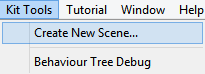
Kit Tools

Das Projekt erlaubt das Anlegen neuer Szenen im 2D Game Kit. Diese Szenen enthalten Ellen (unsere Heldin), einen kleinen Plattformer, Health UI und alles was du benötigst, um dich zu bewegen und anzugreifen.

Lass uns für das 2D Game Kit eine neue Szene erstellen:

– Im Hauptmenü wähle Kit Tools

– Aktiviere Create New Szene

  • Ein neues Fenster öffnet sich

Neue Szene

  • Im leeren Feld neben New Szene gebe den Szenennamen ein

Create New Szene

-Klicke Create

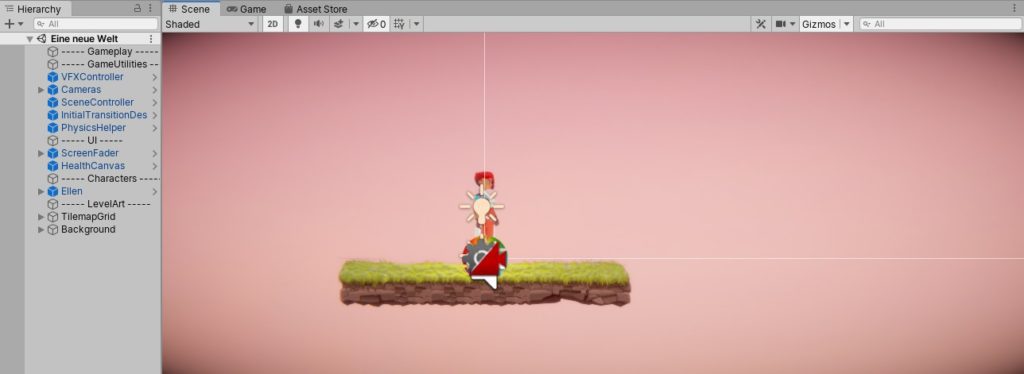
Unity erstellt eine neue Szene an deinem Projekt und fügt diese zu den Build Settings hinzu.
Werbung

Unity neue Szene 2D Game Kit

Unity öffnet eine neue Szene im Editor, den du arbeiten kannst.

Einen Level erstellen

Das 2D Game Kit nutzt Unity’s Tilemap-Funktionen, die entworfen sind, um dir zu helfen, einen Level schnell und einfach zu malen. Das Kit bietet dir alles, sodass du direkt starten kannst.

Beginne mit dem Level Design:

Im Hauptmenü gehe zu Window–>2D–>Tile Palette
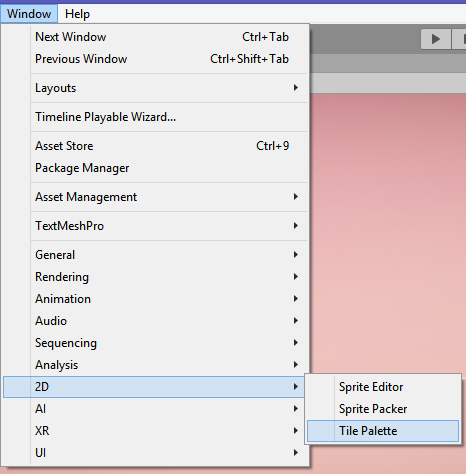
Tile Palette 2D Kit im 2D Game Kit

Du benötigst zwei Tile Palettes, die dir erlauben, einen Level zu malen.
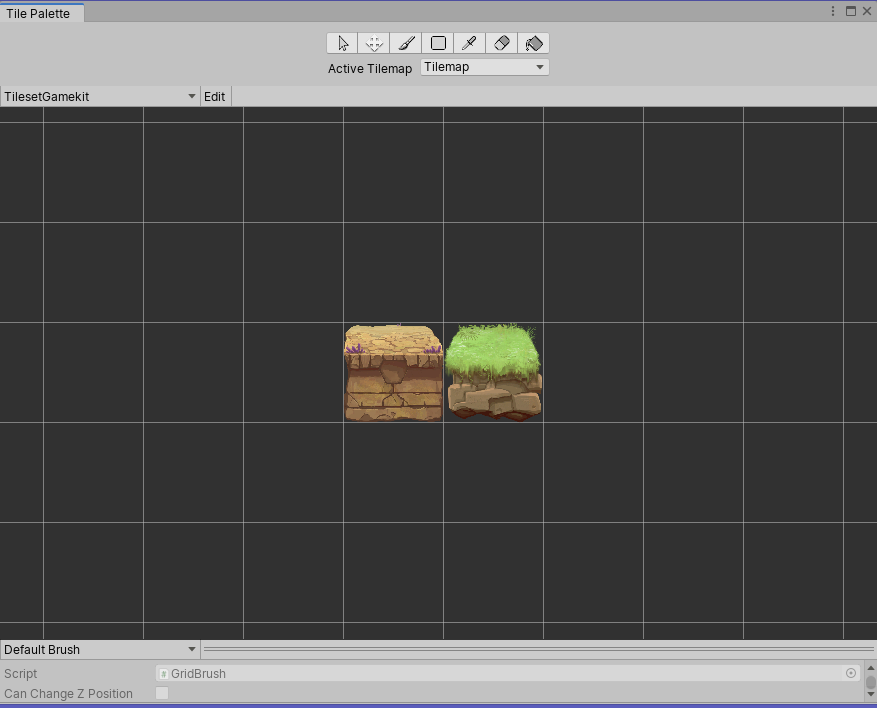
Tile Palette 2D im 2D Game Kit

Diese Tiles nutzen das skriptfähige Tile-System der Unity Tilemap. Sie wählen automatisch das richtige Sprite für den Plattformer. Wir haben zwei Arten von Sprites.

Wir müssen auf Nummer sicher gehen, dass in der Tile Palette die korrekten Einstellungen vorgenommen sind:

Klicke dann auf das Tile Palette Menü.
Wähle Tileset_Gamekit
Wähle das Tile, das du für deinen Level nutzen möchtest

  • Jetzt lass uns einige Tiles in der Szene malen, um den Level zu kreieren:
    • Klicke auf Tile Palette, um ein Tile auszuwählen
    • Navigiere zum Szenenbildschirm
    • Klicke Links, um das ausgewählte Tile in den Level zu ziehen und deinen Level zu erstellen
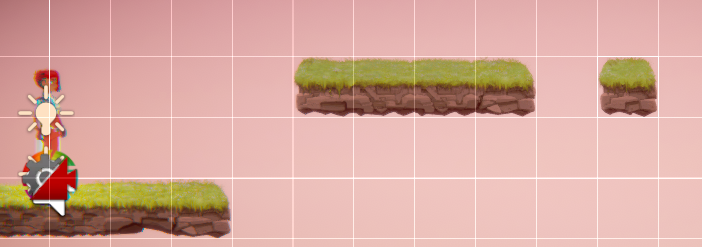
Tiles im 2D Game Kit

  • Wenn du einen Fehler machst benutze den Radiergummi der Tile Palette, um ausgewählte Tiles zu löschen

Radiergummi

Deine Level vom 2D Game Kit testen

Jetzt, nachdem du einen Level erstellt hast, ist es Zeit ihn zu testen:

– drücke play oben im Editor

Folgende Tasten benötigst du im 2D Game Kit für Ellen, den Spielcharakter

Bewegen: A, D
Springen: Leertaste
Hocken: S
Schießen: O
Nahkampf: K
Aktivieren: E
Eine Plattform durchqueren: S und Leertaste

Es gibt außerdem ein Debug-Menü. Drücke F12 auf der Tastatur, um die Option zu ermöglichen oder die Waffen von Ellen im Game View zu deaktivieren.

Eine bewegliche Plattformen hinzufügen

Bevor wir beginnen, GameObjects im Szenenbildschirm zu manipulieren, gehe auf Nummer sicher, dass du dich nicht im Bearbeitungsmodus mit der Tile Palette befindest. Um dies sicherzustellen schließe die Tile Palette oder wähle das Bewegungstool in der oberen linken Ecke des Editors. Du kannst ebenso das Bewegungstool wählen, indem du wie auf der Tastatur W drückst.

Jetzt lass uns eine bewegliche Plattform im Level einbauen:

Navigiere ins Projektfenster:
-gehe zu Prefabs–> Interactables –>Moving Platform

In Interactables findest du alles, womit deine Spielfigur interagieren kann. Dazugehören Türen, Schalter & Co.
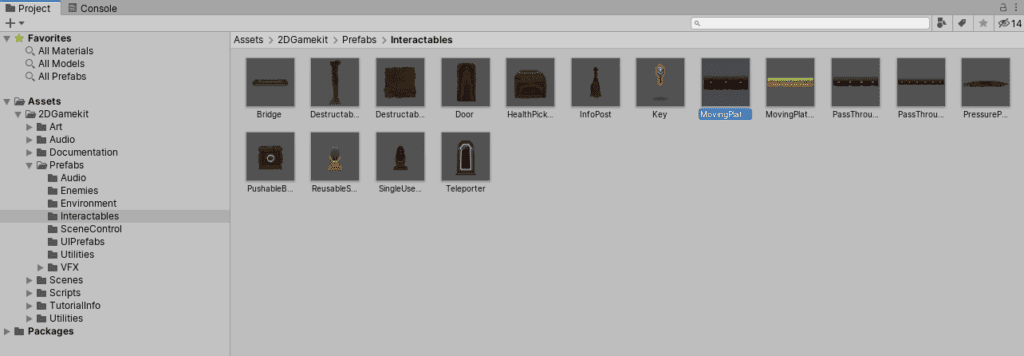
Bewegliche Plattform auswählen 2D Game Kit

Klicke links und ziehe die bewegliche Plattform in Bildschirm.

Nutze dieses Tool, um die bewegliche Plattform dort zu platzieren, wurde sie im Level haben möchtest.

Wenn du die bewegliche Plattform ausgewählt hast, erscheint eine rote Linie mit einem Bewegungstool und einem roten Pfeil am Ende. Dies zeigt den Weg an, den die Plattform nehmen wird, wenn gespielt wird.

Welchen Weg nimmt die Plattform?

Nutze das Bewegungstool, um zu beeinflussen, welchen Weg die Plattform nutzen soll.
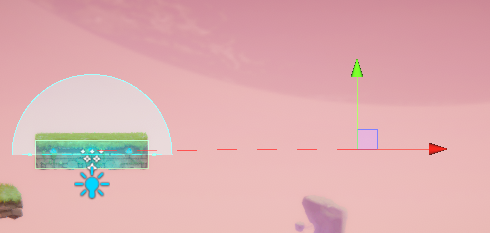
Bewegliche Plattform einrichten im 2D Game Kit

Eine Vorschau der beweglichen Plattform und ihres Weges zu bekommen, wähle die bewegliche Plattform und gehe folgendermaßen vor:

– Navigiere ins Inspektorfenster
– in der Komponente der beweglichen Plattform, finde den Preview Positions Slider
– Wähle diese Option aus, um zu sehen, wohin sich die bewegliche Plattform bewegen wird.

Preview Position Slider

Gestalte den Weg der Plattform etwas komplexer, indem du dafür sorgst, dass sie sich in einem Rechteck bewegt. Wir tun das, indem wir Nodes hinzufügen.

Nodes sind zusätzliche Navigationspunkte für die bewegliche Plattform.

Im Inspektorfenster, suche die Moving Platform Component.
Klicke zweimal Add Node.
Es werden zwei weitere rote Linien eingefügt.
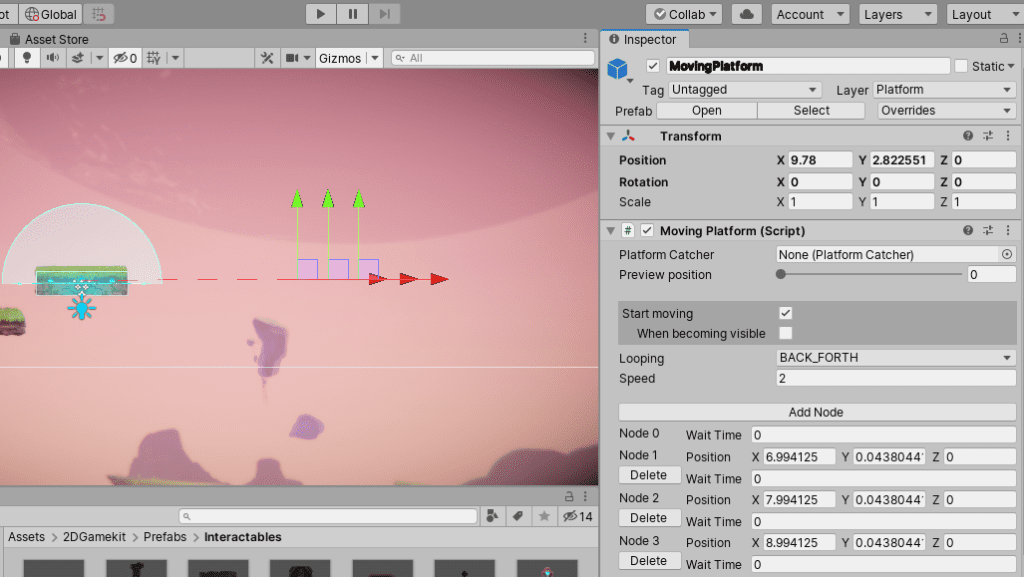
Add Node

Diese kannst du nutzen, um die Position der Punkte festzulegen, zu denen sich die Plattform bewegen soll.
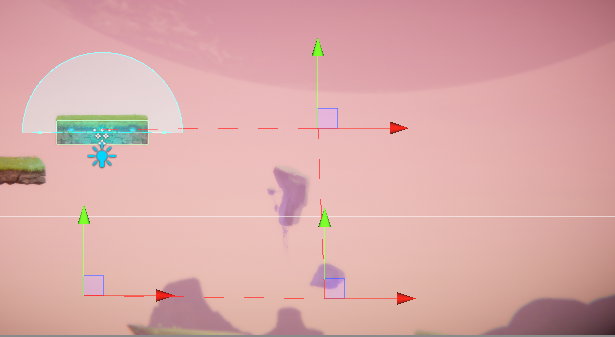
Rechteck

Du wirst feststellen, dass es keinen Weg gibt von der letzten Plattform zum Anfangspunkt gibt. Wenn du Play drückst, wird die Plattform letzten Punkt stoppen. Die Plattform bewegt sich zum letzten Punkt und bewegt sich anschließend wieder zurück.

Die Einstellungen der Plattform

Du kannst im 2D Game Kit die Einstellungen der Plattform verändern, damit sich ihr Weg wiederholt:

Suche in der Moving Platform Componente, die Looping-Option.
Klicke im Drop-down-Menü, bei dem Back_Forth eingestellt ist
Wähle Loop
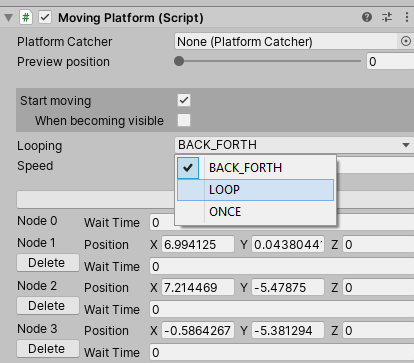
Loop

Dies erlaubt eine Wiederholung des Weges, den die Plattform nimmt. Der letzte Punkt und der Anfangspunkt des Weges werden miteinander verbunden.
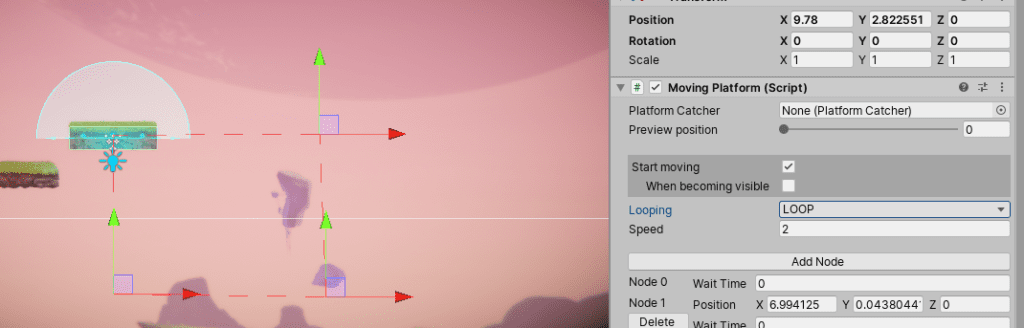
Loop Plattform

Jede Komponente im Spiel hat viele Optionen, die eingestellt werden können.

Eine Tür mit einem Events öffnen

Das 2D Game Kit erlaubt, Events zu erstellen. Wir nutzen die Events, um zum Beispiel eine Tür zu öffnen, wenn der Spieler auf eine Plattform tritt.

Zuerst füge eine Tür hinzu:

Im Projektfenster viele Prefabs–>Interactables
Suche Door Prefab und ziehe es in den Szenenbildschirm. Platziere es irgendwo auf dem Weg des Spielers, wo es den Weg des Spielers blockiert.
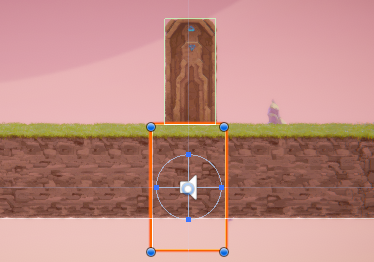
Tür

Nun wählen wir ein Pressure Pad, die Druckplatte aus. Die Druckplatte muss betätigt werden, damit die Tür sich öffnet:
Du findest es ebenfalls im Projektfenster unter Prefabs–>Interactables und suche das PressurePad Prefab
Ziehe sieauf den Boden vor der Tür.

Einige Events sind bereits definiert, wie zum Beispiel das PressurePad, wenn der Spieler darauf tritt. Die Druckplattform spielt eine Musik ab und leuchtet auf. Jetzt verbinden wir das PressurePad und die Tür.

Das PressurePad

Wähle im Hierarchiefenster das PressurePad.
Suche im Inspektorfenster die PressurePad-Komponente.

In der On Pressed-Liste klicke + unten rechts und füge ein neues Event hinzu

Ziehe das Door GameObject vom Hierarchiefenster zu None(Object), unter Event.

Runtime Only

Im Dropdown-Menü  steht momentan No Function. Suche den Animator–>Play(string)
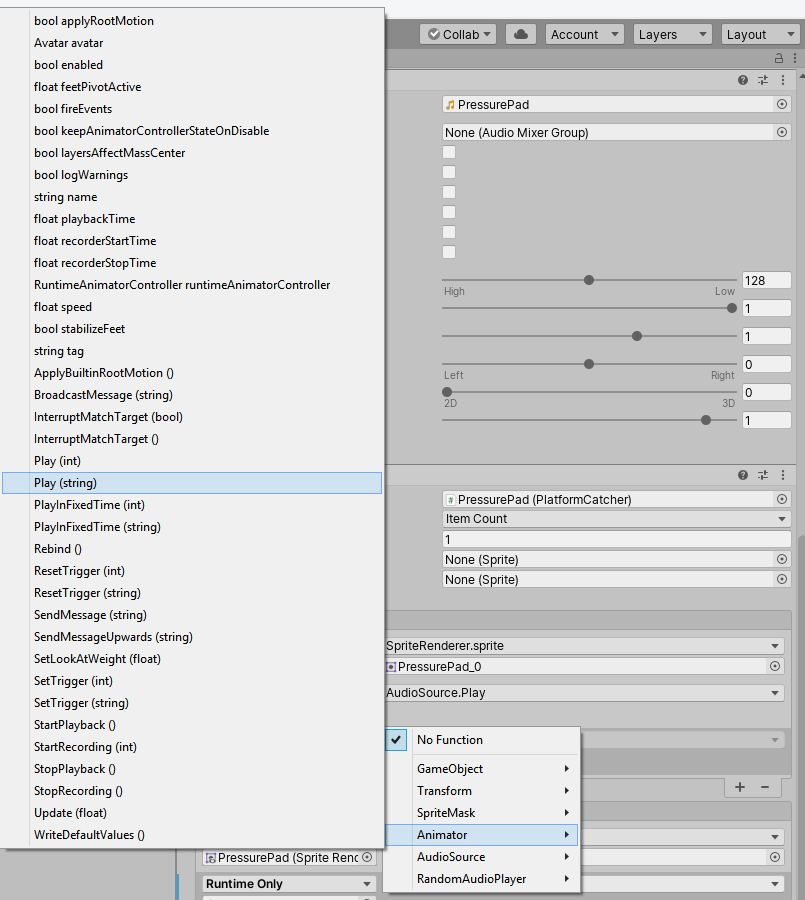
Animator Play String

In der nächsten Textbox unter dem Menü gebe den Text DoorOpening ein.

DoorOpening

Starte das Spiel und nutze Bewegungstasten, um auf die Druckplatte zu rennen und die Tür zu öffnen. Die Tür sollte sich öffnen!

Alle Animatoinsclips im Projektfenster finden sich unter Art–> Animations–>Animation Clips.
Um verschiedene Animationen in einem Event abzuspielen, muss der Name des Animation Clips exakt ausgewählt sein.

Wenn du den Schalter ändern möchtest, anstatt eines Druckfeldes, kannst du dies auf die gleiche Weise tun, aber stattdessen den ReusableSwitch im Prefabs-Ordner auswählen.

Feinde hinzufügen

Es gibt zwei vorgefertigte Feinde: Chomper und Spitter.
Finde diese im Projektfenster Prefabs–>Enemies
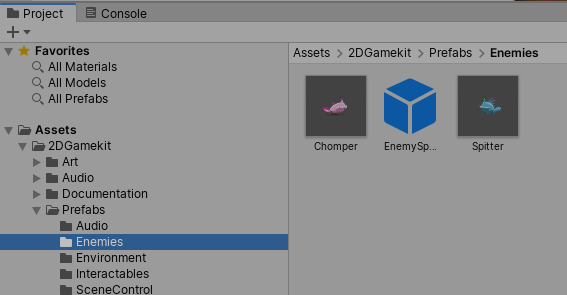
Prefabs Enemies

Sie werden beide von der Enemy Behaviour-Componente im Inspektorfenster kontrolliert. Du kannst diese Komponenten nutzen, um Einstellungen vorzunehmen, wie zum Beispiel die Geschwindigkeit des Gegners, das Blickfeld, die Gesundheit und vieles mehr. Jeder Gegner hat die gleichen Komponenten, nur dass sie unterschiedlich eingestellt sind.
Beachte, dass du nicht nur bestimmte Werte festlegen kannst, sondern auch auf die Komponenteneigenschaften klicken und sie nach links / rechts ziehen kannst, um die Werte zu beeinflussen.

Füge Chomper in der Szene hinzu. Spiele mit den Einstellungen, wie zum Beispiel Geschwindigkeit und Sichtfeld herum. Vergiss nicht im Spielmodus mit F12 die Waffen zu aktivieren und mit O oder K anzugreifen.
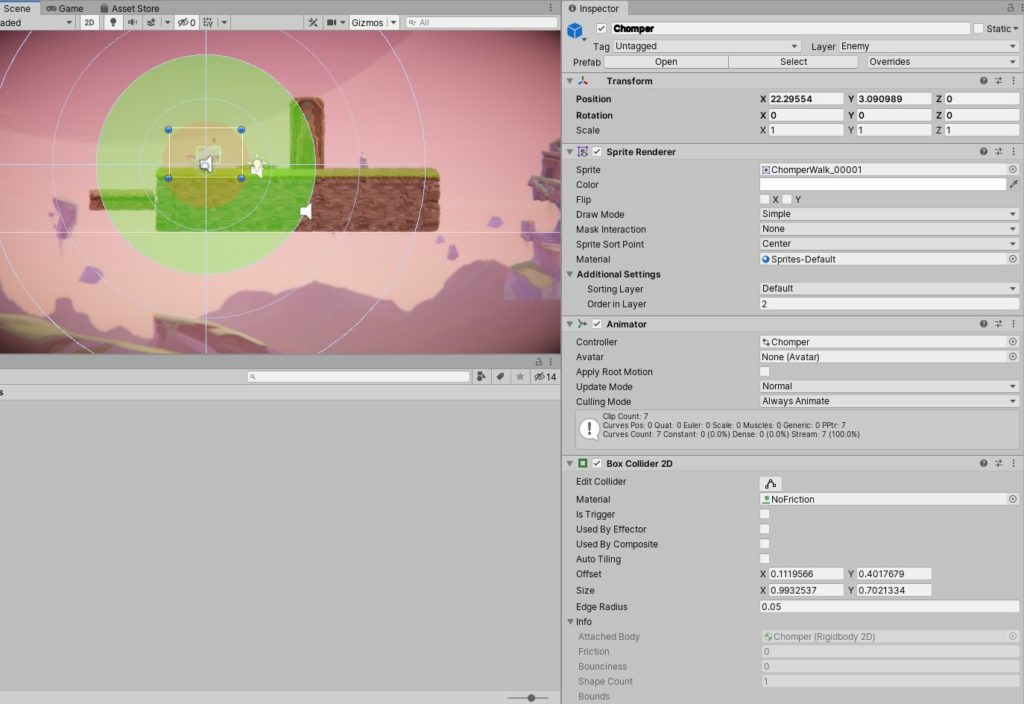
Chomper

In der Szene wähle Chomper aus. Wir können seinen View FOV und die View Direction einstellen, sodass er Ellen nicht registriert, bevor er sich umdreht.
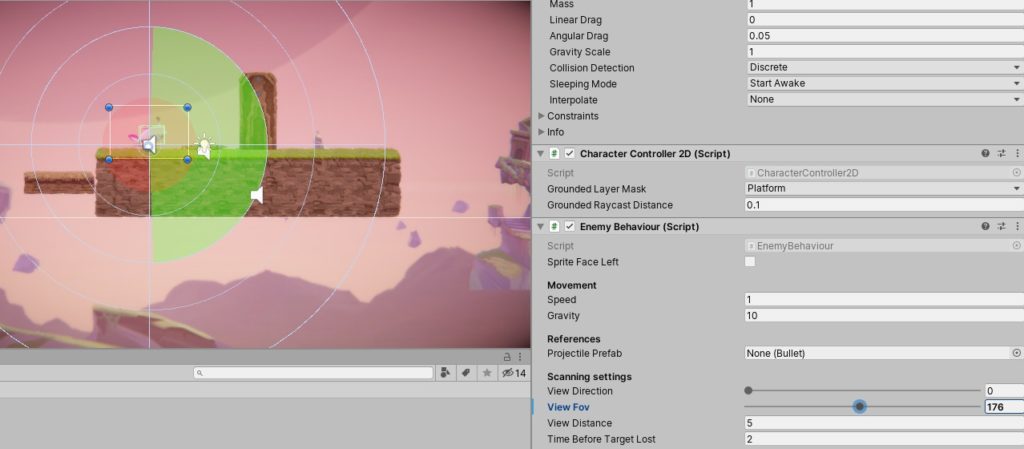
Chomper View

Schaden mit Objekten

In diesem Abschnitt entdecken wir das Schadenssystem. Um dies zu tun, wollen wir eine Box auf den Gegner werfen, um ihn auszuschalten.

Erstelle im Level einen Abschnitt, auf dem Ellen sich in einer höheren Position befindet. Chomper befindet sich auf einer niedrigeren Plattform.

Gehe zu Prefabs–> Enemies und ziehe dem Gegmer in den Szene und platziere ihn auf der niedrigeren Ebene im Level, bei der Klippe

– wähle ihn später aus und gehe auf das Enemy Behaviour Script
– reduziere die View Distance, so der Gegner nicht sofort auf dich schießt, wenn du das Spiel startest

– Im Projekt Fenster gehe zu Prefabs–> Interactables, klicke und ziehe das Pushable Box Prefab in den Szene

– Wähle die Pushable Box im Hierarchiefenster und klicke im Inspektorfenster auf Add Component
– Klicke auf Damager, um die PushableBox hinzuzufügen.
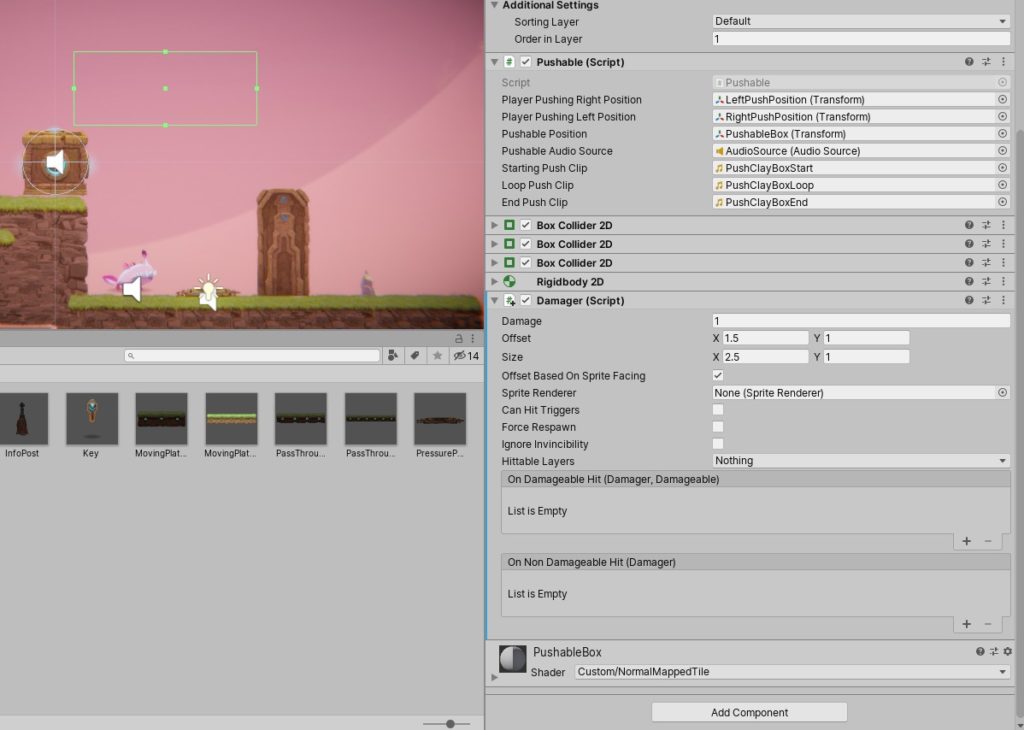
Damager

Die Damagekomponente

Die Damagekomponente sagt dem GameObjects, dass die Damageable Component (der angegeben Gegner) Schaden erleiden.

Der Damager wird von einer grünen Kollisionsbox repräsentiert, die angezeigt wird. Dies ist der Bereich, der Schaden verursacht. Hier gibt es momentan noch keinen Zusammenhang zur PushableBox. Wenn du also diese auf den Gegner wirfst, wird er keinen Schaden erleiden.

Bewegen wir diese Box so, dass sie ungefähr der Größe und Position der Pushable Box entspricht. Hierfür gibt es zwei Möglichkeiten:

– wähle und ziehe die grünen Punkte an den Ecken der grünen Kollisionsbox zu denen der Kiste, die geworfen wird.
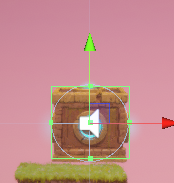
Schadensbox
– Suche im Inspektorfenster die Damager Componente
– Passe die Form und die Größe an, um das Kollisionsfeld zu positionieren und zu vergrößern. Am einfachsten ist es, mit der linken Maustaste auf die Markierungen zu klicken und nach links und rechts zu ziehen, um durch die Werte einzustellen.

Offset Size

Zuletzt gehe auf Nummer sicher, dass der Schaden dem richtigen Spieleobjekt zugefügt wird. Wir teilen die Objekte in bestimmte Ebenen (Layers) im Editor ein, sodass sie leicht gefunden und getrennt werden können:
– Wähle PushableBox
– Im Inspektor suche die Damager-Komponente
– Unter Hittable Layers im Dropdown-Menü wähle Enemy Layer
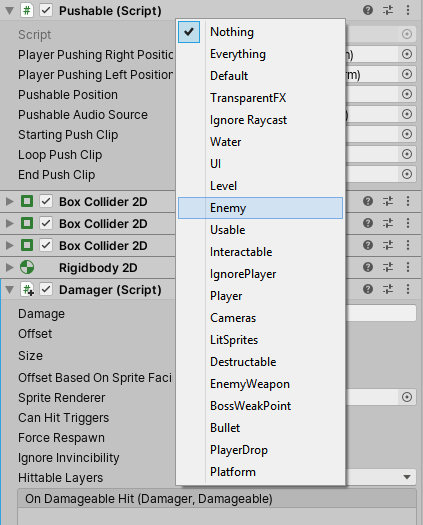
Enemy
– Die PushableBox wird jetzt Schaden zu allem auf dieser Ebene zufügen, wie zum Beispiel unserem Gegner

Dekorieren

Zusätzlich gibt es dekorative Elemente, die du einbauen kannst. Finde diese unter Art–>Sprites–>Environment
Viele dekorative Elemente finden sich in einem Unterordner, deshalb denke daran, die Pfeiler aufzufächern und zu sehen, welche Sprites sich in welcher Kategorie befinden.
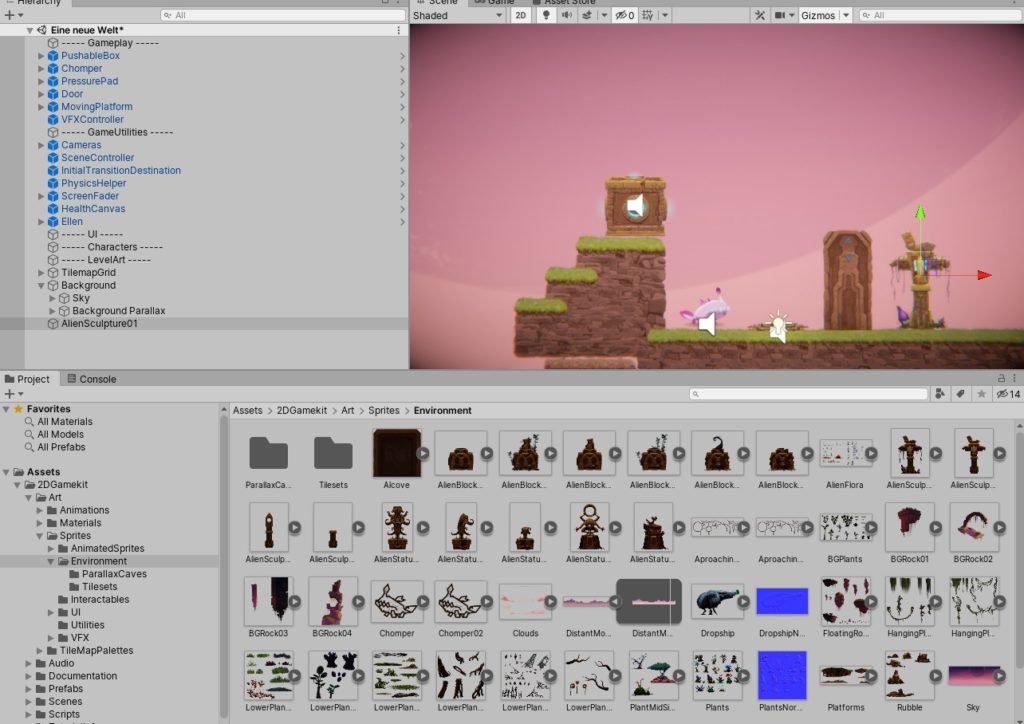
Environment

Die Protagonistin vom 2D Game Kit

Ellen ist die Protagonistin im 2D-Kit.
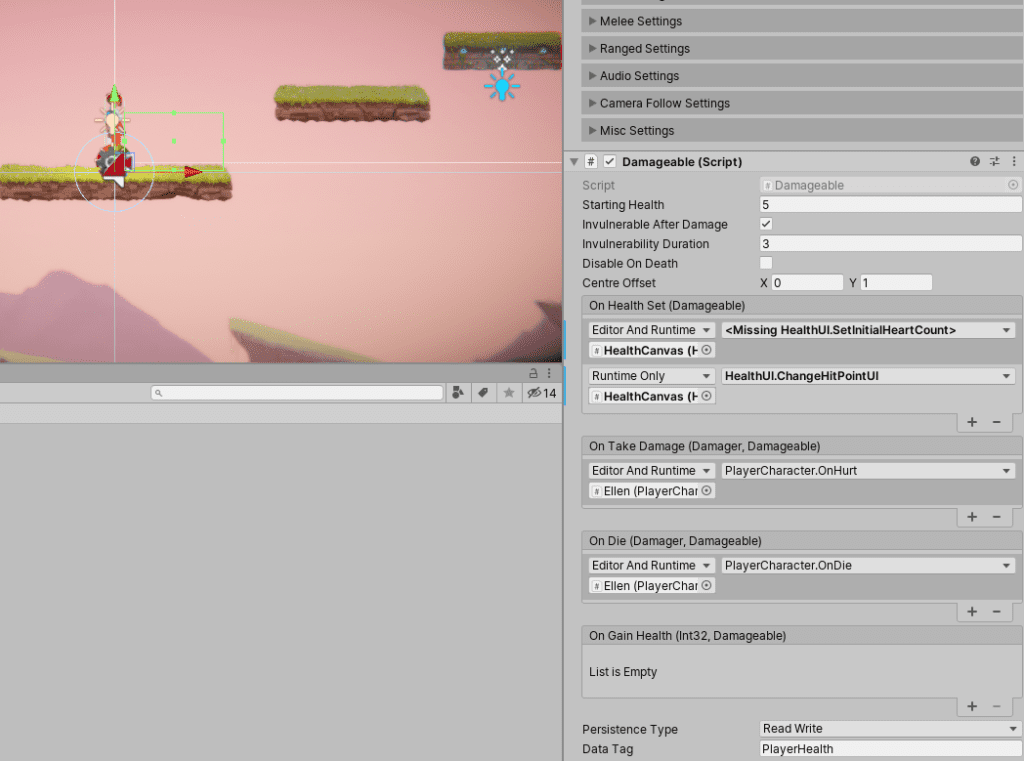
Ellen

Im Inspektorfenster erkennst du, dass sie ein Damageable Script hat, was bedeutet, dass sie durch alles was einen Damager hat, Schaden erleiden kann.

Fügst du beispielsweise Stacheln im 2D Game Kit ein, haben sie eine Damager-Komponente, welche dem Charakter schaden zufügt.
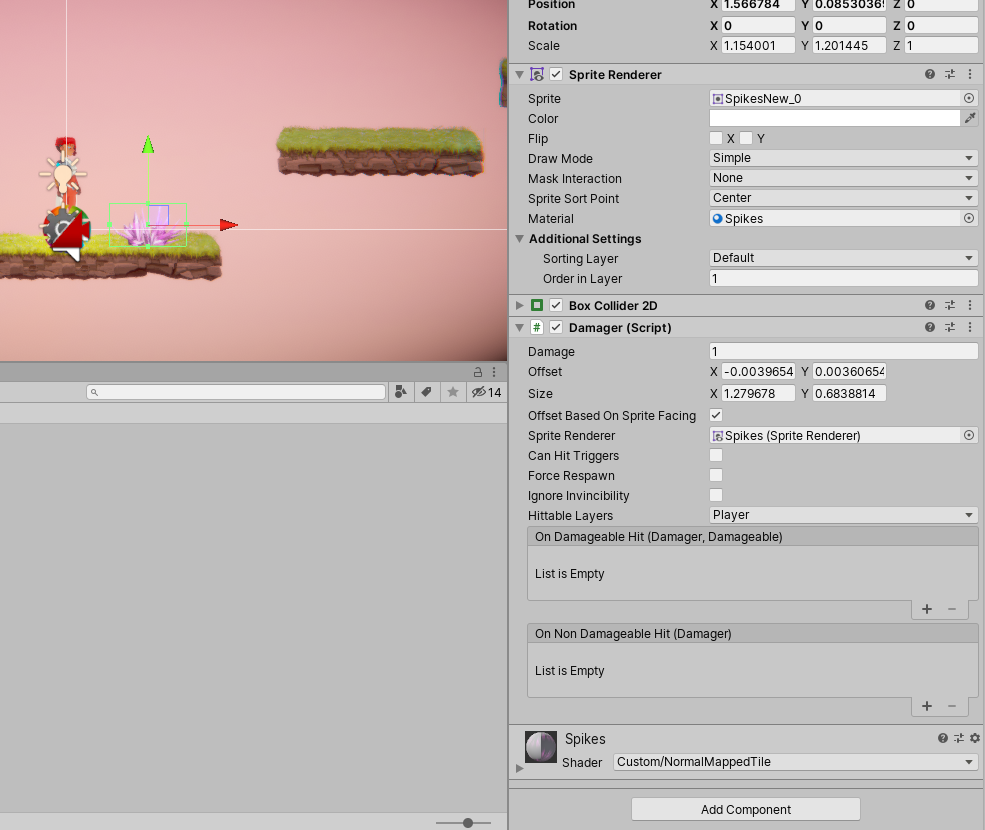
Damager0

Wenn du ein HealthPickup einfügst, kann Ellen Gesundheit wiedererlangen, wenn es dieses einsammelt.
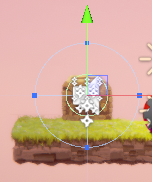
2D Game Kit

Um Ellen aus dem 2D Game Kit und die Kamera zeitgleich zu bewegen bzw. die Startposition von beidem zu veränden, wähle Ellen, drücke Strg und wähle zusätzlich die Kamera aus. Dann kannst du beide gleichzeitig über das Bewegungstool verschiedeben.
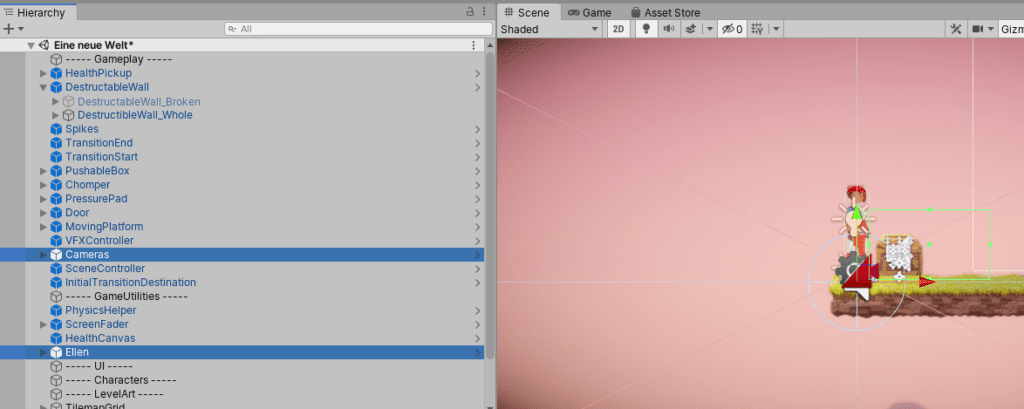
Figur und Kamera

Den Spieler Teleportieren im 2D Game Kit

Du kannst den Spieler im 2D Game Kit von einer Szene in die andere oder zwischen verschiedenen Levels teleportieren.

Innerhalb einer Szene teleportieren:

Um den Spieler innerhalb der Szene zu teleportieren, benutzen wir transition. Für dies benötigen wir zwei Prefabs:

  • TransitionStart
  • TransitionEnd

– Zuerst müssen wir die Einstellungen für den Startpunkt festlegen:

im Projekt Fenster wähle Prefabs–>SceneControl
– Suche das TransitionStart Prefab
– Ziehe TransitionsStart ins Szenebild. Platziere es in einer Position, in welcher der Spieler den Collider bzw. die grüne Box berührt, wenn er darauf läuft.

Den Bestimmungsort festlegen:

Ziehe ein weiteres TransitionStart Prefab vom SceneControl-Ordner in den Szenenbildschirm
– Im Inspectorfenster benenne dies zu TransitionEnd
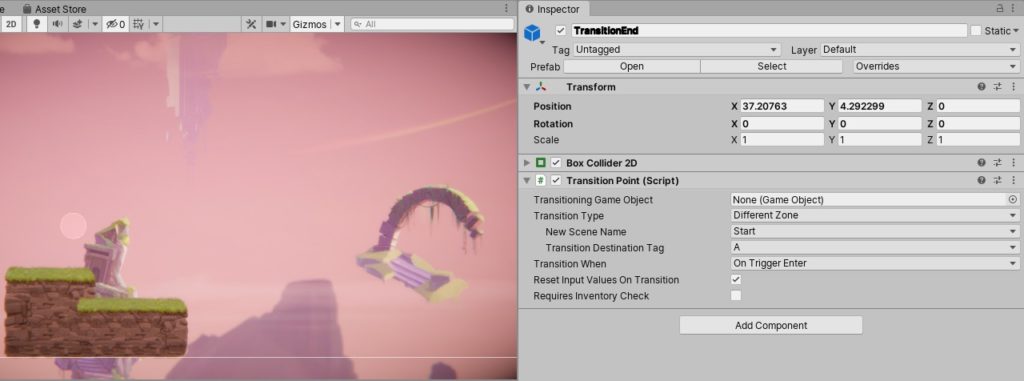
TransitionEnd im 2D Game Kit

Das Verbinden für die Teleportation im 2D Game Kit

– Lass uns beide verbinden:
Im Hierarchiefenster wähle TransitionStart GameObject
– Im Inspektorfenster finden die TransitionPoint-Komponente
– Ziehe das Ellen GameObject vom Hierarchiefenster zur Transition Point-Komponente in den Transitioning Game Object Slot
– Setze den Transition Type auf Same Scene
Du tust dies, um sicher zu gehen, dass nur Ellen teleportiert wird und dass dies nur innerhalb der Szene geschieht.
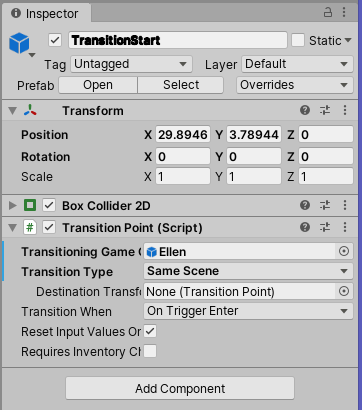
Teleport

Die Einstellungen für den Bestimmungsort

Jetzt lass uns im 2D Game Kit die Einstellungen des Bestimmungsortes festlegen:
Ziehe das TransitionEnd GameObject zum TransitionPoint und in den Slot für DestinationTransform
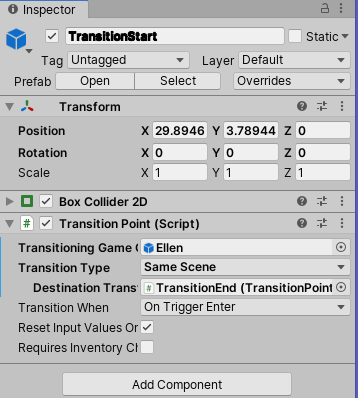
TransitionEnd0
– Setze Transition When auf On Trigger Enter
Trigger Enter bedeutet, dass der Transport nur aktiviert wird, wenn der Spieler den Collider betritt. Ansonsten wird Ellen nur teleportiert, wenn du die Taste E drückst und Transition When auf Interact Pressed gestellt ist. Stellst du Interact Pressed ein, muss der Spieler eine Taste drücken, um zu teleportieren.

In eine andere Szene teleportieren

Dafür werden zum Beispiel im 2D Game Kit zwei Prefabs benötigt:

  • TransitionStart, ist das gleiche Prefab wie vorher. Es sendet den Spieler zu seinem Bestimmungsort. Es enthält den Transition Point, der alle Einstellungen enthält, wo der Teleport startet und wohin der Spieler teleportiert werden soll. Platziere dieses Prefab dort, wo der Teleport beginnen soll.
  • TransitionDestination ist ein Prefab, zu dem der Spieler gesendet wird. Es enthält die TransitionDestination-Komponente. Platziere das Prefabs in einer anderen Szene, wo der Transport beendet werden soll.

Einstellungen für den Bestimmungsort des Transportes

– Zuerst soll der Bestimmungsort im 2D Game Kit festgelegt werden. Wir benötigen alle Informationen von diesem, wenn der Startpunkt für den Transport festgelegt wird. Um dies für eine Szene hinzuzufügen, navigieren wir zum Projektfenster und gehen zu Prefabs–> SceneControl–>TransitionDestination
Platziere diesen deiner Szene, wo der Teleport eher hinführen soll.

Das TransitionDestination Prefab enthält im 2D Game Kit eine Scene Transition Destination-Komponente
– zuerst lege einen Buchstaben für Destination Tag fest. Dies ist relevant für die Scene Transition Destination Component
– Als nächstes lege das Objekt fest, dass transportiert werden soll. Ziehe nun das GameObject vom Hierarchie Fenster in den Slot für Transitioning Game Object.
– Schließlich gehe auf Nummer sicher, dass deine Szene sich in den Editor’s Build Settings befindet.
– Gehe zu File-->Build Settings und klicke auf Add Open Scenes
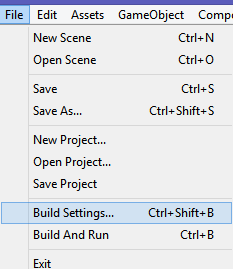
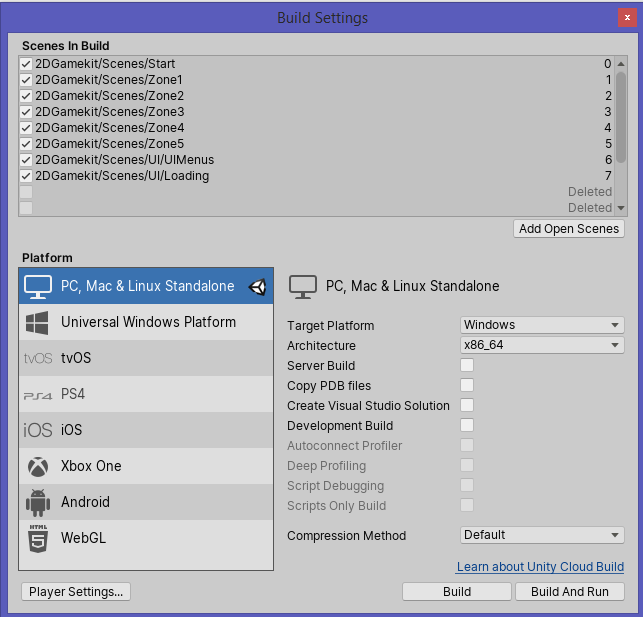
Build Settings auswählen

Build Settings im 2D Game Kit

Den Startpunkt festlegen
– Diese Einstellungen entsprechen denen des vorigen Abschnittes:
– Transiton Type: Different Level
– New Scene Name: Der Name der Szene
– Transition Destination –> Destination Tag-Buchstabe aus der Transition Destination Componente

Beispiel: Sorge dafür, dass der Spieler in den ersten Level teleportiert wird.
In der Transition Start-Komponente stelle folgendes ein:
Transition Type: Different Level
New Scene Name: Zone1
Transition Destination: A
Drücke Play und gehe dorthin, wo der Teleporter ist. Du solltest den ganzen Weg bis zu Zone 1 teleportiert werden.

Zerstörbare Objekte im 2D Game Kit

Du kannst Objekte im 2D Game Kit hinzufügen, die zerstört werden können, wie z. B. Wände.
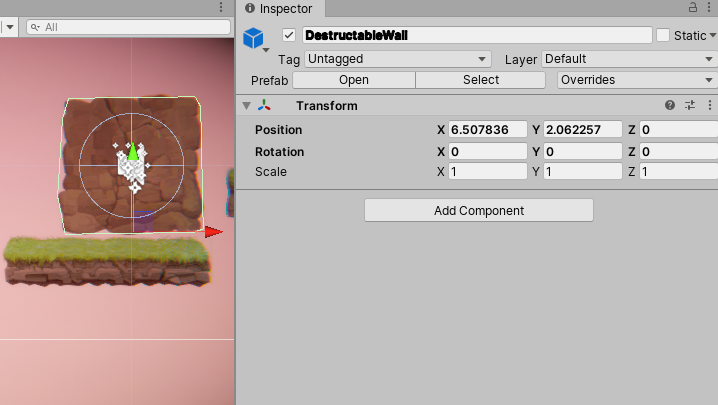
Destructable Wall

Im Beispiel findest du die Einstellungen zu DestructableWall_Whole.

Darin kannst du dann sämtliche Einstellungen am Objekt vornehmen.
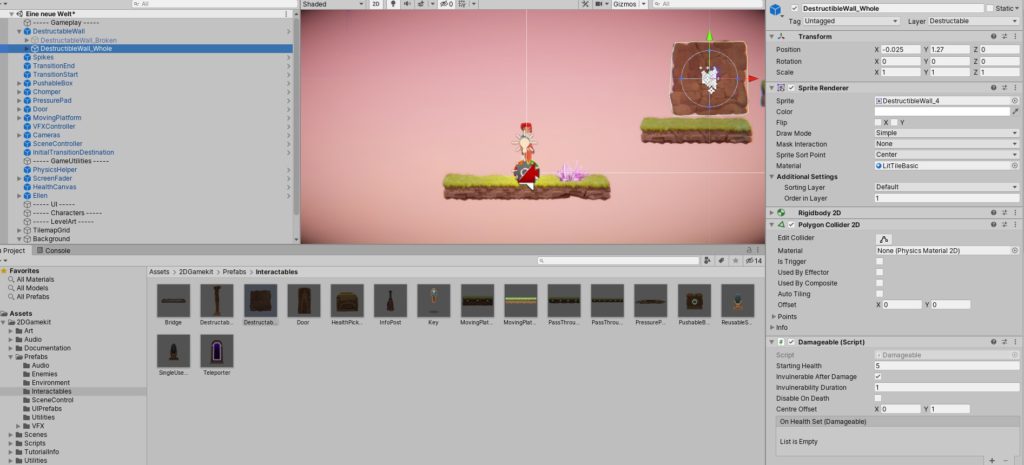
Einstellungen zerstörbare Objekte im 2D Game Kit

Objekte, die zerstört werden können, haben ein Damageable Script.

Damageable 2D Game Kit

Unter Starting Health stellst du beispielsweise ein, wie oft ein Objekt getroffen werden muss, bevor es zerstört wird.

Das Inventar im 2D Game Kit

Wenn deine Spielfigur im 2D Game Kit ein Inventar benötigt, braucht sie einen Inventory Controller.

Inventory Controller 2D Game Kit

Gegenstände, die aufgesammelt werden können, benötigen dann als Add Component das „Inventory Item“.
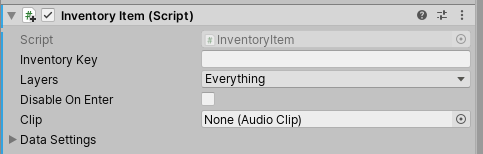
Inventory Item 2D Game Kit

Der Schlüssel, den Ellen einsammeln soll, benötigt außerdem einen Collider, welcher der Größe angepasst wird.
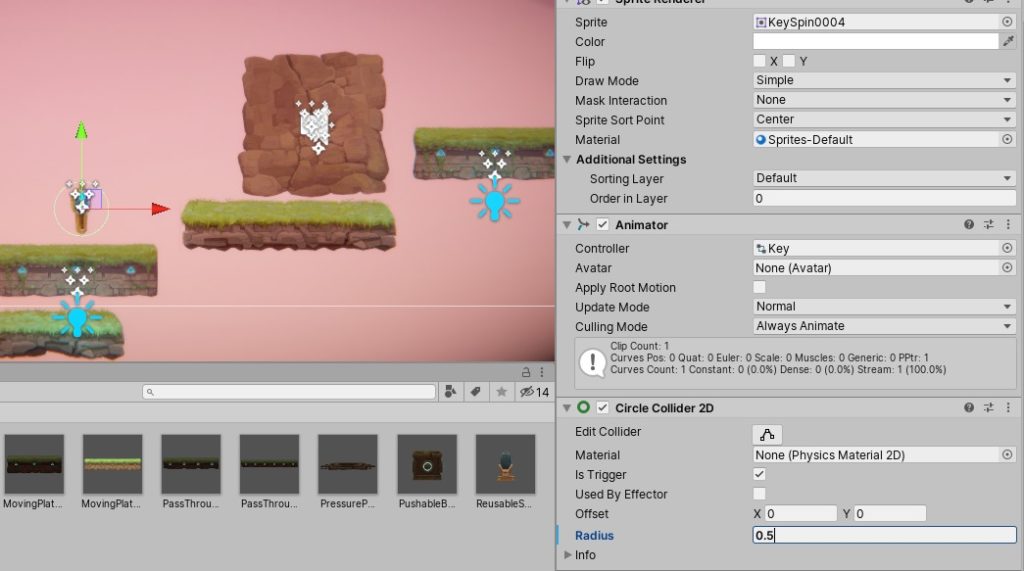
Circle Collider im 2D Game Kit

Unter Inventory Key wird der Titel eingetragen, den das Item somit im Inventar trägt.

Inventory Key 2D Game Kit

Stelle unter Layers Player ein, damit auch nur die Spielfigur den Schlüssel einsammeln kann. Füge außerdem einen Audio-Clip hinzu, wie zum Beispiel GenericPickup.

Erstelle eine Tür und sage dem System, dass sich für Ellen beim Einsammeln des Schlüssels die Tür öffnet. Dafür füge die Tür beim Inventarcontroller von Ellen ein und nehme dich gleichen Einstellungen wie bei der ersten Tür vor.

Damit der Schlüssel verschwindet, wenn Ellen ihn einsammelt, aktiviere im Invantarkontroller vom Schlüssel: Disable on Enter
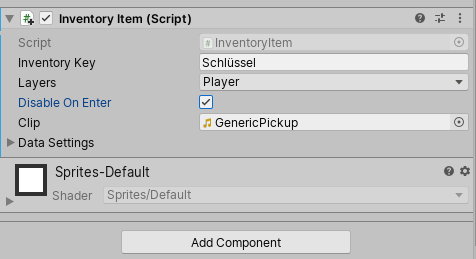
Disable on Enter 2D Game Kit

Soll der Schlüssel im 2D Game Kit in einem Inventar erschienen, füge anschließend eine UI ein. Damit fügst du dann am rechten Platz den Inventarplatz für den Schlüssel ein.
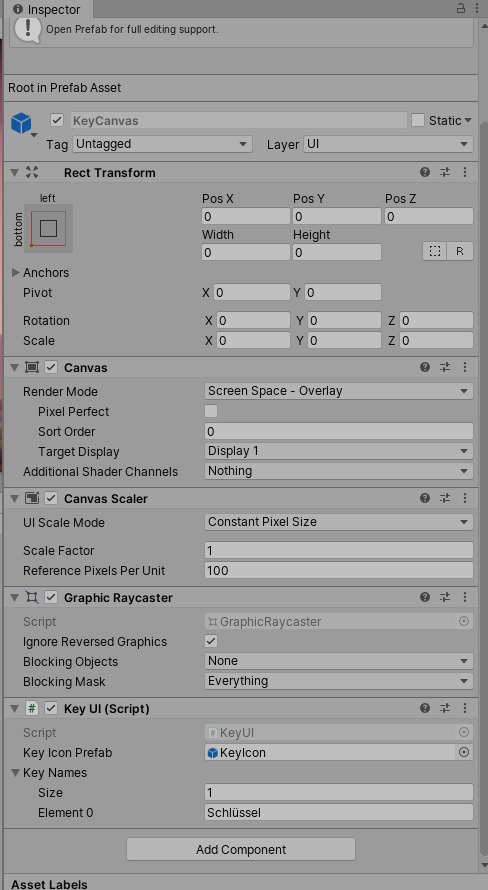
KeyCanvas für das 2D Game Kit

Unter Key UI im Inspektorfenster vom KeyCanvas fügst du den Namen deines Objektes ein und gibst die Menge der zu sammelnden Objekte ein.

Dialoge einfügen mit dem 2D Game Kit

Du benötigst hierfür im 2D Game Kit ebenfalls den UI-Bereich. Du benötigst UI-Prefabs –> DialogueCanvas

Ziehe dieses ebenfalls unter UI. Dies muss beispielsweise verbunden werden, damit die Dialogbox erscheint, wenn ein Ereignis stattfindet.

Beim Teleporter füge über Add Component schließlich „Interact on Button 2D“ hinzu.

Interact on Button im 2D Game Kit

Damit sich dies nur auf Ellen bezieht, wähle dazu die PlayerLayer. Dafür wähle zuerst Nothing und dann Player im Layerfeld. Wähle unter Interact On Button 2D das Pluszeichen und ziehe außerdem vom Hierarchiefeld den DialogueCanvas in den leeren Objektraum.
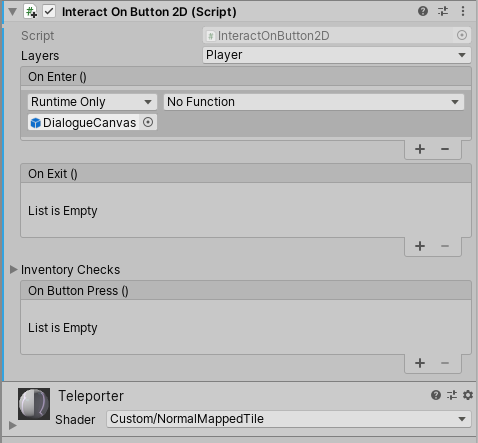
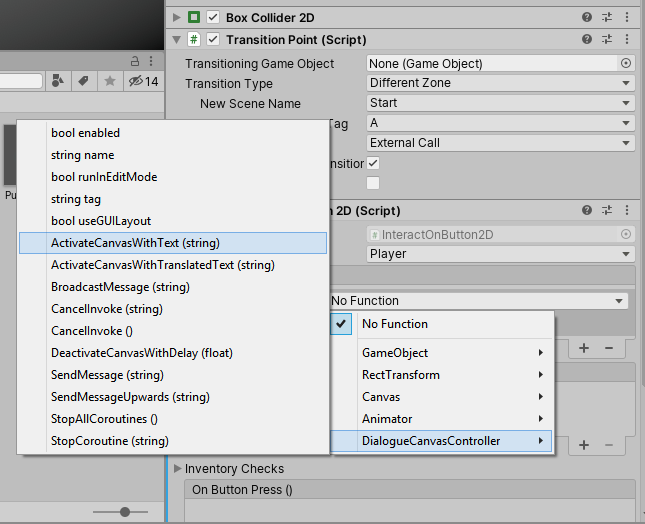
Interact on Button 2D

Dialogue Canvas Controller 2D Game Kit

Füge unter DialogueCanvas den Namen des Objekts ein, bei dem schließlich die Dialogbox erscheinen soll.

Interact on Button 2D Dialogue 2D Game Kit

Je nachdem, was du dort eingibst, erscheint der Text im Textfenster.
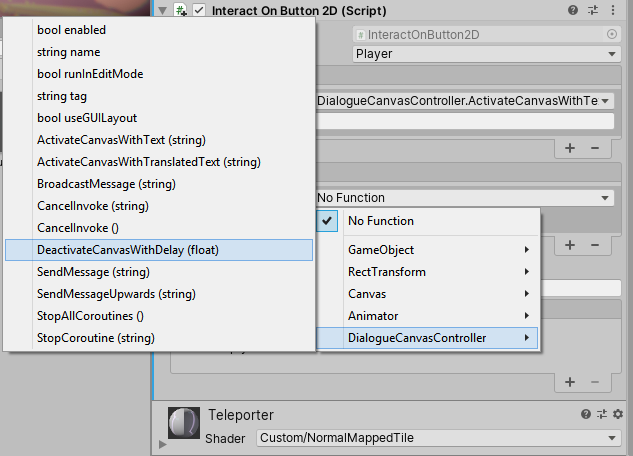
Damit das Fenster im 2D Game Kit nicht die ganze Zeit stehenbleibt, füge außerdem bei OnExit den DialogueCanvasController mit DeactivateCanvasWithDelay hinzu. Mit der Nummer gibst du damit schließlich die Dauer an, welche die Textbox stehen bleibt.
Feld wieder deaktivieren 2D Game Kit
Weiter geht es zur Übersicht zur Spieleprogrammierung in Unity

Originally posted 2020-02-19 09:00:37.

Post Views: 2.069
Weitersagen:
Games und Lyrik Tags:Unity

Beitragsnavigation

Previous Post: NVYVE Studios
Next Post: Pirates of Gravitae

Related Posts

  • Nevernotplay Logo
    NeverNotPlay – Berliner Indie-Studio für fesselnde Sports-Games Games und Lyrik
  • Cultic Cover
    Cultic Games und Lyrik
  • American Gladiators Cover
    American Gladiator’s Games und Lyrik
  • Mega Man Zero 2 Cover
    Mega Man Zero – Mega Man für den GBA Games und Lyrik
  • GameGuru MAX Cover
    GameGuru MAX Games und Lyrik
  • Hollywood Squares Cover
    Hollywood Squares Games und Lyrik

Schreibe einen Kommentar Antwort abbrechen

Deine E-Mail-Adresse wird nicht veröffentlicht. Erforderliche Felder sind mit * markiert

Diese Website verwendet Akismet, um Spam zu reduzieren. Erfahre, wie deine Kommentardaten verarbeitet werden.

Unsere Besucher

089911
Users Today : 6
Total views : 411148
Powered By WPS Visitor Counter
  • Games und Lyrik (2.724)
    • Action (83)
    • Adventure (462)
      • Point & Click-Adventure (16)
    • Ecke der verlorenen Spiele (17)
    • Horror (35)
    • Kinderfreundliche Games (5)
    • Partyspiele (9)
    • Puzzle (17)
    • Rollenspiele (115)
    • Shooter (346)
    • Simulation (30)
    • Sport (113)
      • Fußball (5)
      • Rennspiele (6)
    • Strategie (201)
    • Survival (9)
    • Wimmelbild (8)
  • Hardware (2)
  • Jump & Run (1)
  • Lyrik (112)
  • Spieleentwickler (432)
  • Spieleprogrammierung (48)

Action Adventure Capcom Daedalic Deck 13 Devcom 2020 Ecke der verlorenen Spiele Gamescom 2019 Gamescom 2020 Gamescom 2021 Gamescom 2023 Games from Spain GB GBA GBC Horror Indie Arena Booth 2022 Jump & Run Kalypso Media Mega Man N64 NDS NES Nintendo Switch PC PS1 PS2 PS3 PS4 PS5 PSP Rareware Rennspiel Sega Shooter SNES State of Play Strategie Switch Unity Visual Novel VR Windows Xbox XBox One

Cosplay-Schnittmuster

  • 094ddf7788f49439577a1f264f2ea1ca Akira Band 2 Katsuhiro Otomo Carlsen Verlag Manga 19,90 €
  • 3b19aed4a4ecd2d447d502b5040d272e Fruits Basket Pearls Band 1 Natsuki Takaya Carlsen Verlag Manga 11,00 €
  • f1b2be429c6da35582dbc14e7d6d3b72 Angel Sanctuary Pearls Band 3 Kaori Yuki Carlsen Verlag Manga 12,00 €


Hier finden Sie mehr.

RSS Lets-Plays.de

  • Zombie Spiele: Die spannendsten Survival- und Action-Games
  • Pen and Paper Spiele

Ezoic

RSS GameStar – News

  • Saros ist der beste Shooter des Jahres - Test/Review
  • Windrose - Das Reddit einer Metal-Band wird gerade versehentlich von Spielern geflutet, aber das hat auch seine guten Seiten
  • Cards & Cannons ist Mittelalter-Wahnsinn mit gewaltigen Monster-Horden, dicken Bossen und einer Nominierung beim Deutschen Computerspielpreis
TopBlogs.de das Original - Blogverzeichnis | Blog Top Liste
blogwolke.de - Das Blog-Verzeichnis
  • AC-DC Live Rockband Cover
    AC/DC Live: Rock Band Games und Lyrik
  • Play on Words Studios Logo
    Play on Words Studios: Kreativität und Rätselspaß Spieleentwickler
  • Logo Breda University of Applied Sciences.
    Die Breda University of Applied Sciences Spieleentwickler
  • Saber Interactive Logo
    Saber Interactive: Ein Überblick über den Entwickler Spieleentwickler
  • Crash 'n the Boys: Street Challenge
    Crash ’n the Boys: Street Challenge Sport
  • Mega Man X Collection
    Mega Man X Collection – Die Spielesammlung Games und Lyrik
  • Conqueror's Blade Cover
    Booming Games Strategie
  • Ultimate Pirates
    Ultimate Pirates Games und Lyrik

Copyright © 2026 Games und Lyrik.

Powered by PressBook News Dark theme

Cookie-Einstellungen
Diese Webseite benutzt Cookies um die Nutzererfahrung zu verbessern. Diese Cookies können Sie hier ausschalten.

This website uses cookies to improve your experience. We'll assume you're ok with this, but you can opt-out if you wish.
Cookie-Einstellungen / Cookie settingsAkzeptieren / ACCEPT
Privatsphären- und Cookie-Einstellungen

Informationen zu Cookies / Privacy Overview

Informationen zu Cookies / Privacy Overview


Diese Webseite benutzt Cookies um die Funktion und die Nutzererfahrung zu verbessern. Es gibt zwei Arten von Cookies: Die notwendigen im Browser gespeichert und sind wichtig für die korrekte Funktion der Webseite. Die nicht notwendigen oder auch Drittanbieter-Cookies, die zum Einsatz kommen, dienen zur Analyse und zeigen uns die Benutzung dieser Webseite. Diese Cookies werden ebenfalls im Browser gespeichert aber nur, wenn Sie es ausdrücklich erlauben. Sie haben im Folgenden die Möglichkeit, diese Drittanbieter-Cookies zu verbieten. Das Abschalten dieser  Cookies kann das Verhalten der Webseite beeinflussen.


This website uses cookies to improve your experience while you navigate through the website. Out of these cookies, the cookies that are categorized as necessary are stored on your browser as they are essential for the working of basic functionalities of the website. We also use third-party cookies that help us analyze and understand how you use this website. These cookies will be stored in your browser only with your consent. You also have the option to opt-out of these cookies. But opting out of some of these cookies may have an effect on your browsing experience.

necessary
immer aktiv
Necessary cookies are absolutely essential for the website to function properly. This category only includes cookies that ensures basic functionalities and security features of the website. These cookies do not store any personal information.
CookieDauerBeschreibung
AWSALBCORS7 daysThis cookie is managed by Amazon Web Services and is used for load balancing.
client_id10 yearsThis cookie is used for passing authentication information.
cookielawinfo-checkbox-advertisement1 yearSet by the GDPR Cookie Consent plugin, this cookie is used to record the user consent for the cookies in the "Advertisement" category .
cookielawinfo-checkbox-analytics1 yearSet by the GDPR Cookie Consent plugin, this cookie is used to record the user consent for the cookies in the "Analytics" category .
cookielawinfo-checkbox-analytics11 monthsThis cookie is set by GDPR Cookie Consent plugin. The cookie is used to store the user consent for the cookies in the category "Analytics".
cookielawinfo-checkbox-functional1 yearThe cookie is set by the GDPR Cookie Consent plugin to record the user consent for the cookies in the category "Functional".
cookielawinfo-checkbox-functional11 monthsThe cookie is set by GDPR cookie consent to record the user consent for the cookies in the category "Functional".
cookielawinfo-checkbox-necessary1 yearSet by the GDPR Cookie Consent plugin, this cookie is used to record the user consent for the cookies in the "Necessary" category .
cookielawinfo-checkbox-necessary11 monthsThis cookie is set by GDPR Cookie Consent plugin. The cookies is used to store the user consent for the cookies in the category "Necessary".
cookielawinfo-checkbox-non-necessary1 yearSet by the GDPR Cookie Consent plugin, this cookie is used to record the user consent for the cookies in the "Non-necessary" category .
cookielawinfo-checkbox-others1 yearSet by the GDPR Cookie Consent plugin, this cookie is used to store the user consent for cookies in the category "Others".
cookielawinfo-checkbox-others11 monthsThis cookie is set by GDPR Cookie Consent plugin. The cookie is used to store the user consent for the cookies in the category "Other.
cookielawinfo-checkbox-performance1 yearSet by the GDPR Cookie Consent plugin, this cookie is used to store the user consent for cookies in the category "Performance".
cookielawinfo-checkbox-performance11 monthsThis cookie is set by GDPR Cookie Consent plugin. The cookie is used to store the user consent for the cookies in the category "Performance".
CookieLawInfoConsent1 yearRecords the default button state of the corresponding category & the status of CCPA. It works only in coordination with the primary cookie.
ezCMPCCS1 yearEzoic sets this cookie to track when a user consents to statistics cookies.
PHPSESSIDsessionThis cookie is native to PHP applications. The cookie is used to store and identify a users' unique session ID for the purpose of managing user session on the website. The cookie is a session cookies and is deleted when all the browser windows are closed.
viewed_cookie_policy11 monthsThe cookie is set by the GDPR Cookie Consent plugin and is used to store whether or not user has consented to the use of cookies. It does not store any personal data.
Nicht notwendige
Alle Cookies, die für die korrekte Funktion der Webseite nicht unmittelbar notwendig sind und genutzt werden, um persönliche Nutzerdaten per Analyse, Werbung oder anderen eingebetteten Inhalt zu sammeln, werden als nicht notwendige Cookies bezeichnet. Es ist zwingend erforderlich die Zustimmung des Nutzers / der Nutzerin einzuholen, bevor diese Cookies zur Anwendung kommen. Wird die Einwilligung zur Nutzung der Cookies nicht erteilt, werden sie nicht angewendet und nur die notwendigen Cookies sind aktiv.
CookieDauerBeschreibung
__qca1 year 26 daysThe __qca cookie is associated with Quantcast. This anonymous data helps us to better understand users' needs and customize the website accordingly.
eudssessionThis cookie is set by Rocket Fuel for targeted advertising so that users are shown relevant ads.
i10 yearsThis cookie is set by OpenX to record anonymized user data, such as IP address, geographical location, websites visited, ads clicked by the user etc., for relevant advertising.
IDE1 year 24 daysGoogle DoubleClick IDE cookies are used to store information about how the user uses the website to present them with relevant ads and according to the user profile.
mc1 year 1 monthQuantserve sets the mc cookie to anonymously track user behaviour on the website.
rud1 year 24 daysThe rud cookie is owned by Rocketfuel and registers user data, such as IP address, location, etc. for the purpose of optimising ad display.
rudssessionThis cookie is owned by Rocketfuel and collects anonymous user data to target audiences and deliver personalized ads.
test_cookie15 minutesThe test_cookie is set by doubleclick.net and is used to determine if the user's browser supports cookies.
VISITOR_INFO1_LIVE5 months 27 daysA cookie set by YouTube to measure bandwidth that determines whether the user gets the new or old player interface.
YSCsessionYSC cookie is set by Youtube and is used to track the views of embedded videos on Youtube pages.
yt-remote-connected-devicesneverYouTube sets this cookie to store the video preferences of the user using embedded YouTube video.
yt-remote-device-idneverYouTube sets this cookie to store the video preferences of the user using embedded YouTube video.
yt.innertube::nextIdneverThis cookie, set by YouTube, registers a unique ID to store data on what videos from YouTube the user has seen.
yt.innertube::requestsneverThis cookie, set by YouTube, registers a unique ID to store data on what videos from YouTube the user has seen.
Funktionelle
Funktionelle Cookies werden benutzt, um bestimmte Funktionen wie die Teilung von Informationen auf Plattformen der sozialen Medien, Sammlung von Rückmeldungen und andre Drittanbieterfunktionen einsetzen zu können.
CookieDauerBeschreibung
__cf_bm30 minutesThis cookie, set by Cloudflare, is used to support Cloudflare Bot Management.
pll_language1 yearThe pll _language cookie is used by Polylang to remember the language selected by the user when returning to the website, and also to get the language information when not available in another way.
Leistungsanalyse
Leistungsanalyse-Cookies werden eingesetzt um die wichtigsten Leistungsaspekte zu analysieren und zu verstehen. Dies trägt dazu bei, die Webseite kontinuierlich zu verbessern und so den Besuchern eine gute Nutzererfahrung zu bieten.
CookieDauerBeschreibung
AWSALB7 daysAWSALB is an application load balancer cookie set by Amazon Web Services to map the session to the target.
ezds7 yearsThe ezds cookie is set by the provider Ezoic, and is used for storing the pixel size of the user's browser, to personalize user experience and ensure content fits.
ezoab_10342 hoursEzoic uses this cookie to split test different features and functionality.
ezohw7 yearsThe ezohw cookie is set by the provider Ezoic, and is used for storing the pixel size of the user's browser, to personalize user experience and ensure content fits.
ymex1 yearYandex sets this cookie to collect information about the user behaviour on the website. This information is used for website analysis and for website optimisation.
yuidss1 yearYandex stores this cookie in the user's browser in order to recognize the visitor.
Analytik
Analytische Cookies werden benutzt um zu verstehen, auf welche Art und Weise Besucher mit dieser Webseite interagieren. Diese Cookies helfen Informationen über Anzahl der Besucher, Absprungrate (Anzahl der Besucher,, die eine Webseite Besuchen und sie gleich wieder verlassen), Ursprungsland des Besuchers, usw. zu erhalten.
CookieDauerBeschreibung
__gads1 year 24 daysThe __gads cookie, set by Google, is stored under DoubleClick domain and tracks the number of times users see an advert, measures the success of the campaign and calculates its revenue. This cookie can only be read from the domain they are set on and will not track any data while browsing through other sites.
_gu1 monthThis cookie is set by the provider Getsitecontrol. This cookie is used to distinguish the users.
_ym_d1 yearYandex sets this cookie to store the date of the users first site session.
_ym_isad20 hoursYandex sets this cookie to determine if a visitor has ad blockers.
_ym_uid1 yearYandex sets this cookie to identify site users.
CONSENT2 yearsYouTube sets this cookie via embedded youtube-videos and registers anonymous statistical data.
eud1 year 24 daysThis cookie is owned by Rocketfuel and collects anonymous user data to target audiences and deliver personalized ads.
ezepvv1 dayThis cookie is set by the provider Ezoic to track what pages the user has viewed.
ezoadgid_103430 minutesEzoic uses this cookie to record an id for the user's age and gender category.
ezoref_10342 hoursEzoic uses this cookie to store the referring domain, i.e the website the user was on, before he came to the current website.
ezouspvasessionThe ezouspva cookie is set by the provider Ezoic and is used to track the number of pages a user has visited all time.
ezouspvvsessionThe ezouspvv cookie is set by the provider Ezoic and is used to track the number of pages a user has visited all time.
UserID13 monthsThis cookie is set by ADITION Technologies AG, as a unique and anonymous ID for the visitor of the website, to identify unique users across multiple sessions.
yabs-sidsessionYandex sets this cookie to store the session ID.
yandexuid1 yearYandex sets this cookie to identify site users.
Werbung
Werbungs-Cookies werden benutzt um Besuchern relevante Werbungen und Vermarktungskampanien anzuzeigen. Diese Cookies verfolgen die Besucher beim Besuch einer Webseite und sammeln Informationen mit deren Hilfe sie angepasste Werbungen einblenden.
CookieDauerBeschreibung
__qca1 year 26 daysThe __qca cookie is associated with Quantcast. This anonymous data helps us to better understand users' needs and customize the website accordingly.
eudssessionThis cookie is set by Rocket Fuel for targeted advertising so that users are shown relevant ads.
i10 yearsThis cookie is set by OpenX to record anonymized user data, such as IP address, geographical location, websites visited, ads clicked by the user etc., for relevant advertising.
IDE1 year 24 daysGoogle DoubleClick IDE cookies are used to store information about how the user uses the website to present them with relevant ads and according to the user profile.
mc1 year 1 monthQuantserve sets the mc cookie to anonymously track user behaviour on the website.
rud1 year 24 daysThe rud cookie is owned by Rocketfuel and registers user data, such as IP address, location, etc. for the purpose of optimising ad display.
rudssessionThis cookie is owned by Rocketfuel and collects anonymous user data to target audiences and deliver personalized ads.
test_cookie15 minutesThe test_cookie is set by doubleclick.net and is used to determine if the user's browser supports cookies.
VISITOR_INFO1_LIVE5 months 27 daysA cookie set by YouTube to measure bandwidth that determines whether the user gets the new or old player interface.
YSCsessionYSC cookie is set by Youtube and is used to track the views of embedded videos on Youtube pages.
yt-remote-connected-devicesneverYouTube sets this cookie to store the video preferences of the user using embedded YouTube video.
yt-remote-device-idneverYouTube sets this cookie to store the video preferences of the user using embedded YouTube video.
yt.innertube::nextIdneverThis cookie, set by YouTube, registers a unique ID to store data on what videos from YouTube the user has seen.
yt.innertube::requestsneverThis cookie, set by YouTube, registers a unique ID to store data on what videos from YouTube the user has seen.
Sonstige
Zu den sonstigen unkategorisierten Cookies zählen jene, die zwar analysiert wurden, aber noch keiner Kategorie zugeordnet werden konnten.
CookieDauerBeschreibung
_auid1 yearNo description available.
active_template::3326192 days

No description

appReleasesessionNo description available.
BACKENDIDsessionNo description available.
dspid1 yearNo description available.
ezoab_3326192 hoursNo description
ezoadgid_33261930 minutesNo description
ezopvc_33261930 minutesNo description
ezoref_3326192 hoursNo description
ezosuibasgeneris-11 yearNo description
ezovid_33261930 minutesNo description
ezovuuid_33261930 minutesNo description
ezovuuidtime_3326192 daysNo description
ezux_lpl_3326191 yearNo description
f_0013 monthsNo description
g_0011 dayNo description
gt_auto_switch1 monthNo description available.
lp_33261930 minutesNo description
mts_id9 years 10 months 8 daysNo description available.
mts_id_last_sync9 years 10 months 8 daysNo description available.
pvc_visits[0]1 yearThis cookie is created by post-views-counter. This cookie is used to count the number of visits to a post. It also helps in preventing repeat views of a post by a visitor.
srpsessionNo description available.
userId5 months 27 daysNo description
Notwendige
Notwendige Cookies sind für die korrekte Funktion der Webseite unerlässlich. Diese Kategorie enthält nur Cookies, die grundlegende Funktionalitäten und Sicherheitsfunktionen der Webseite ermöglichen. Diese Cookies speichern keine persönlichen Daten.
CookieDauerBeschreibung
AWSALBCORS7 daysThis cookie is managed by Amazon Web Services and is used for load balancing.
client_id10 yearsThis cookie is used for passing authentication information.
cookielawinfo-checkbox-advertisement1 yearSet by the GDPR Cookie Consent plugin, this cookie is used to record the user consent for the cookies in the "Advertisement" category .
cookielawinfo-checkbox-analytics1 yearSet by the GDPR Cookie Consent plugin, this cookie is used to record the user consent for the cookies in the "Analytics" category .
cookielawinfo-checkbox-functional1 yearThe cookie is set by the GDPR Cookie Consent plugin to record the user consent for the cookies in the category "Functional".
cookielawinfo-checkbox-necessary1 yearSet by the GDPR Cookie Consent plugin, this cookie is used to record the user consent for the cookies in the "Necessary" category .
cookielawinfo-checkbox-non-necessary1 yearSet by the GDPR Cookie Consent plugin, this cookie is used to record the user consent for the cookies in the "Non-necessary" category .
cookielawinfo-checkbox-others1 yearSet by the GDPR Cookie Consent plugin, this cookie is used to store the user consent for cookies in the category "Others".
cookielawinfo-checkbox-performance1 yearSet by the GDPR Cookie Consent plugin, this cookie is used to store the user consent for cookies in the category "Performance".
CookieLawInfoConsent1 yearRecords the default button state of the corresponding category & the status of CCPA. It works only in coordination with the primary cookie.
ezCMPCCS1 yearEzoic sets this cookie to track when a user consents to statistics cookies.
Advertisement
Advertisement cookies are used to provide visitors with relevant ads and marketing campaigns. These cookies track visitors across websites and collect information to provide customized ads.
CookieDauerBeschreibung
__qca1 year 26 daysThe __qca cookie is associated with Quantcast. This anonymous data helps us to better understand users' needs and customize the website accordingly.
eudssessionThis cookie is set by Rocket Fuel for targeted advertising so that users are shown relevant ads.
i10 yearsThis cookie is set by OpenX to record anonymized user data, such as IP address, geographical location, websites visited, ads clicked by the user etc., for relevant advertising.
IDE1 year 24 daysGoogle DoubleClick IDE cookies are used to store information about how the user uses the website to present them with relevant ads and according to the user profile.
loc1 year 1 monthAddThis sets this geolocation cookie to help understand the location of users who share the information.
mc1 year 1 monthQuantserve sets the mc cookie to anonymously track user behaviour on the website.
rud1 year 24 daysThe rud cookie is owned by Rocketfuel and registers user data, such as IP address, location, etc. for the purpose of optimising ad display.
rudssessionThis cookie is owned by Rocketfuel and collects anonymous user data to target audiences and deliver personalized ads.
test_cookie15 minutesThe test_cookie is set by doubleclick.net and is used to determine if the user's browser supports cookies.
VISITOR_INFO1_LIVE5 months 27 daysA cookie set by YouTube to measure bandwidth that determines whether the user gets the new or old player interface.
YSCsessionYSC cookie is set by Youtube and is used to track the views of embedded videos on Youtube pages.
yt-remote-connected-devicesneverYouTube sets this cookie to store the video preferences of the user using embedded YouTube video.
yt-remote-device-idneverYouTube sets this cookie to store the video preferences of the user using embedded YouTube video.
yt.innertube::nextIdneverThis cookie, set by YouTube, registers a unique ID to store data on what videos from YouTube the user has seen.
yt.innertube::requestsneverThis cookie, set by YouTube, registers a unique ID to store data on what videos from YouTube the user has seen.
non-necessary
Other uncategorized cookies are those that are being analyzed and have not been classified into a category as yet.
CookieDauerBeschreibung
_auid1 yearNo description available.
active_template::3326192 days

No description

appReleasesessionNo description available.
BACKENDIDsessionNo description available.
dspid1 yearNo description available.
ezoab_3326192 hoursNo description
ezoadgid_33261930 minutesNo description
ezopvc_33261930 minutesNo description
ezoref_3326192 hoursNo description
ezosuibasgeneris-11 yearNo description
ezovid_33261930 minutesNo description
ezovuuid_33261930 minutesNo description
ezovuuidtime_3326192 daysNo description
ezux_lpl_3326191 yearNo description
f_0013 monthsNo description
g_0011 dayNo description
gt_auto_switch1 monthNo description available.
lp_33261930 minutesNo description
mts_id9 years 10 months 8 daysNo description available.
mts_id_last_sync9 years 10 months 8 daysNo description available.
pvc_visits[0]1 yearThis cookie is created by post-views-counter. This cookie is used to count the number of visits to a post. It also helps in preventing repeat views of a post by a visitor.
srpsessionNo description available.
userId5 months 27 daysNo description
xtc1 year 1 monthNo description
performance
Performance cookies are used to understand and analyze the key performance indexes of the website which helps in delivering a better user experience for the visitors.
CookieDauerBeschreibung
AWSALB7 daysAWSALB is an application load balancer cookie set by Amazon Web Services to map the session to the target.
ezds7 yearsThe ezds cookie is set by the provider Ezoic, and is used for storing the pixel size of the user's browser, to personalize user experience and ensure content fits.
ezoab_10342 hoursEzoic uses this cookie to split test different features and functionality.
ezohw7 yearsThe ezohw cookie is set by the provider Ezoic, and is used for storing the pixel size of the user's browser, to personalize user experience and ensure content fits.
ymex1 yearYandex sets this cookie to collect information about the user behaviour on the website. This information is used for website analysis and for website optimisation.
yuidss1 yearYandex stores this cookie in the user's browser in order to recognize the visitor.
Others
Other uncategorized cookies are those that are being analyzed and have not been classified into a category as yet.
CookieDauerBeschreibung
_auid1 yearNo description available.
active_template::3326192 days

No description

appReleasesessionNo description available.
BACKENDIDsessionNo description available.
dspid1 yearNo description available.
ezoab_3326192 hoursNo description
ezoadgid_33261930 minutesNo description
ezopvc_33261930 minutesNo description
ezoref_3326192 hoursNo description
ezosuibasgeneris-11 yearNo description
ezovid_33261930 minutesNo description
ezovuuid_33261930 minutesNo description
ezovuuidtime_3326192 daysNo description
ezux_lpl_3326191 yearNo description
f_0013 monthsNo description
g_0011 dayNo description
gt_auto_switch1 monthNo description available.
lp_33261930 minutesNo description
mts_id9 years 10 months 8 daysNo description available.
mts_id_last_sync9 years 10 months 8 daysNo description available.
pvc_visits[0]1 yearThis cookie is created by post-views-counter. This cookie is used to count the number of visits to a post. It also helps in preventing repeat views of a post by a visitor.
srpsessionNo description available.
userId5 months 27 daysNo description
xtc1 year 1 monthNo description
Analytics
Analytical cookies are used to understand how visitors interact with the website. These cookies help provide information on metrics the number of visitors, bounce rate, traffic source, etc.
CookieDauerBeschreibung
__gads1 year 24 daysThe __gads cookie, set by Google, is stored under DoubleClick domain and tracks the number of times users see an advert, measures the success of the campaign and calculates its revenue. This cookie can only be read from the domain they are set on and will not track any data while browsing through other sites.
_gu1 monthThis cookie is set by the provider Getsitecontrol. This cookie is used to distinguish the users.
_ym_d1 yearYandex sets this cookie to store the date of the users first site session.
_ym_isad20 hoursYandex sets this cookie to determine if a visitor has ad blockers.
_ym_uid1 yearYandex sets this cookie to identify site users.
at-randneverAddThis sets this cookie to track page visits, sources of traffic and share counts.
CONSENT2 yearsYouTube sets this cookie via embedded youtube-videos and registers anonymous statistical data.
eud1 year 24 daysThis cookie is owned by Rocketfuel and collects anonymous user data to target audiences and deliver personalized ads.
ezepvv1 dayThis cookie is set by the provider Ezoic to track what pages the user has viewed.
ezoadgid_103430 minutesEzoic uses this cookie to record an id for the user's age and gender category.
ezoref_10342 hoursEzoic uses this cookie to store the referring domain, i.e the website the user was on, before he came to the current website.
ezouspvasessionThe ezouspva cookie is set by the provider Ezoic and is used to track the number of pages a user has visited all time.
ezouspvvsessionThe ezouspvv cookie is set by the provider Ezoic and is used to track the number of pages a user has visited all time.
UserID13 monthsThis cookie is set by ADITION Technologies AG, as a unique and anonymous ID for the visitor of the website, to identify unique users across multiple sessions.
uvc1 year 1 monthSet by addthis.com to determine the usage of addthis.com service.
yabs-sidsessionYandex sets this cookie to store the session ID.
yandexuid1 yearYandex sets this cookie to identify site users.
Functional
Functional cookies help to perform certain functionalities like sharing the content of the website on social media platforms, collect feedbacks, and other third-party features.
CookieDauerBeschreibung
__atuvc1 year 1 monthAddThis sets this cookie to ensure that the updated count is seen when one shares a page and returns to it, before the share count cache is updated.
__atuvs30 minutesAddThis sets this cookie to ensure that the updated count is seen when one shares a page and returns to it, before the share count cache is updated.
__cf_bm30 minutesThis cookie, set by Cloudflare, is used to support Cloudflare Bot Management.
pll_language1 yearThe pll _language cookie is used by Polylang to remember the language selected by the user when returning to the website, and also to get the language information when not available in another way.
SPEICHERN & AKZEPTIEREN
Präsentiert von CookieYes Logo