
Skip to content
Versunken

Games und Lyrik

Von Spielen inspiriert

  • Inhalt
  • Über uns
  • Shop
    • Mein Konto
    • Kasse
    • Warenkorb
  • Games & Lyrik Podcast
  • Pressezentrum und Media-Kit
  • Jobs
  • Impressum
    • AGBs
    • Datenschutzerklärung
    • Disclaimer
  • 0 Artikel0,00 €
  • Toggle search form

Das Visual Effect Graph-Fenster-Layout

Posted on 16. Oktober 2024 By Claudia Wendt Keine Kommentare zu Das Visual Effect Graph-Fenster-Layout
Das Visual Effect Graph-Fenster-Layout

Inhaltsverzeichnis

Toggle
    • Das Visual Effect Graph Window
    •  
    • Das Visual Effect Graph-Fenster-Layout
  • Visual Effekt Graph Logik
    • Verarbeitungsverlauf (vertikale Logik)
    • Eigenschaften-Workflow (horizontale Logik)
    • Diagrammelemente
    • Der Arbeitsplatz
    • Systeme bzw. Systems
    • Kontexte
    • Blöcke
    • Operatoren
    • Allgemeine Elemente des Diagramms
      • Einstellungen
      • Eigenschaften
    • Andere Diagrammelemente

Das Visual Effect Graph Window

Das Fenster Visual Effect Graph ist das Hauptfenster für Visual Effect Graph. Hier können Visual Effect Graph-Assets und Subgraph-Assets bearbeitet werden. Das Fenster zeigt einen Arbeitsbereich an, der aus den Systemen, Kontexten und Operatoren besteht, die ein Visual Effect Graph-Asset enthält.

  • Mache einen Doppelklick im Projektfenster auf dasVisual Effect Graph-Asset oder das Subgraph-Asset. Du kannst auch im Inspektorfenster auf die Schaltfläche öffnen und das jeweilige Asset klicken. Dies verbindet das erste, das du im Fenster öffnen willst. Klicke im Inspektorfenster auf die visuelle Effektkomponente und gehe auf den Bearbeiten-Button (Edit), neben dem Asset-Template. Dadurch wird das der Asset-Vorlage zugewiesene Asset mit dem Fenster verbunden.
    Wähle im Menü Window –>Visuelle Effects–> Visual Effect Graph


    Dies öffnet ein leeres Visual Effect Graph-Fenster, sodass du ein Visuel Effect Graph-Asset öffnen musst, um den Editor zu verwenden.


Das Visual Effect Graph-Fenster-Layout

Symbolleiste: Diese Leiste enthält Steuerelemente, die sich global auf das visuelle Effektdiagramm auswirken. Dies umfasst Steuerelemente, mit denen festgelegt wird, wann Unity das visuelle Effektdiagramm kompiliert, sowie Steuerelemente, mit denen du bestimmte Bedienfelder anzeigen bzw. ausblenden kannst.

Symbolleiste

  • Auto: Schaltet die automatische Kompilierung des visuellen Effektdiagramms ein und aus.
  • Compile: Kompiliert das aktuell geöffnete visuelle Effektdiagramm neu.
  • Show in Project: Fokussiert das aktuell geöffnete Asset des visuellen Effektdiagramms im Projektfenster.
  • Blackboard: Schaltet die Sichtbarkeit des Blackboard-Bedienfelds um.
  • Target GameObject: Schaltet die Sichtbarkeit des Target VisualEffect GameObject-Bedienfelds um.
    Im GameObject-Bedienfeld für visuelle Effekte hängst du das aktuell geöffnete visuelle Effektdiagramm an ein GameObject an, steuerst die Wiedergabeoptionen und löst Ereignisse aus. Es ist ein schwebendes Bedienfeld, das unabhängig von Zoom und Position der aktuellen Arbeitsbereichsansicht ist. Das Fenster zeigt diesen Bereich immer über den Knoten im Knotenarbeitsbereich an.


    Werbung

    Um die Größe dieses Bedienfelds zu ändern, klicken Sie auf eine Kante oder Ecke und ziehen Sie. Um dieses Bedienfeld neu zu positionieren, klicken Sie auf die Überschrift des Bedienfelds und ziehen Sie.

  • Erweitertes Menü (Advanced Menu): zeigt die erweiterten Eigenschaften an.
    • Die Optionen sind:
      • Runtime Mode (Forced): Erzwingt eine optimierte Kompilierung, auch wenn der Editor geöffnet ist.
      • Shader Validation (Forced): Führt eine erzwungene Shader-Kompilierung durch, wenn der Effekt erneut kompiliert wird, auch wenn kein visueller Effekt sichtbar ist. Dies zeigt die Shader-Fehler in der Szene an.
      • Refresh UI: Aktualisiert die Benutzeroberfläche des Fensters.

Knotenarbeitsbereich: Hier wird das visuelle Effektdiagramm angezeigt und bearbeitet.

Es ist der Arbeitsbereich unterhalb der Symbolleiste. Hier navigierst du und bearbeitest die Grafik. Der Knoten-Arbeitsbereich enthält auch die Bereiche Blackboard und Target VisualEffect GameObject.

Knotenarbeitsbereich

Im Arbeitsbereich navigieren: Die Navigationssteuerelemente für den Knotenarbeitsbereich ähneln denen, die andere graphbasierte Unity-Funktionen verwenden:

Bewege dich im Diagramm:

Klicken Sie mit der mittleren Maustaste und ziehen Sie.

Werbung

Halten Sie die Alt-Taste gedrückt, klicken Sie mit der linken Maustaste und ziehen Sie.

Vergrößern und Verkleinern mit:

Scrollen Sie zum Vergrößern mit dem Mausrad nach oben.

Scrollen Sie zum Verkleinern mit dem Mausrad nach unten.

Elemente auswählen:

Um Elemente einzeln auszuwählen, klicken darauf.

Um ein Element zur aktuellen Auswahl hinzuzufügen / daraus zu entfernen, halte die Strg-Taste gedrückt und klicke darauf.

Um ein Auswahlrechteck zu erstellen, klicke in einen leeren Bereich und ziehe es auseinander. Dies wählt jedes Element aus, das das Rechteck berührt.

Du kannst ein Auswahlrechteck verwenden, um Elemente zur aktuellen Auswahl hinzuzufügen oder daraus zu entfernen. Halten Sie dazu die Strg-Taste gedrückt und erstelle Sie mit der oben beschriebenen Methode ein neues Auswahlrechteck.

Um einen Auswahlrahmen zu erstellen, halte die Umschalttaste gedrückt, klicke Sie in eine leere Stelle und ziehen Sie, um einen Pfad zu erstellen. Hiermit wird jedes Element ausgewählt, das der Pfad / Laufschrift berührt.

Klicke in einen leeren Bereich, um die aktuelle Auswahl zu löschen.

Focus:

Um sich auf einen bestimmten Knoten / eine bestimmte Gruppe von Knoten zu konzentrieren, wähle den / die Knoten aus und drücken Sie die F-Taste.

Um sich auf das gesamte Diagramm zu konzentrieren, löschen die aktuelle Auswahl und drücken Sie die F-Taste.

Elemente kopieren, ausschneiden und einfügen und duplizieren:

Klicke mit der rechten Maustaste auf ein Element oder eine Elementgruppe, um ein Menü mit den entsprechenden Befehlen zu öffnen.

Tastatürkürzel:

Kopieren: Strg + C.

Ausschneiden: Strg + X.

Einfügen: Strg + V.

Duplizieren: Strg + D.

Mit Kanten duplizieren: Strg + Alt + D.


Diagrammelemente hinzufügen:

Zum Hinzufügen von Diagrammelementen kann eine der folgenden Methoden verwendet werden:

Rechtsklick-Menü: Klicke mit der rechten Maustaste, um das Menü zu öffnen, wähle Knoten hinzufügen und dann den Knoten, den du hinzufügen möchtest, aus dem Menü aus. Diese Aktion ist kontextsensitiv und basiert auf dem Element unterhalb Ihres Cursors. Es werden nur Diagrammelemente bereitgestellt, die kompatibel sind.

Leertaste-Menü: Diese Verknüpfung entspricht einem Rechtsklick und der Auswahl von Knoten hinzufügen.

Interaktive Verbindungen: Ziehe beim Erstellen einer Kante von einem Port (entweder Eigenschaft oder Workflow) die Kante herum und lasse den Mausklick in einem leeren Bereich los, um das Knotenmenü anzuzeigen. Diese Aktion ist abhängig vom Typ des Quellports kontextsensitiv und bietet Ihnen nur kompatible Diagrammelemente, mit denen eine Verbindung hergestellt werden kann.

Bearbeiten von Diagrammelementen:

Diagrammelemente lassen sich im Arbeitsbereich bearbeiten:

  • Elemente verschieben: Um ein Element im Arbeitsbereich zu verschieben, klicke mit der linken Maustaste auf die Kopfzeile des Elements, ziehe das Element an eine neue Position und lasse die Maustaste los.
  • Um Blöcke innerhalb eines Kontexts oder in einen anderen Kontext zu verschieben, klicke auf die Kopfzeile des Blocks, ziehe den Block an eine neue Position und lasse die Maustaste los.
  • Größenänderung von Elementen:
    Einige Elemente, wie z. B. Haftnotizen, unterstützen die Größenänderung. Klicke dazu auf eine Kante oder Ecke, ziehe Sie, bis die gewünschte Elementgröße erreicht ist, und lasse Sie die Maustaste los.

Tafel: In diesem Bereich werden die vom visuellen Effektdiagramm verwendeten Eigenschaften angezeigt.
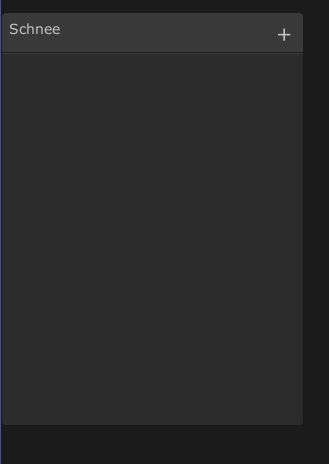
Tafel

Target visual effect GameObject: Visueller Zieleffekt GameObject: In diesem Bereich werden Steuerelemente für das aktuell angehängte GameObject angezeigt.
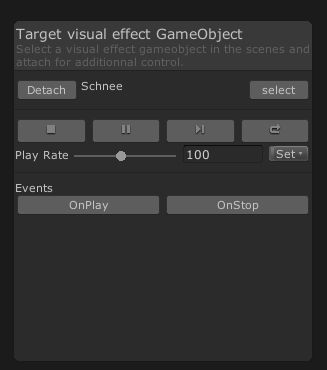
Target Visual Effect

Visual Effekt Graph Logik

Der Visual Effect Graph nutzt zwei Workflows:

1. Eine prozessuale (vertikale) Logik welches benutzerdefinierte Bereiche definiert, um die Lebensdauer eines Systems zu definieren
2. Die Eigenschaftslogik (horizontal) verbindte verschiedene Kontexte miteinander, um zu definieren wie die Partikel aussehen und sich verhalten

Verarbeitungsverlauf (vertikale Logik)

Der Verarbeitungsworkflow verknüpft eine Abfolge anpassbarer Phasen, um die gesamte Systemlogik zu definieren. Hier legst du fest, wann die Partikel während des Effekts erzeugt, initialisiert, aktualisiert und gerendert werden sollen.

Der Verarbeitungsworkflow verbindet Kontexte mithilfe ihrer Ablauffenster am oberen und unteren Rand des Kontextknotens.

Die Verarbeitungslogik definiert die verschiedenen Verarbeitungsstufen eines visuellen Effekts. Jede Phase besteht aus einem großen farbigen Container, der als Kontext bezeichnet wird. Jeder Kontext verbindet sich mit einem anderen kompatiblen Kontext, der definiert, wie die nächste Verarbeitungsstufe den aktuellen Kontext verwendet.

Kontexte können Elemente enthalten, die als Blöcke bezeichnet werden. Jeder Block ist ein stapelbarer Knoten, der für eine Operation zuständig ist. Du kannst Blöcke neu anordnen, um die Reihenfolge zu ändern, in der Unity einen visuellen Effekt verarbeitet. Unity führt die Blöcke in einem Kontext von oben nach unten aus.

Eigenschaften-Workflow (horizontale Logik)

Im Workflow für horizontale Eigenschaften können mathematische Operationen definiert werden, um den visuellen Effekt zu verbessern. Dies beeinflusst, wie die Partikel aussehen und sich verhalten.

Der Eigenschafts-Workflow verbindet Kontexte mithilfe der Eigenschafts-Slots der Blöcke. Die linke Seite ist die Eingabe und die rechte Seite ist die Ausgabe.

Das visuelle Effektdiagramm enthält eine große Block- und Knotenbibliothek, mit der das Verhalten des visuellen Effekts definiert werden kann. Das von erstellte Knotennetzwerk steuert den horizontalen Datenfluss, den die Render-Pipeline an die Blöcke in den Kontexten Ihres Diagramms übergibt.

Um das Verhalten von Partikeln anzupassen, können horizontale Knoten mit einem Block verbunden werden, um einen benutzerdefinierten mathematischen Ausdruck zu erstellen. Verwende dazu das Kontextmenü „Knoten erstellen“, um Knoten hinzuzufügen, deren Werte zu ändern und die Knoten dann mit den Blockeigenschaften zu verbinden.

Diagrammelemente

Ein visuelles Effektdiagramm bietet einen Arbeitsbereich, in dem du Diagrammelemente erstellst und miteinander verbindest, um das Verhalten von Effekten zu definieren. Das visuelle Effektdiagramm enthält viele verschiedene Arten von Diagrammelementen, die in den Arbeitsbereich passen.

Der Arbeitsplatz

Ein visuelles Effektdiagramm bietet einen Arbeitsbereich, in dem Diagrammelemente erstellt und miteinander verbunden werden können, um das Verhalten von Effekten zu definieren.

Systeme bzw. Systems

Systeme sind die Hauptkomponenten eines visuellen Effekts. Jedes System definiert einen bestimmten Teil, den die Render-Pipeline neben anderen Systemen simuliert und wiedergibt. Systeme, die durch eine Abfolge von Kontexten definiert sind werden als gestrichelte Umrisse angezeigt.

Ein Spawn-System besteht aus einem einzelnen Spawn-Kontext: Wie viele Partikel werden kreiert?
Ein Partikelsystem besteht aus einer Abfolge von Initialisieren, Aktualisieren und Ausgeben: Was definiert die Partikel und wann werden sie erschaffen?
Ein Mesh-Ausgabesystem besteht aus einem einzelnen Mesh-Ausgabekontext.

Update: Wie verhalten sich die Partikel in einer bestimmten Zeit?

Output: Wie werden die Partikel gerendert?

Kontexte

Kontexte sind die Teile eines Systems, die eine Verarbeitungsstufe definieren. Kontexte verbinden sich, um ein System zu definieren.

Die vier häufigsten Kontexte in einem visuellen Effektdiagramm sind:

Knotenarbeitsbereich

Spawn: Wenn diese Option aktiviert ist, ruft Unity diese Option bei jedem Frame auf und berechnet die Menge der zu erzeugenden Partikel.
Initialisieren: Die Einheit nennt dies bei der „Geburt“ jedes Partikels. Dies definiert den Anfangszustand des Partikels.
Aktualisieren: Unity nennt dies jeden Frame für alle Partikel und verwendet dies, um Simulationen durchzuführen, z. B. Kräfte und Kollisionen.
Ausgabe: Die Einheit nennt dies jeden Rahmen für jedes Teilchen. Dies bestimmt die Form eines Partikels und führt Transformationen vor dem Rendern durch.
Hinweis: Einige Kontexte, z. B. das Ausgangsnetz, stellen keine Verbindung zu anderen Kontexten her, da sie sich nicht auf andere Systeme beziehen.

Blöcke

Blöcke sind Knoten, die in einen Kontext gestapelt werden können. Jeder Block ist für eine Operation verantwortlich. Zum Beispiel kann es eine Kraft auf die Geschwindigkeit ausüben, mit einer Kugel kollidieren oder eine zufällige Farbe festlegen.

Wenn du einen Block erstellst, kann dieser im aktuellen Kontext neu angeordnet oder in einen anderen kompatiblen Kontext verschoben werden.

Einen Block anpassen:

Passe eine Eigenschaft an. Verbinde dazu einen Eigenschafts-Port mit einem Edge-Knoten mit einem anderen Knoten.

Passe die Einstellungen einer Eigenschaft an. Einstellungen sind bearbeitbare Werte ohne Ports, die Sie nicht mit anderen Knoten verbinden können.

Operatoren

Operatoren sind Knoten, aus denen die Operationen auf niedriger Ebene des Eigenschaftenworkflows bestehen. Knoten können miteinander verbunden werden, um benutzerdefinierte Verhaltensweisen zu generieren. Knotennetzwerke stellen eine Verbindung zu Ports her, die zu Blöcken oder Kontexten gehören.

Allgemeine Elemente des Diagramms

Obwohl sich die Diagrammelemente unterscheiden, sind Inhalt und Verhalten in der Regel identisch. Diagrammelemente haben die folgenden Funktionen und Layoutelemente gemeinsam:

Einstellungen

Einstellungen sind Felder, mit denen über den Eigenschaftenworkflow keine Verbindungen hergestellt werden können. Jedes Graph-Element zeigt Einstellungen an:

  • Im Diagramm: Zwischen dem Titel und dem Eigenschaftscontainer im Diagramm.
  • Im Inspektor: Wenn du einen Knoten auswählst, zeigt der Inspektor zusätzliche, erweiterte Einstellungen an.

Wenn du den Wert einer Einstellung änderst, muss das Diagramm neu kompiliert werden, um den Effekt zu sehen.

Eigenschaften

Eigenschaften sind Felder, die mithilfe des Eigenschaften-Workflows bearbeitet werden und mit denen  eine Verbindung hergestellt wird. Sie können sie mit anderen Eigenschaften verbunden werden, die in anderen Diagrammelementen enthalten sind.

Andere Diagrammelemente

Gruppen
Knoten lassen sich gruppieren, um die Diagramme zu organisieren. Gruppierte Knotenlassen sich zusammen ziehen und ihnen kann sogar ein Titel gegeben werden, um zu beschreiben, was die Gruppe tut. Um eine Gruppe hinzuzufügen, wähle mehrere Knoten aus, klicke mit der rechten Maustaste und wählen Gruppenauswahl.

Haftnotizen bzw. Sticky Notes

Haftnotizen sind ziehbare Kommentarelemente, die hinzugefügt werden können, um Erklärungen oder Erinnerungen für Kollegen oder sich selbst zu hinterlassen.
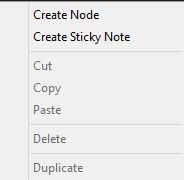
Allgemeine Diagrammelemente


Originally posted 2020-01-17 08:18:00.
Post Views: 1.409
Weitersagen:
Games und Lyrik Tags:Unity

Beitragsnavigation

Previous Post: Kipi Interactive – Innovatives Studio für Mobile-Games
Next Post: The Skyland Chronicles – Ein episches Abenteuer von MFA Games

Related Posts

  • Rebuilders
    Rebuilders Games und Lyrik
  • Still There Screenshot
    Still There Games und Lyrik
  • Marvel-Snap-Cover
    Marvel Snap Games und Lyrik
  • First Class Trouble Screenshot
    First Class Trouble Games und Lyrik
  • Gori-16-9-KeyArt-Square- Cover
    Gori – Cuddly Carnage Games und Lyrik
  • Feuerwerk in Unity
    Ein Feuerwerk in Unity erstellen Games und Lyrik

Schreibe einen Kommentar Antwort abbrechen

Deine E-Mail-Adresse wird nicht veröffentlicht. Erforderliche Felder sind mit * markiert

Diese Website verwendet Akismet, um Spam zu reduzieren. Erfahre, wie deine Kommentardaten verarbeitet werden.

Unsere Besucher

089892
Users Today : 9
Total views : 410929
Powered By WPS Visitor Counter
  • Games und Lyrik (2.723)
    • Action (83)
    • Adventure (462)
      • Point & Click-Adventure (16)
    • Ecke der verlorenen Spiele (17)
    • Horror (35)
    • Kinderfreundliche Games (5)
    • Partyspiele (9)
    • Puzzle (17)
    • Rollenspiele (115)
    • Shooter (346)
    • Simulation (30)
    • Sport (113)
      • Fußball (5)
      • Rennspiele (6)
    • Strategie (200)
    • Survival (9)
    • Wimmelbild (8)
  • Hardware (2)
  • Jump & Run (1)
  • Lyrik (112)
  • Spieleentwickler (432)
  • Spieleprogrammierung (48)

Action Adventure Capcom Daedalic Deck 13 Devcom 2020 Ecke der verlorenen Spiele Gamescom 2019 Gamescom 2020 Gamescom 2021 Gamescom 2023 Games from Spain GB GBA GBC Horror Indie Arena Booth 2022 Jump & Run Kalypso Media Mega Man N64 NDS NES Nintendo Switch PC PS1 PS2 PS3 PS4 PS5 PSP Rareware Rennspiel Sega Shooter SNES State of Play Strategie Switch Unity Visual Novel VR Windows Xbox XBox One

Cosplay-Schnittmuster

  • 094ddf7788f49439577a1f264f2ea1ca Akira Band 2 Katsuhiro Otomo Carlsen Verlag Manga 19,90 €
  • 3b19aed4a4ecd2d447d502b5040d272e Fruits Basket Pearls Band 1 Natsuki Takaya Carlsen Verlag Manga 11,00 €
  • f1b2be429c6da35582dbc14e7d6d3b72 Angel Sanctuary Pearls Band 3 Kaori Yuki Carlsen Verlag Manga 12,00 €


Hier finden Sie mehr.

RSS Lets-Plays.de

  • Pen and Paper Spiele
  • Verlorenes Android-Handy orten

Ezoic

RSS GameStar – News

  • Clayface: Der erste Teaser zum Body-Horror von DC ist endlich da – und Junge, wird das gruselig!
  • Verwirrendes Vakuum: In The Expanse Osiris Reborn laufen wir kopfüber und am Ende gibt's Loot
  • Wer braucht Mass Effect 5, wenn es solche Spiele gibt? - The Expanse vs. Exodus
TopBlogs.de das Original - Blogverzeichnis | Blog Top Liste
blogwolke.de - Das Blog-Verzeichnis
  • The Last Whale Singer: Rise of the Leviathan Cover
    The Last Whale Singer: Rise of the Leviathan – Ein musikalisches Abenteuer in den Tiefen des Ozeans Adventure
  • Silent Hill f Cover
    Silent Hill f Horror
  • Army of Ruin Cover
    Army of Ruin – Auto-Shooter mit Fantasy-Charme Games und Lyrik
  • Wildcat Gun Machine Keyart
    Wildcat Gun Machine: Tauche ein in ein actiongeladenes Abenteuer Shooter
  • California Games-Cover
    California Games Sport
  • Lucky 7 Studio Spieleentwickler
  • Action 52 Cover
    Action 52 Shooter
  • State of Play Cover
    State of Play 2025 – Die Höhepunkte Spieleentwickler

Copyright © 2026 Games und Lyrik.

Powered by PressBook News Dark theme

Cookie-Einstellungen
Diese Webseite benutzt Cookies um die Nutzererfahrung zu verbessern. Diese Cookies können Sie hier ausschalten.

This website uses cookies to improve your experience. We'll assume you're ok with this, but you can opt-out if you wish.
Cookie-Einstellungen / Cookie settingsAkzeptieren / ACCEPT
Privatsphären- und Cookie-Einstellungen

Informationen zu Cookies / Privacy Overview

Informationen zu Cookies / Privacy Overview


Diese Webseite benutzt Cookies um die Funktion und die Nutzererfahrung zu verbessern. Es gibt zwei Arten von Cookies: Die notwendigen im Browser gespeichert und sind wichtig für die korrekte Funktion der Webseite. Die nicht notwendigen oder auch Drittanbieter-Cookies, die zum Einsatz kommen, dienen zur Analyse und zeigen uns die Benutzung dieser Webseite. Diese Cookies werden ebenfalls im Browser gespeichert aber nur, wenn Sie es ausdrücklich erlauben. Sie haben im Folgenden die Möglichkeit, diese Drittanbieter-Cookies zu verbieten. Das Abschalten dieser  Cookies kann das Verhalten der Webseite beeinflussen.


This website uses cookies to improve your experience while you navigate through the website. Out of these cookies, the cookies that are categorized as necessary are stored on your browser as they are essential for the working of basic functionalities of the website. We also use third-party cookies that help us analyze and understand how you use this website. These cookies will be stored in your browser only with your consent. You also have the option to opt-out of these cookies. But opting out of some of these cookies may have an effect on your browsing experience.

necessary
immer aktiv
Necessary cookies are absolutely essential for the website to function properly. This category only includes cookies that ensures basic functionalities and security features of the website. These cookies do not store any personal information.
CookieDauerBeschreibung
AWSALBCORS7 daysThis cookie is managed by Amazon Web Services and is used for load balancing.
client_id10 yearsThis cookie is used for passing authentication information.
cookielawinfo-checkbox-advertisement1 yearSet by the GDPR Cookie Consent plugin, this cookie is used to record the user consent for the cookies in the "Advertisement" category .
cookielawinfo-checkbox-analytics1 yearSet by the GDPR Cookie Consent plugin, this cookie is used to record the user consent for the cookies in the "Analytics" category .
cookielawinfo-checkbox-analytics11 monthsThis cookie is set by GDPR Cookie Consent plugin. The cookie is used to store the user consent for the cookies in the category "Analytics".
cookielawinfo-checkbox-functional1 yearThe cookie is set by the GDPR Cookie Consent plugin to record the user consent for the cookies in the category "Functional".
cookielawinfo-checkbox-functional11 monthsThe cookie is set by GDPR cookie consent to record the user consent for the cookies in the category "Functional".
cookielawinfo-checkbox-necessary1 yearSet by the GDPR Cookie Consent plugin, this cookie is used to record the user consent for the cookies in the "Necessary" category .
cookielawinfo-checkbox-necessary11 monthsThis cookie is set by GDPR Cookie Consent plugin. The cookies is used to store the user consent for the cookies in the category "Necessary".
cookielawinfo-checkbox-non-necessary1 yearSet by the GDPR Cookie Consent plugin, this cookie is used to record the user consent for the cookies in the "Non-necessary" category .
cookielawinfo-checkbox-others1 yearSet by the GDPR Cookie Consent plugin, this cookie is used to store the user consent for cookies in the category "Others".
cookielawinfo-checkbox-others11 monthsThis cookie is set by GDPR Cookie Consent plugin. The cookie is used to store the user consent for the cookies in the category "Other.
cookielawinfo-checkbox-performance1 yearSet by the GDPR Cookie Consent plugin, this cookie is used to store the user consent for cookies in the category "Performance".
cookielawinfo-checkbox-performance11 monthsThis cookie is set by GDPR Cookie Consent plugin. The cookie is used to store the user consent for the cookies in the category "Performance".
CookieLawInfoConsent1 yearRecords the default button state of the corresponding category & the status of CCPA. It works only in coordination with the primary cookie.
ezCMPCCS1 yearEzoic sets this cookie to track when a user consents to statistics cookies.
PHPSESSIDsessionThis cookie is native to PHP applications. The cookie is used to store and identify a users' unique session ID for the purpose of managing user session on the website. The cookie is a session cookies and is deleted when all the browser windows are closed.
viewed_cookie_policy11 monthsThe cookie is set by the GDPR Cookie Consent plugin and is used to store whether or not user has consented to the use of cookies. It does not store any personal data.
Nicht notwendige
Alle Cookies, die für die korrekte Funktion der Webseite nicht unmittelbar notwendig sind und genutzt werden, um persönliche Nutzerdaten per Analyse, Werbung oder anderen eingebetteten Inhalt zu sammeln, werden als nicht notwendige Cookies bezeichnet. Es ist zwingend erforderlich die Zustimmung des Nutzers / der Nutzerin einzuholen, bevor diese Cookies zur Anwendung kommen. Wird die Einwilligung zur Nutzung der Cookies nicht erteilt, werden sie nicht angewendet und nur die notwendigen Cookies sind aktiv.
CookieDauerBeschreibung
__qca1 year 26 daysThe __qca cookie is associated with Quantcast. This anonymous data helps us to better understand users' needs and customize the website accordingly.
eudssessionThis cookie is set by Rocket Fuel for targeted advertising so that users are shown relevant ads.
i10 yearsThis cookie is set by OpenX to record anonymized user data, such as IP address, geographical location, websites visited, ads clicked by the user etc., for relevant advertising.
IDE1 year 24 daysGoogle DoubleClick IDE cookies are used to store information about how the user uses the website to present them with relevant ads and according to the user profile.
mc1 year 1 monthQuantserve sets the mc cookie to anonymously track user behaviour on the website.
rud1 year 24 daysThe rud cookie is owned by Rocketfuel and registers user data, such as IP address, location, etc. for the purpose of optimising ad display.
rudssessionThis cookie is owned by Rocketfuel and collects anonymous user data to target audiences and deliver personalized ads.
test_cookie15 minutesThe test_cookie is set by doubleclick.net and is used to determine if the user's browser supports cookies.
VISITOR_INFO1_LIVE5 months 27 daysA cookie set by YouTube to measure bandwidth that determines whether the user gets the new or old player interface.
YSCsessionYSC cookie is set by Youtube and is used to track the views of embedded videos on Youtube pages.
yt-remote-connected-devicesneverYouTube sets this cookie to store the video preferences of the user using embedded YouTube video.
yt-remote-device-idneverYouTube sets this cookie to store the video preferences of the user using embedded YouTube video.
yt.innertube::nextIdneverThis cookie, set by YouTube, registers a unique ID to store data on what videos from YouTube the user has seen.
yt.innertube::requestsneverThis cookie, set by YouTube, registers a unique ID to store data on what videos from YouTube the user has seen.
Funktionelle
Funktionelle Cookies werden benutzt, um bestimmte Funktionen wie die Teilung von Informationen auf Plattformen der sozialen Medien, Sammlung von Rückmeldungen und andre Drittanbieterfunktionen einsetzen zu können.
CookieDauerBeschreibung
__cf_bm30 minutesThis cookie, set by Cloudflare, is used to support Cloudflare Bot Management.
pll_language1 yearThe pll _language cookie is used by Polylang to remember the language selected by the user when returning to the website, and also to get the language information when not available in another way.
Leistungsanalyse
Leistungsanalyse-Cookies werden eingesetzt um die wichtigsten Leistungsaspekte zu analysieren und zu verstehen. Dies trägt dazu bei, die Webseite kontinuierlich zu verbessern und so den Besuchern eine gute Nutzererfahrung zu bieten.
CookieDauerBeschreibung
AWSALB7 daysAWSALB is an application load balancer cookie set by Amazon Web Services to map the session to the target.
ezds7 yearsThe ezds cookie is set by the provider Ezoic, and is used for storing the pixel size of the user's browser, to personalize user experience and ensure content fits.
ezoab_10342 hoursEzoic uses this cookie to split test different features and functionality.
ezohw7 yearsThe ezohw cookie is set by the provider Ezoic, and is used for storing the pixel size of the user's browser, to personalize user experience and ensure content fits.
ymex1 yearYandex sets this cookie to collect information about the user behaviour on the website. This information is used for website analysis and for website optimisation.
yuidss1 yearYandex stores this cookie in the user's browser in order to recognize the visitor.
Analytik
Analytische Cookies werden benutzt um zu verstehen, auf welche Art und Weise Besucher mit dieser Webseite interagieren. Diese Cookies helfen Informationen über Anzahl der Besucher, Absprungrate (Anzahl der Besucher,, die eine Webseite Besuchen und sie gleich wieder verlassen), Ursprungsland des Besuchers, usw. zu erhalten.
CookieDauerBeschreibung
__gads1 year 24 daysThe __gads cookie, set by Google, is stored under DoubleClick domain and tracks the number of times users see an advert, measures the success of the campaign and calculates its revenue. This cookie can only be read from the domain they are set on and will not track any data while browsing through other sites.
_gu1 monthThis cookie is set by the provider Getsitecontrol. This cookie is used to distinguish the users.
_ym_d1 yearYandex sets this cookie to store the date of the users first site session.
_ym_isad20 hoursYandex sets this cookie to determine if a visitor has ad blockers.
_ym_uid1 yearYandex sets this cookie to identify site users.
CONSENT2 yearsYouTube sets this cookie via embedded youtube-videos and registers anonymous statistical data.
eud1 year 24 daysThis cookie is owned by Rocketfuel and collects anonymous user data to target audiences and deliver personalized ads.
ezepvv1 dayThis cookie is set by the provider Ezoic to track what pages the user has viewed.
ezoadgid_103430 minutesEzoic uses this cookie to record an id for the user's age and gender category.
ezoref_10342 hoursEzoic uses this cookie to store the referring domain, i.e the website the user was on, before he came to the current website.
ezouspvasessionThe ezouspva cookie is set by the provider Ezoic and is used to track the number of pages a user has visited all time.
ezouspvvsessionThe ezouspvv cookie is set by the provider Ezoic and is used to track the number of pages a user has visited all time.
UserID13 monthsThis cookie is set by ADITION Technologies AG, as a unique and anonymous ID for the visitor of the website, to identify unique users across multiple sessions.
yabs-sidsessionYandex sets this cookie to store the session ID.
yandexuid1 yearYandex sets this cookie to identify site users.
Werbung
Werbungs-Cookies werden benutzt um Besuchern relevante Werbungen und Vermarktungskampanien anzuzeigen. Diese Cookies verfolgen die Besucher beim Besuch einer Webseite und sammeln Informationen mit deren Hilfe sie angepasste Werbungen einblenden.
CookieDauerBeschreibung
__qca1 year 26 daysThe __qca cookie is associated with Quantcast. This anonymous data helps us to better understand users' needs and customize the website accordingly.
eudssessionThis cookie is set by Rocket Fuel for targeted advertising so that users are shown relevant ads.
i10 yearsThis cookie is set by OpenX to record anonymized user data, such as IP address, geographical location, websites visited, ads clicked by the user etc., for relevant advertising.
IDE1 year 24 daysGoogle DoubleClick IDE cookies are used to store information about how the user uses the website to present them with relevant ads and according to the user profile.
mc1 year 1 monthQuantserve sets the mc cookie to anonymously track user behaviour on the website.
rud1 year 24 daysThe rud cookie is owned by Rocketfuel and registers user data, such as IP address, location, etc. for the purpose of optimising ad display.
rudssessionThis cookie is owned by Rocketfuel and collects anonymous user data to target audiences and deliver personalized ads.
test_cookie15 minutesThe test_cookie is set by doubleclick.net and is used to determine if the user's browser supports cookies.
VISITOR_INFO1_LIVE5 months 27 daysA cookie set by YouTube to measure bandwidth that determines whether the user gets the new or old player interface.
YSCsessionYSC cookie is set by Youtube and is used to track the views of embedded videos on Youtube pages.
yt-remote-connected-devicesneverYouTube sets this cookie to store the video preferences of the user using embedded YouTube video.
yt-remote-device-idneverYouTube sets this cookie to store the video preferences of the user using embedded YouTube video.
yt.innertube::nextIdneverThis cookie, set by YouTube, registers a unique ID to store data on what videos from YouTube the user has seen.
yt.innertube::requestsneverThis cookie, set by YouTube, registers a unique ID to store data on what videos from YouTube the user has seen.
Sonstige
Zu den sonstigen unkategorisierten Cookies zählen jene, die zwar analysiert wurden, aber noch keiner Kategorie zugeordnet werden konnten.
CookieDauerBeschreibung
_auid1 yearNo description available.
active_template::3326192 days

No description

appReleasesessionNo description available.
BACKENDIDsessionNo description available.
dspid1 yearNo description available.
ezoab_3326192 hoursNo description
ezoadgid_33261930 minutesNo description
ezopvc_33261930 minutesNo description
ezoref_3326192 hoursNo description
ezosuibasgeneris-11 yearNo description
ezovid_33261930 minutesNo description
ezovuuid_33261930 minutesNo description
ezovuuidtime_3326192 daysNo description
ezux_lpl_3326191 yearNo description
f_0013 monthsNo description
g_0011 dayNo description
gt_auto_switch1 monthNo description available.
lp_33261930 minutesNo description
mts_id9 years 10 months 8 daysNo description available.
mts_id_last_sync9 years 10 months 8 daysNo description available.
pvc_visits[0]1 yearThis cookie is created by post-views-counter. This cookie is used to count the number of visits to a post. It also helps in preventing repeat views of a post by a visitor.
srpsessionNo description available.
userId5 months 27 daysNo description
Notwendige
Notwendige Cookies sind für die korrekte Funktion der Webseite unerlässlich. Diese Kategorie enthält nur Cookies, die grundlegende Funktionalitäten und Sicherheitsfunktionen der Webseite ermöglichen. Diese Cookies speichern keine persönlichen Daten.
CookieDauerBeschreibung
AWSALBCORS7 daysThis cookie is managed by Amazon Web Services and is used for load balancing.
client_id10 yearsThis cookie is used for passing authentication information.
cookielawinfo-checkbox-advertisement1 yearSet by the GDPR Cookie Consent plugin, this cookie is used to record the user consent for the cookies in the "Advertisement" category .
cookielawinfo-checkbox-analytics1 yearSet by the GDPR Cookie Consent plugin, this cookie is used to record the user consent for the cookies in the "Analytics" category .
cookielawinfo-checkbox-functional1 yearThe cookie is set by the GDPR Cookie Consent plugin to record the user consent for the cookies in the category "Functional".
cookielawinfo-checkbox-necessary1 yearSet by the GDPR Cookie Consent plugin, this cookie is used to record the user consent for the cookies in the "Necessary" category .
cookielawinfo-checkbox-non-necessary1 yearSet by the GDPR Cookie Consent plugin, this cookie is used to record the user consent for the cookies in the "Non-necessary" category .
cookielawinfo-checkbox-others1 yearSet by the GDPR Cookie Consent plugin, this cookie is used to store the user consent for cookies in the category "Others".
cookielawinfo-checkbox-performance1 yearSet by the GDPR Cookie Consent plugin, this cookie is used to store the user consent for cookies in the category "Performance".
CookieLawInfoConsent1 yearRecords the default button state of the corresponding category & the status of CCPA. It works only in coordination with the primary cookie.
ezCMPCCS1 yearEzoic sets this cookie to track when a user consents to statistics cookies.
Advertisement
Advertisement cookies are used to provide visitors with relevant ads and marketing campaigns. These cookies track visitors across websites and collect information to provide customized ads.
CookieDauerBeschreibung
__qca1 year 26 daysThe __qca cookie is associated with Quantcast. This anonymous data helps us to better understand users' needs and customize the website accordingly.
eudssessionThis cookie is set by Rocket Fuel for targeted advertising so that users are shown relevant ads.
i10 yearsThis cookie is set by OpenX to record anonymized user data, such as IP address, geographical location, websites visited, ads clicked by the user etc., for relevant advertising.
IDE1 year 24 daysGoogle DoubleClick IDE cookies are used to store information about how the user uses the website to present them with relevant ads and according to the user profile.
loc1 year 1 monthAddThis sets this geolocation cookie to help understand the location of users who share the information.
mc1 year 1 monthQuantserve sets the mc cookie to anonymously track user behaviour on the website.
rud1 year 24 daysThe rud cookie is owned by Rocketfuel and registers user data, such as IP address, location, etc. for the purpose of optimising ad display.
rudssessionThis cookie is owned by Rocketfuel and collects anonymous user data to target audiences and deliver personalized ads.
test_cookie15 minutesThe test_cookie is set by doubleclick.net and is used to determine if the user's browser supports cookies.
VISITOR_INFO1_LIVE5 months 27 daysA cookie set by YouTube to measure bandwidth that determines whether the user gets the new or old player interface.
YSCsessionYSC cookie is set by Youtube and is used to track the views of embedded videos on Youtube pages.
yt-remote-connected-devicesneverYouTube sets this cookie to store the video preferences of the user using embedded YouTube video.
yt-remote-device-idneverYouTube sets this cookie to store the video preferences of the user using embedded YouTube video.
yt.innertube::nextIdneverThis cookie, set by YouTube, registers a unique ID to store data on what videos from YouTube the user has seen.
yt.innertube::requestsneverThis cookie, set by YouTube, registers a unique ID to store data on what videos from YouTube the user has seen.
non-necessary
Other uncategorized cookies are those that are being analyzed and have not been classified into a category as yet.
CookieDauerBeschreibung
_auid1 yearNo description available.
active_template::3326192 days

No description

appReleasesessionNo description available.
BACKENDIDsessionNo description available.
dspid1 yearNo description available.
ezoab_3326192 hoursNo description
ezoadgid_33261930 minutesNo description
ezopvc_33261930 minutesNo description
ezoref_3326192 hoursNo description
ezosuibasgeneris-11 yearNo description
ezovid_33261930 minutesNo description
ezovuuid_33261930 minutesNo description
ezovuuidtime_3326192 daysNo description
ezux_lpl_3326191 yearNo description
f_0013 monthsNo description
g_0011 dayNo description
gt_auto_switch1 monthNo description available.
lp_33261930 minutesNo description
mts_id9 years 10 months 8 daysNo description available.
mts_id_last_sync9 years 10 months 8 daysNo description available.
pvc_visits[0]1 yearThis cookie is created by post-views-counter. This cookie is used to count the number of visits to a post. It also helps in preventing repeat views of a post by a visitor.
srpsessionNo description available.
userId5 months 27 daysNo description
xtc1 year 1 monthNo description
performance
Performance cookies are used to understand and analyze the key performance indexes of the website which helps in delivering a better user experience for the visitors.
CookieDauerBeschreibung
AWSALB7 daysAWSALB is an application load balancer cookie set by Amazon Web Services to map the session to the target.
ezds7 yearsThe ezds cookie is set by the provider Ezoic, and is used for storing the pixel size of the user's browser, to personalize user experience and ensure content fits.
ezoab_10342 hoursEzoic uses this cookie to split test different features and functionality.
ezohw7 yearsThe ezohw cookie is set by the provider Ezoic, and is used for storing the pixel size of the user's browser, to personalize user experience and ensure content fits.
ymex1 yearYandex sets this cookie to collect information about the user behaviour on the website. This information is used for website analysis and for website optimisation.
yuidss1 yearYandex stores this cookie in the user's browser in order to recognize the visitor.
Others
Other uncategorized cookies are those that are being analyzed and have not been classified into a category as yet.
CookieDauerBeschreibung
_auid1 yearNo description available.
active_template::3326192 days

No description

appReleasesessionNo description available.
BACKENDIDsessionNo description available.
dspid1 yearNo description available.
ezoab_3326192 hoursNo description
ezoadgid_33261930 minutesNo description
ezopvc_33261930 minutesNo description
ezoref_3326192 hoursNo description
ezosuibasgeneris-11 yearNo description
ezovid_33261930 minutesNo description
ezovuuid_33261930 minutesNo description
ezovuuidtime_3326192 daysNo description
ezux_lpl_3326191 yearNo description
f_0013 monthsNo description
g_0011 dayNo description
gt_auto_switch1 monthNo description available.
lp_33261930 minutesNo description
mts_id9 years 10 months 8 daysNo description available.
mts_id_last_sync9 years 10 months 8 daysNo description available.
pvc_visits[0]1 yearThis cookie is created by post-views-counter. This cookie is used to count the number of visits to a post. It also helps in preventing repeat views of a post by a visitor.
srpsessionNo description available.
userId5 months 27 daysNo description
xtc1 year 1 monthNo description
Analytics
Analytical cookies are used to understand how visitors interact with the website. These cookies help provide information on metrics the number of visitors, bounce rate, traffic source, etc.
CookieDauerBeschreibung
__gads1 year 24 daysThe __gads cookie, set by Google, is stored under DoubleClick domain and tracks the number of times users see an advert, measures the success of the campaign and calculates its revenue. This cookie can only be read from the domain they are set on and will not track any data while browsing through other sites.
_gu1 monthThis cookie is set by the provider Getsitecontrol. This cookie is used to distinguish the users.
_ym_d1 yearYandex sets this cookie to store the date of the users first site session.
_ym_isad20 hoursYandex sets this cookie to determine if a visitor has ad blockers.
_ym_uid1 yearYandex sets this cookie to identify site users.
at-randneverAddThis sets this cookie to track page visits, sources of traffic and share counts.
CONSENT2 yearsYouTube sets this cookie via embedded youtube-videos and registers anonymous statistical data.
eud1 year 24 daysThis cookie is owned by Rocketfuel and collects anonymous user data to target audiences and deliver personalized ads.
ezepvv1 dayThis cookie is set by the provider Ezoic to track what pages the user has viewed.
ezoadgid_103430 minutesEzoic uses this cookie to record an id for the user's age and gender category.
ezoref_10342 hoursEzoic uses this cookie to store the referring domain, i.e the website the user was on, before he came to the current website.
ezouspvasessionThe ezouspva cookie is set by the provider Ezoic and is used to track the number of pages a user has visited all time.
ezouspvvsessionThe ezouspvv cookie is set by the provider Ezoic and is used to track the number of pages a user has visited all time.
UserID13 monthsThis cookie is set by ADITION Technologies AG, as a unique and anonymous ID for the visitor of the website, to identify unique users across multiple sessions.
uvc1 year 1 monthSet by addthis.com to determine the usage of addthis.com service.
yabs-sidsessionYandex sets this cookie to store the session ID.
yandexuid1 yearYandex sets this cookie to identify site users.
Functional
Functional cookies help to perform certain functionalities like sharing the content of the website on social media platforms, collect feedbacks, and other third-party features.
CookieDauerBeschreibung
__atuvc1 year 1 monthAddThis sets this cookie to ensure that the updated count is seen when one shares a page and returns to it, before the share count cache is updated.
__atuvs30 minutesAddThis sets this cookie to ensure that the updated count is seen when one shares a page and returns to it, before the share count cache is updated.
__cf_bm30 minutesThis cookie, set by Cloudflare, is used to support Cloudflare Bot Management.
pll_language1 yearThe pll _language cookie is used by Polylang to remember the language selected by the user when returning to the website, and also to get the language information when not available in another way.
SPEICHERN & AKZEPTIEREN
Präsentiert von CookieYes Logo