
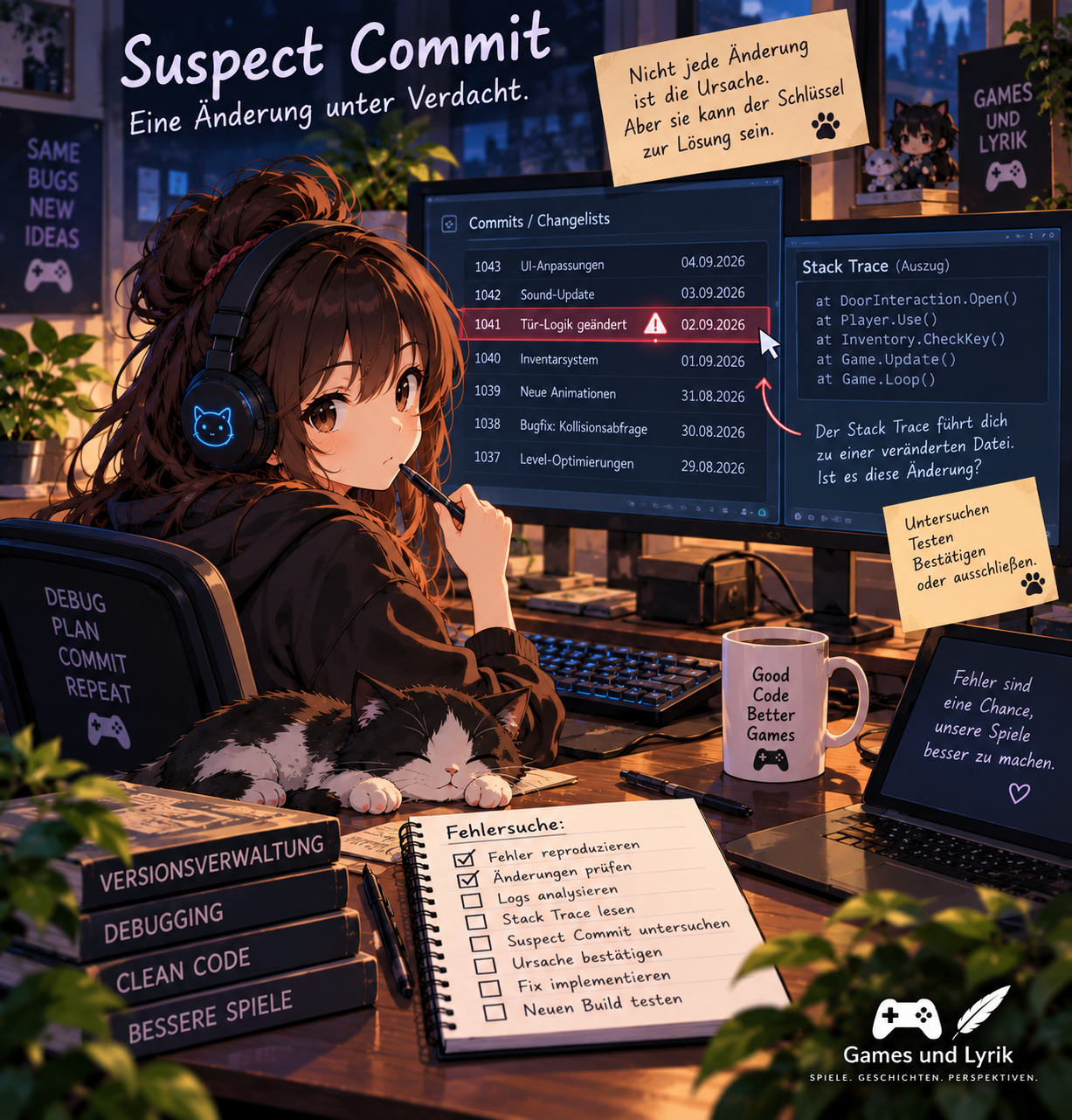
A suspect commit is a change that is considered a possible cause of a problem during troubleshooting. "Suspect" simply means "likely": a temporal or technical correlation provides a clue, but does not yet prove that this change actually caused the error.
What is a commit?
In version control systems like Git, a Commit A saved change set. You can use it to, for example, save several related changes to the program code and add a description.
Perforce P4 It uses a slightly different concept. There, related changes are grouped together in one... changelist organized. After submission, the changelist to the documented version history of the project.
The terms Commit and changelist Therefore, they are not entirely interchangeable. In the context of troubleshooting, "suspect commit" generally describes a change that is being investigated as a possible source of an error.
Why does a change become a suspect?
Assumed, Build 120 of your game works. After some changes, it... Build 121, which crashes when opening a door. This suggests that the changes between the two builds should be investigated first.
One of these concerns, for example, the door logic. Since the Crash Since this also occurs when a door is opened, there is an additional connection to the content. This change is therefore a suitable candidate for further investigation.
A change can be suspicious, among other reasons, because it was made shortly before the first occurrence of an error or because it affects a code area related to the observed problem.
A suspect commit is not yet a cause
The term can easily be misunderstood. A suspect commit is not an already identified faulty change. It initially represents a hypothesis for troubleshooting.
Perhaps the door logic was implemented immediately before the Crash The system has changed. However, the root cause could lie in an earlier change to the inventory system. The new door function is the only thing that triggers a pre-existing fault.
Therefore, you should investigate a suspicious change instead of treating it as the cause solely based on its timing.
How do you narrow down suspicious changes?
A good starting point is to consider two known stages of development: one in which the problem does not yet occur, and one in which it already exists. version control It then shows you what changes have occurred in between.
The shorter this period, the fewer changes you initially need to consider. For example, do you know that... Build 120 works and Build If 121 is faulty, you can focus on the differences between these two. Builds .
Stack traces provide further clues
A Stack Trace This can further narrow down the search. It shows the sequence of function calls at the time of an error and may therefore lead you to a specific area of the program code.
refers to the Stack Trace For example, if a function for door interaction is used and this file has recently been modified, the change in question will receive additional attention.
The same applies here: The Stack Trace This shows where a fault became visible. The original cause may have originated elsewhere.
Logs supplement the investigation
Log Files They document events during program execution. This allows you to investigate what happened immediately before an error occurred.
Does this report Log For example, if you first notice a missing inventory item followed by a crash in the door interaction, you should consider the inventory system in addition to the door logic. This expands your initial suspicion to include other possible causes.
Suspect Changelists in Perforce
For perforce Instead of a classic Git commit, the following often appears: changelist at the center. It summarizes files that were jointly modified and submitted for a task.
If the investigation leads to a specific file, you can use its version history to find out which changelists it was modified in. You can then check which other files were associated with that particular change.
This can reveal new connections. For example, a seemingly minor change to the door might have been submitted together with adjustments to the inventory system.
Automatic assignment through error detection systems
In larger projects, the search for relevant changes doesn't have to be done exclusively manually. Error detection systems can combine information about an error with data from the version control .
This allows, for example, files from a Stack Trace Compare with their change history. Changes that appear relevant to the area in question can then be highlighted as potential candidates for investigation.
Such an automatic assignment provides a pre-selection. It does not replace the technical review by the development team.
How do you check a suspect commit?
Once you've found a suspicious change, the real investigation begins. First, you should understand what was changed and what purpose the change served.
You can then formulate a concrete hypothesis. Instead of "This change causes the crash," it could be, for example: "Under certain conditions, the new key check fails to pass a valid item to the door logic."
This assumption can be tested systematically. If the hypothesis is not confirmed, you rule out the change as the cause or investigate another connection. In this way, the circle of possible sources of error is narrowed down step by step.
Resetting alone is not always enough
Reverting a suspicious change as a test can aid in the investigation. If the error subsequently disappears, this suggests a connection. However, this result also needs to be interpreted correctly.
For example, a change might simply have revealed a previously hidden error. Resetting the settings will then remove the error. Crash, but the real weakness in the project remains.
Therefore, it is part of Debugging It's more than just removing the last change made. The goal is to understand the actual cause and correct it effectively.
From suspicion to error correction
A suspect commit combines several parts of the troubleshooting process. Crash or a bug provides the starting point. Logs and Stack Trace define the technical environment. version control It then shows what changes were made to the affected areas.
From this information, a list of possible candidates is created. You examine them, test your hypotheses, and either confirm or refute each suspicion.
Once you find the cause, you can correct it and get a new one. Build generate. Subsequent tests show whether the original error has disappeared and whether the correction causes unintended new problems.
More articles on games and poetry
If you're interested in classic adventure games in addition to technical game development, you'll find more articles on Games and Poetry. Runaway 3: A Twist of Fate You accompany Brian and Gina through a point-and-click adventure with puzzles, unusual situations and a story full of twists and turns.
Further information on how error data can be linked with information from software development can be found on the official website of Sentry.