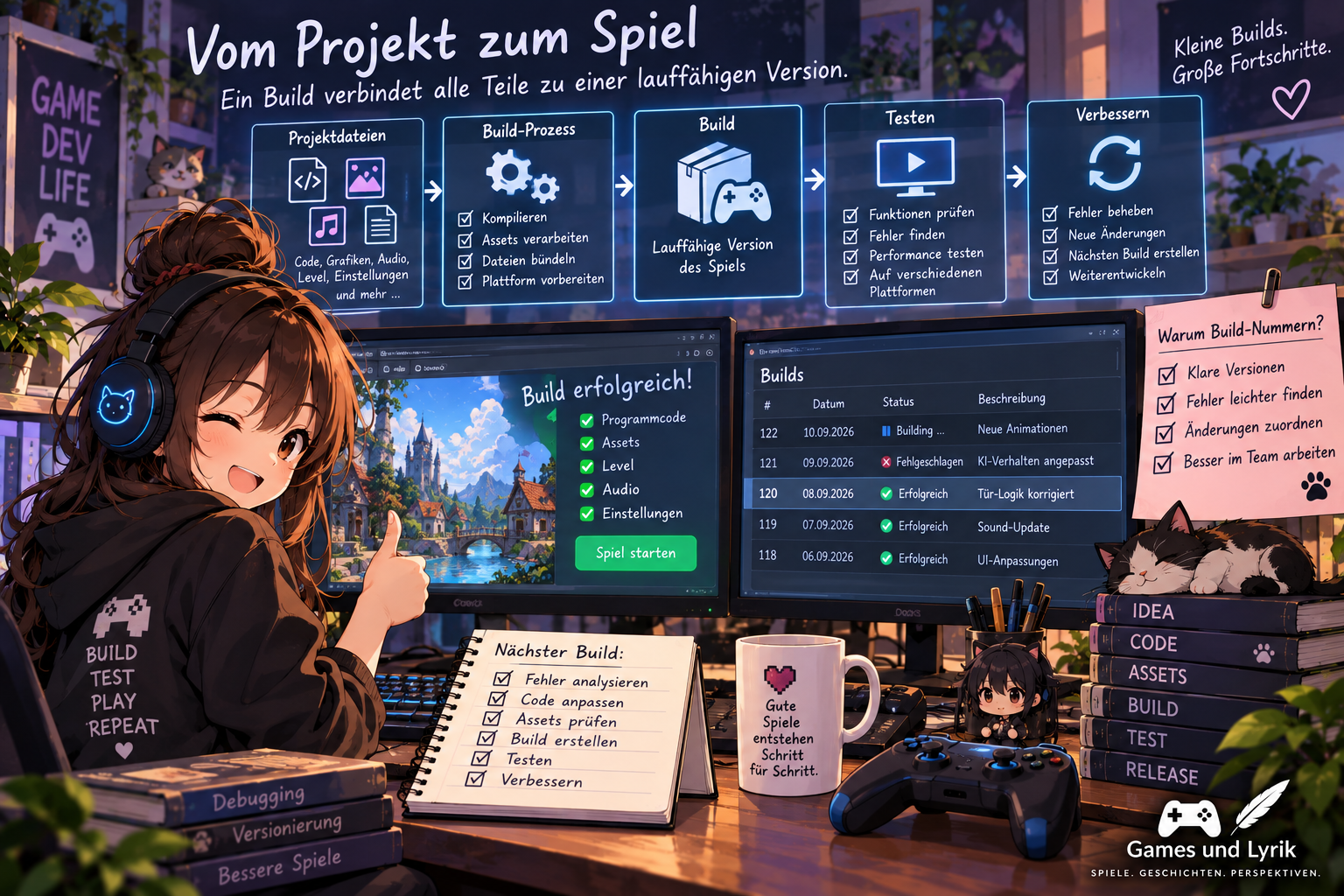
A build is an executable or otherwise testable version of your game, generated from a specific development stage. The build process combines program code, graphics, audio, level data, and other necessary components into a version that can run on the intended platform.
What is a build?
While developing a game, the project consists of many different files. These include, for example, program code, textures, 3D models, animations, audio files, levels, configurations, and settings.
These project files do not automatically correspond to the version that will later be run on a PC or console. First, the necessary components must be processed and assembled for the respective target platform. This happens during... Build process.
The result of this process is called Build This refers to a version of the game. Depending on the project and development environment, it could be, for example, an executable PC version, a console version, or another testable version of the game.
What happens during the build process?
The necessary steps depend on the type used. Engine, the target platform and the project. Program code can be compiled, assets can be processed, and required files can be brought into a structure suitable for execution.
Compile In simple terms, this means that source code is translated into a form that the computer or the respective runtime environment can execute. Not every component of a game undergoes the same process. A texture, for example, must be processed differently than program code.
The end result is a concrete version of the game. This allows testing to determine whether the individual components work together as intended, even outside of the immediate development work.
Project status and build are not the same thing
A project is constantly changing during development. A build, on the other hand, represents a specific development stage at a specific point in time.
You can continue working on the project after creating a version. The new changes will then be reflected in the current project state, but not automatically in the previously created build. Only a new test version will incorporate them.
Internal and published builds
Not every version reaches the players. During development, internal versions are regularly created for programmers, designers, quality assurance, and other team members.
These builds are used, for example, to test new features, reproduce bugs, or check whether different changes work together. Some versions only exist for a short time and are replaced by a new version after the next development stage.
External testers can also receive specially prepared versions. However, additional requirements apply for publication. Which tests are necessary depends, among other things, on the platform and distribution channel.
What is a development build?
Development environments can generate special versions for debugging. Development Builds often contain additional information or functions that are useful during testing and Debugging help.
In contrast, a release version may be more heavily focused on performance, file size, and the requirements of the target platform. Therefore, a bug may sometimes behave differently in an internal development build than in a version created for players.
Why are build numbers important?
When numerous versions are generated, it must be clearly identifiable which version was tested. This can be achieved by assigning numbers or other unique identifiers to the versions.
Assumed, Build 120 Works without any problems. Build 121 However, the game crashes when a door is opened. The numbers initially provide a clear indication of which version works and which exhibits the error.
Now you can investigate what changes exist between the underlying development stages. The number itself doesn't explain the error. However, it provides a clear reference point for further investigation.
Builds and version control
The connection with a version controlIt documents which changes were made to the project.
If you know which project version Build 120 and Build 121 were derived from, you can examine the change history between the two versions. This will help you narrow down the area where the new bug might have originated.
For Perforce P4 Can related changes in Changelists They are organized. If an error first appears after certain changelists, these provide possible starting points for investigation.
A new build does not necessarily prove successful bug fixing.
If you modify the program code and then create a new test version, this does not automatically mean that the original error is fixed. The new version must be tested.
First, you examine the situation in which the error previously occurred. Further tests are then advisable, as a correction can unintentionally affect other areas. Such newly arising problems are referred to as... Regressions bezeichnet.
What happens if a build fails?
Not every process results in a bootable version. Errors in the program code, missing files, incorrect settings, or other technical problems can prevent the version from being created successfully.
A failed version is something different than a CrashIn a failed test build, the intended version is not produced correctly. In a Crash However, the game was initially able to start but then unexpectedly ended during execution.
Builds for different platforms
A game can be released for multiple platforms, but the same generated file won't automatically run everywhere. PC, PlayStation, Xbox, Nintendo systems, and mobile platforms have different technical requirements.
Therefore, separate versions are created for each target platform. Not only can file formats and technical settings differ, but controls, graphics options, platform functions, and performance requirements may also require adjustments.
Builds, logs, and stack traces
If an error occurs in a specific version, the version number and history are not always sufficient. Further technical information can help with the search.
Log Files can document events during execution. Stack Trace In the case of suitable errors, it displays the sequence of called functions. Together with the identifier, this allows you to determine in which version a problem occurred and what happened immediately before it.
Investigate bugs in published builds
During internal testing, the development team often sits directly in front of the affected computer. After release, however, errors appear on players' systems. Information about the affected version therefore becomes even more important.
Error detection platforms such as Sentry They can collect technical events from applications and assign them to a published version. This makes it possible, for example, to identify whether a problem only occurs in a specific release.
Such systems do not replace debugging. They provide information that allows an error to be reproduced and subsequently investigated within the development project.
From error to the next build
A typical process can begin with a faulty build. Logs and stack traces provide clues that version control This leads to relevant changes, and during debugging you investigate the possible cause.
After the fix is implemented, a new version is created. This version undergoes the necessary tests again. If the original situation is restored and further tests reveal no new problems, the fix can be incorporated into the next development stage.
Version control is therefore not just the result of a technical process. It represents a clearly defined development status that can be tested, compared, and investigated in case of errors.
More articles on games and poetry
If you're interested in classic adventure games in addition to technical game development, you'll find more articles on Games and Poetry. Runaway 3: A Twist of Fate You accompany Brian and Gina through a point-and-click adventure with puzzles, unusual situations and a story full of twists and turns.
You can also learn how to detect and analyze errors in different builds on the official website of Sentry.